


In Agile methodology, a spike story—often called an Agile spike—is a crucial tool for tackling uncertainties. Picture it as a timeboxed investigation, where the team dives into research to answer specific questions or solve unclear issues. It’s not about delivering a usable feature; it’s about figuring out what’s needed to move forward. Spikes are like a safety net, giving the team the clarity they need to estimate and plan effectively.
These spike stories help the product owner make informed decisions on splitting stories, managing the product backlog, and prioritizing the sprint backlog. By resolving uncertainties early on, spikes play a big role in making Agile software development more efficient.
Kanban spike introduction
In the world of Agile, a 'spike' is more than just a fancy term—it’s a lifeline during uncertain times. When a user story isn’t fully understood or a technical challenge needs exploration, the team initiates a spike. This timeboxed user story focuses on research, not on delivering a finished product. Think of it as a mini-project within a sprint, designed to uncover answers or reduce risks.
Spikes are a strategic tool in the Agile toolbox. They help the product owner refine the product backlog and get the sprint backlog in shape. By dedicating time to research and experimentation, the team ensures that they’re not just guessing but making informed decisions that keep the project on track.
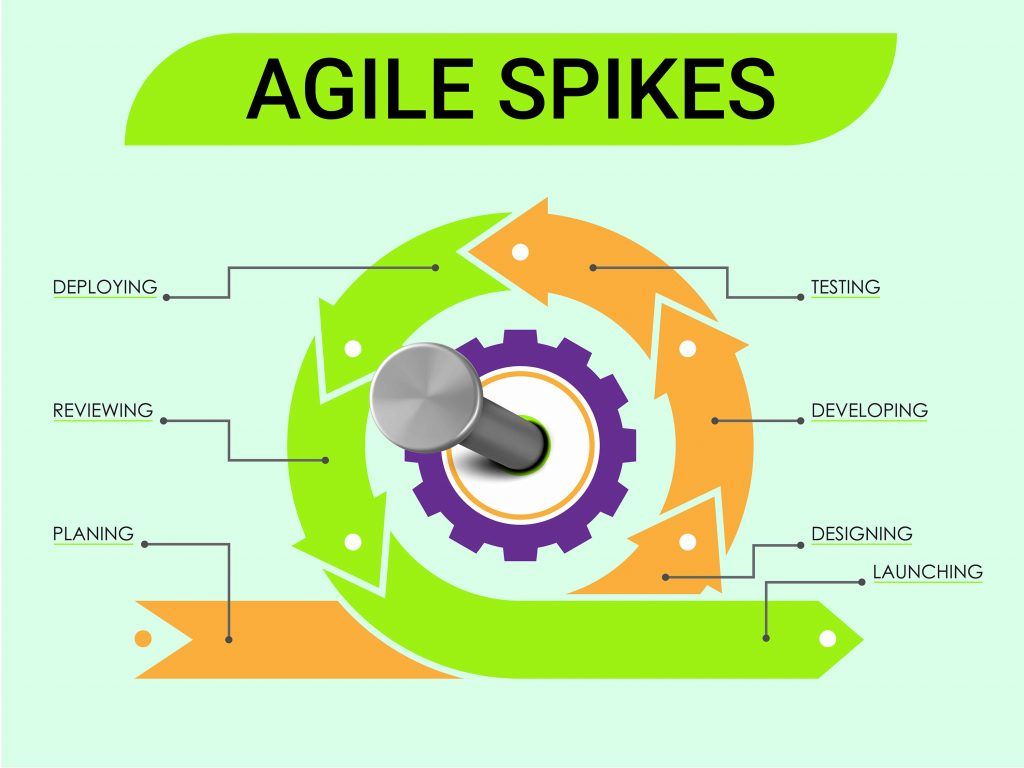
Kanban spike definition
A spike in Agile is essentially a timeboxed research activity. It’s a way to explore unknowns without making a long-term commitment. When the team encounters a tricky problem that needs investigation, they create a spike to dig deeper. The duration of this experiment is limited—just enough time to gather the necessary information.
These spikes are added to the sprint backlog from the product backlog. They’re not about delivering a shippable product but about getting the insights needed to estimate and plan accurately. Spikes are indispensable in Agile because they allow the team to tackle technical uncertainties head-on, reducing risks and improving overall project outcomes.
Origin of the term 'spike'
The term 'Spike' in Agile has its roots in Extreme Programming, a concept introduced by Kent Beck. Originally, a spike was a timeboxed experiment to answer a technical or functional question. In Agile, this idea evolved into spike stories—timeboxed research activities aimed at resolving uncertainties.
When an Agile team encounters a user story that’s shrouded in ambiguity, they can initiate a spike. The findings from this investigation are shared with the product owner, who then adjusts the product backlog or sprint backlog accordingly. This concept has become a cornerstone of Agile methodology, helping teams navigate through the fog of uncertainty.
How to use Bonsai for agile project management
Using Bonsai Tax for Agile project management can significantly improve your workflow and boost team collaboration. Agile project management emphasizes flexibility, teamwork, and ongoing improvement.
Bonsai Tax, a flexible project management platform, can greatly enhance your Agile processes. By using Bonsai's features, you can simplify task management, boost team communication, and ensure projects are delivered on time. This guide will take you through the key steps to effectively use Bonsai for Agile project management, assisting you in setting up projects, monitoring progress, and encouraging collaboration within your team.
Whether you're new to Agile, Bonsai offers the tools necessary for your success.
Here’s a comprehensive guide on how to use Bonsai for Agile project management:
Set up project
The initial step in Agile project management with Bonsai is to establish your project. Start by creating a new project within the platform. Clearly define the project scope, objectives, and deliverables. Break the project down into smaller, manageable tasks or user stories. This breakdown aids in understanding the workload and planning effectively.
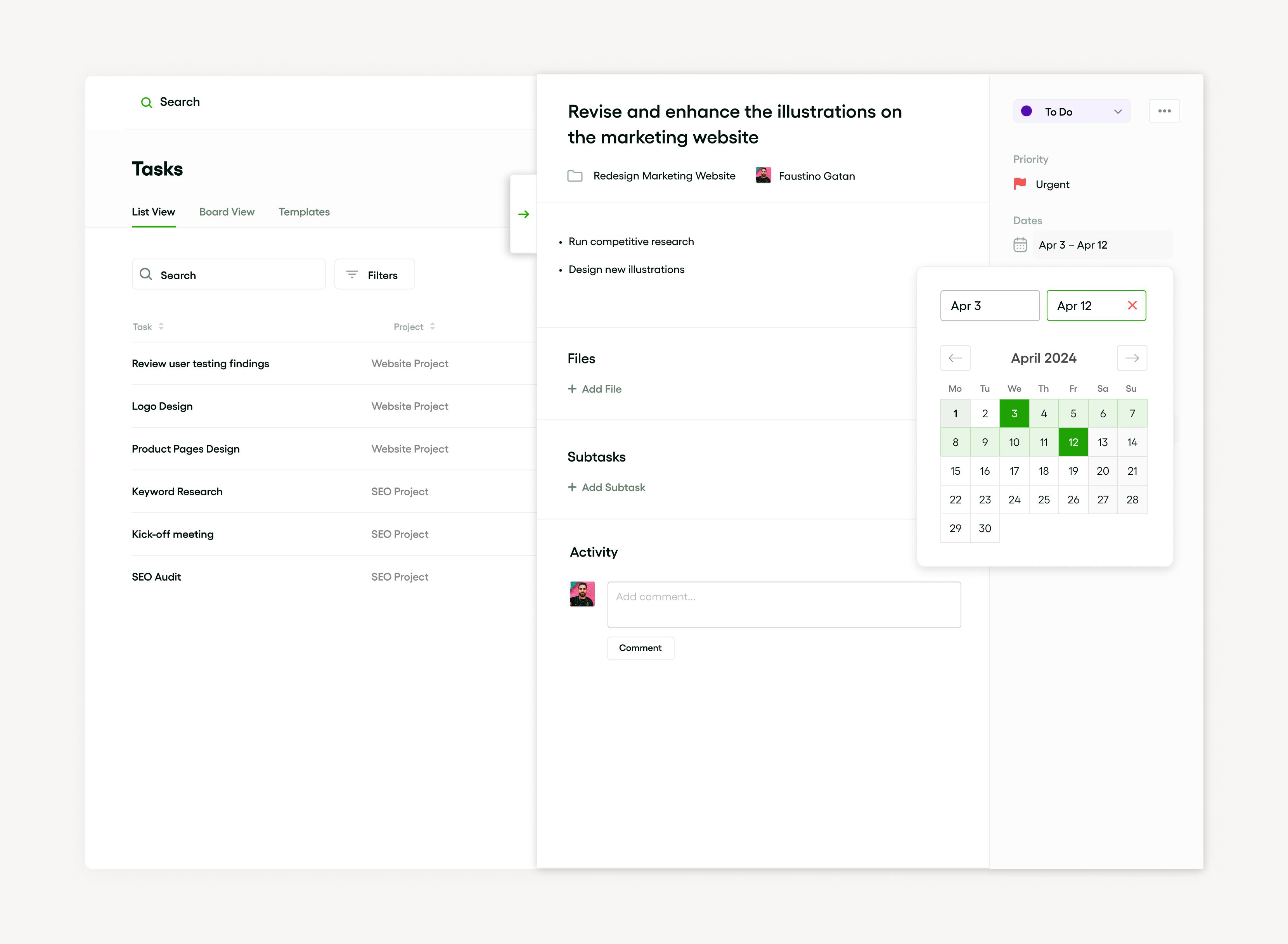
Each task should include a clear description, priority level, and estimated completion time. Assign tasks to team members based on their skills and availability, ensuring that everyone is aware of their responsibilities and deadlines.
Track project progress
Monitoring progress is essential in Agile project management. Bonsai provides powerful task management features that allow you to keep track of each task's status. As tasks progress through different stages, update their statuses accordingly, such as:
- To Do
- In Progress
- Done
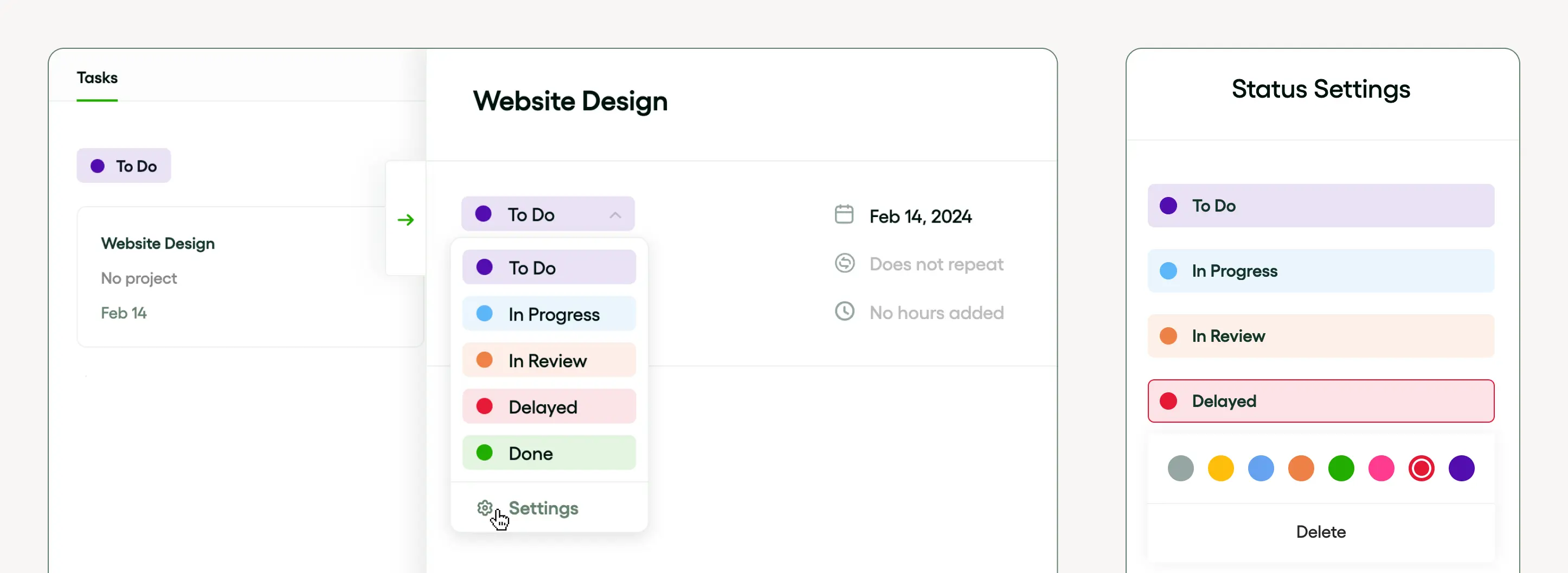
This visual representation of task progress helps identify bottlenecks and ensures the project remains on track. Bonsai also includes time tracking features, enabling team members to log the hours spent on each task.
This information can be used to generate reports, offering insights into productivity and assisting in future project planning. Regularly review the progress to make necessary adjustments and keep the project aligned with its goals.
Collaborate and communicate
Effective collaboration and communication are important for successful Agile project management. Bonsai’s collaboration tools promote seamless communication among team members. Use these tools to share updates, leave comments, and provide feedback directly within the platform.
This centralized communication ensures that everyone is informed and reduces the chances of miscommunication.
Types of kanban spikes
In Agile methodology, spikes come in two main flavors: Technical Spikes and Research Spikes. A Technical Spike is used when the team needs to explore potential technical solutions. It’s about diving deep into the technicalities of a project. On the other hand, a Research Spike focuses on understanding the broader aspects of a user story, often involving timeboxed investigations to clarify complex requirements.
Both types of spikes are timeboxed to keep the research focused and efficient. They help in refining the product backlog and preparing the sprint backlog. By the end of a spike, the product owner and the team have a clearer path forward, which is essential for smooth Agile software development.
Functional kanban spikes
Functional Spikes are a type of timeboxed investigation in Agile, designed to address complex issues with unclear solutions. These spikes might involve exploring different functionalities or experimenting with potential solutions. Anyone on the team can suggest a spike, but it’s usually the product owner who adds it to the product backlog.
Once a spike is prioritized, it becomes part of the sprint backlog. There are two main types of spikes:
- Technical Spikes
- Research Spikes
- Research Spikes: These involve time-boxed research to answer specific questions or acquire knowledge essential for the project.
- Functional Spikes: These are experiments that explore potential solutions or dig deeper into a problem to find the best approach.
Technical kanban spikes
Technical Spikes in Agile are all about diving into the nuts and bolts of a project. When the team faces uncertainty around a technical aspect of the project, they initiate a technical spike. This is a timeboxed user story or investigation where the team conducts research to solve a problem or determine the best approach.
Technical spikes are added to the product backlog and prioritized for a sprint when necessary. They’re a vital part of Agile methodology, helping the team manage risks and ensure that the project is on solid ground. By focusing on the technical challenges, spikes pave the way for smoother project execution.
Types of spikes: technical vs functional
Understanding technical spikes
Technical spikes focus on exploring unknowns related to technology or implementation challenges. They help teams reduce uncertainty about how to build a feature or integrate a new tool. For example, a developer might run a technical spike to test if a new API can support the required data flow before committing to full development.
In 2024, many teams use tools like Jira or Trello to track technical spikes as time-boxed tasks, often limited to a few days. This keeps research focused and prevents scope creep. A typical technical spike might involve prototyping code, experimenting with libraries, or assessing infrastructure needs.
To use technical spikes effectively, define a clear question or problem to answer upfront. Set a strict time limit, such as two days, and document findings immediately after. This approach helps freelancers and small businesses avoid wasting time on open-ended research and ensures decisions are data-driven.
Exploring functional spikes
Functional spikes investigate how a feature should behave from a user or business perspective. They clarify requirements, workflows, or design choices before development begins. For instance, a functional spike might involve creating wireframes or user stories to validate a new checkout process.
Unlike technical spikes, functional spikes often require collaboration with stakeholders or clients. Tools like Miro or Figma are popular in 2024 for quickly mocking up user interfaces and gathering feedback. This helps ensure the final product meets business goals and user needs.
Freelancers and small businesses should schedule functional spikes early in the project timeline. This prevents costly rework by confirming assumptions about features. Clearly communicate the spike’s goals and expected deliverables, such as a prototype or user flow diagram, to keep everyone aligned.
How to choose between technical and functional spikes
Choosing the right spike depends on the type of uncertainty your project faces. If the challenge is about how to build or integrate technology, a technical spike is appropriate. If the uncertainty lies in what the feature should do or how users will interact with it, a functional spike is better.
For example, a freelance web developer might run a technical spike to test a new payment gateway’s API, then follow with a functional spike to design the checkout user experience. Using both types in sequence can improve project outcomes and client satisfaction.
To implement this, start by listing your project’s unknowns and categorize them as technical or functional. Allocate time-boxed spikes accordingly, track progress with project management tools like Asana, and review findings with stakeholders. This structured approach helps freelancers and small business owners manage risks and deliver value efficiently.
Why use kanban spikes?
Spikes are a powerful tool in Agile software development. They are used to conduct timeboxed research activities when the team is not clear on how to proceed. An Agile spike story represents work that needs to be done but is not yet understood well enough to break down into user stories.
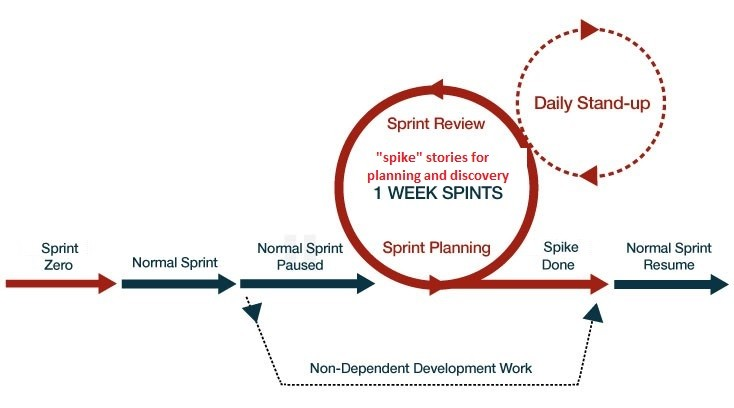
The product owner or team identifies the need for a spike, which is then added to the product backlog and selected for a sprint. Spikes help provide a concrete understanding of a problem or validate a proposed solution, keeping the sprint backlog transparent and preventing unnecessary work.
Address uncertainty in agile projects
Uncertainty is a common challenge in Agile projects, but spike stories offer a way to tackle it head-on. When the team encounters ambiguity, they initiate a spike—a timeboxed investigation to explore and experiment. These activities prevent the project from becoming overly complex or bogged down by unknowns.
Spike stories often involve items from the sprint backlog that require further research. The product owner and the Agile team work together to optimize the product backlog and reduce risks. Whether it’s a timeboxed user story or a complex technical problem, spikes help the team navigate uncertainty and keep the project on track.
Facilitate technical exploration
In Agile methodology, facilitating technical exploration is crucial for success. Spikes are a tool designed specifically for this purpose. An Agile spike allows the team to explore a concept through a timeboxed experiment, helping them understand the technical challenges before diving into the actual work.
Sprint backlogs often include a spike story to allow for this exploration. By conducting timeboxed investigations, the team can reduce uncertainties and enhance their understanding of the project. This continuous learning process is vital in Agile software development, ensuring that the team is always prepared to tackle the next challenge.
When to use spikes
Use spikes to clarify unclear requirements
Spikes are best used when project requirements are unclear or incomplete. In Kanban, a spike is a time-boxed research or investigation task that helps the team gather information needed to move forward confidently. For example, if a client requests a feature but the technical details are vague, a spike allows you to explore possible solutions without committing to full development.
By dedicating a spike to clarify requirements, you reduce the risk of rework later. Tools like Jira, Trello, and Asana let you create spike cards that clearly separate research tasks from regular development work. This approach helps freelancers and small teams manage uncertainty efficiently and keep the project on track.
To apply this, identify any ambiguous user stories or tasks during your Kanban planning. Then, create a spike with a clear goal and a fixed time limit, such as one or two days. This ensures focused investigation and prevents spikes from dragging on indefinitely, maintaining steady workflow progress.
Use spikes to evaluate technical feasibility
Spikes are valuable when you need to test whether a technical approach is feasible before full implementation. For instance, if you are unsure whether a new API can integrate with your existing system, a spike can involve building a small prototype or running experiments to validate the idea.
This practice helps freelancers avoid costly mistakes by confirming technical assumptions early. In 2024, many teams use spikes to explore new tools like AI APIs and cloud services, ensuring compatibility and performance before committing resources. Using platforms like GitHub Projects or Asana can help track spike progress alongside development tasks.
To use spikes effectively for feasibility, define clear questions to answer during the spike. Set measurable criteria, such as response time or error rates, to decide if the approach works. This data-driven method helps you make informed decisions and communicate findings clearly to clients or stakeholders.
Use spikes to estimate effort and risks
Spikes are also useful for estimating how much time and effort a task might require, especially when dealing with complex or unfamiliar work. When you encounter a user story that feels too vague for accurate estimation, a spike can break down the unknowns and reveal potential challenges.
For example, a freelancer building a custom website might use a spike to research third-party plugins or design frameworks before committing to a timeline. This helps create more realistic estimates and identify risks early. Project management tools like Monday.com allow you to tag spikes separately, making it easier to analyze their impact on delivery schedules.
To implement this, allocate a fixed timebox for the spike focused on discovery and analysis. After completing the spike, update your estimates based on the insights gained. This approach improves client communication by setting clearer expectations and reduces surprises during project execution.
How to implement kanban spikes
In Agile, a spike is a timeboxed experiment or investigation to solve uncertainty or gain knowledge for a user story. To implement a spike, the product owner introduces a spike story in the product backlog during sprint planning. This item moves to the sprint backlog when the team is ready for the time-boxed research activity. The scope or purpose of the research spike is defined and scheduled into sprints like other tasks.
Spikes are closely monitored by the Agile team to ensure they don’t overrun or detract from the sprint’s objectives. The results feed directly into the Agile software development process, reducing uncertainty for future user stories.
Identify the need for a kanban spike
In Agile, the need for a spike arises when the team lacks information or faces uncertainty about a user story or feature. The product owner may not fully understand the complexity, or unknowns about a feature exist in the product backlog that cannot be estimated. This calls for a timeboxed investigation or research spike.
A time-boxed research activity or experiment effectively handles these uncertainties. This brief, focused exploration helps the team estimate the size of user stories in the sprint backlog, aiding accurate planning and execution.
Set time-box for kanban spikes
In Agile software development, a spike is a timeboxed research activity designed to answer questions or solve uncertainties about a user story or function. This helps the product owner, team, and stakeholders understand the risks and complexity involved in implementing certain features. These investigations are often incorporated into the sprint backlog based on priority.
The time dedicated to a spike story is usually decided by the team during sprint planning. It’s crucial that the timebox for these studies is strictly adhered to, ensuring the sprint’s goal is achievable. A research spike can last from a few hours to a couple of days, depending on complexity.
Document and share kanban spike findings
After completing spike stories, it’s valuable to document and share findings with the team. The product owner and scrum master can then prioritize these investigations and place them in the sprint backlog. This promotes transparency and nurtures ongoing improvement.
Findings from a spike are useful during sprint planning sessions. Timeboxed user stories, research activities, or results of any experiment are discussed and applied to refine the product backlog. Agile methodology highlights learning, which is significantly underscored in spikes.
Role of kanban spikes in agile teams
Spikes play a crucial role in Agile teams by acting as timeboxed user stories or investigations, allowing teams to explore and decide on specific uncertainties. Commonly referred to as spikes, these short, precise studies may entail elements like an experiment, research activity, or user story aimed at answering specific questions.

This spike story is included in the sprint backlog after discussions with the product owner and helps prioritize the product backlog. Agile methodology integrates spikes to facilitate the software development process, making them essential in an Agile team.
Kanban spikes and scrum teams
In Agile software development, a spike is a timeboxed research activity or investigation used by scrum teams to tackle complex product backlog items. A typical spike story involves user stories that may present uncertainties or risks. The product owner decides on the inclusion of such spikes into the sprint backlog.
The team then conducts an experiment or research spike to gain knowledge or proof of concept. This helps break down complex user stories into simpler tasks that can be estimated and included in subsequent sprints. The outcome aids in Agile planning, ensuring effective methodology execution.
Kanban spikes and kanban teams
In an Agile setup, teams often use spikes, which are timeboxed user stories or investigations aimed at answering specific questions or overcoming hurdles that a normal user story wouldn’t cover. Agile teams use spikes in two ways:
- Research spike: a time-boxed research activity
- Design spike: an experiment
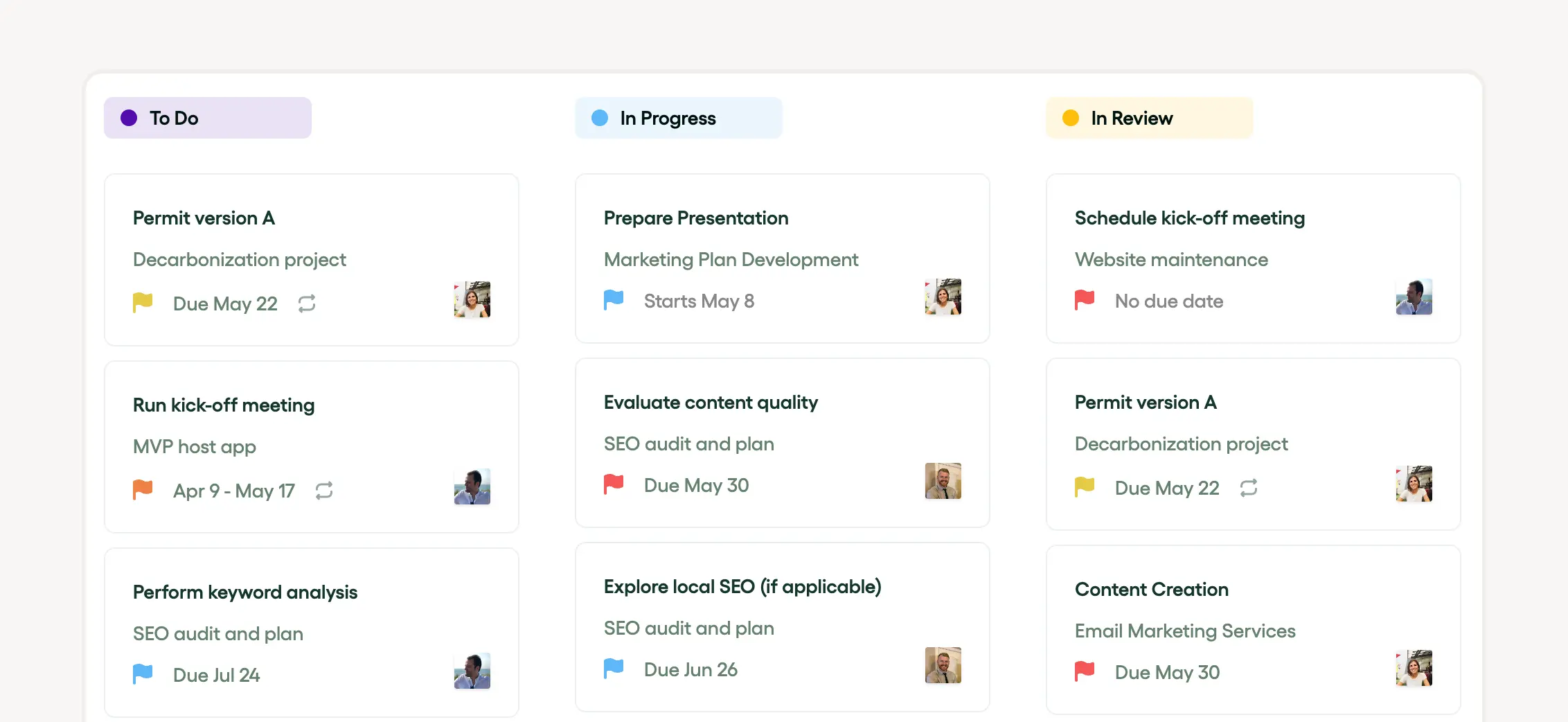
In the Kanban approach, the product owner creates the product backlog. The team selects user stories to move into the sprint backlog for implementation. Spikes are part of these user stories, maximizing the efficiency and productivity of Kanban teams.
Real-world examples of kanban spikes
In Agile development, a product owner may identify a user story in the product backlog that requires deeper understanding. A spike is created for timeboxed investigations into the story. This research spike clarifies the requirements or feasibility of the user story.
For instance, during a sprint, a team might encounter a complex functionality they’ve never implemented before. To reduce uncertainties, a timeboxed experiment, known as a spike story, could be executed. Post completion, the learnings can be implemented in the sprint backlog for future sprints.
Kanban spikes in software development: the case of Microsoft
In the world of Agile software development, Microsoft frequently leverages the concept of spikes to tackle complex challenges. These are focused, timeboxed investigations designed to resolve technical issues or clarify user stories. During a sprint, the Agile team dedicates time to these research activities, addressing uncertainties within the product or sprint backlog.
Agile spike stories, often initiated by the product owner, play a crucial role in decision-making, particularly when dealing with complex features. The insights gained from these research spikes enable the team to make more accurate estimates and craft better designs, thereby maximizing the efficiency of their Agile methodology.
Kanban spikes in product development: the case of Apple
Apple's innovative approach to product development often includes the strategic use of Agile methodology, particularly the application of spikes. These timeboxed investigations, known as Agile spikes, are utilized to explore ideas deeply within a set duration or sprint, ensuring that resources are used efficiently.
The outcomes of these timeboxed experiments are thoroughly analyzed and reviewed by the Agile team and product owner. The findings influence the product backlog, helping shape the subsequent sprint backlog and ensuring that Agile software development processes are continuously refined.
Common misconceptions about kanban spikes
One of the most common misconceptions is that Agile spikes disrupt the flow of a sprint. In reality, spikes are designed to enhance efficiency by allowing the Agile team to tackle complex tasks in a structured manner. Another misconception is that spikes unnecessarily add to the product backlog when, in fact, they are integral to the sprint backlog, helping the product owner prioritize tasks.
Additionally, some believe that spikes require the entire team’s involvement, but often, these timeboxed research activities are handled by individual team members, adding focused value to the development process without causing unnecessary interruptions.
Kanban spikes as a waste of time
Some in the Agile community view spikes as a potential waste of time, arguing that these timeboxed research activities detract from building actual user stories. This perspective suggests that the Agile team should focus directly on converting the product backlog into functional components rather than investing time in separate research spikes.
However, the usefulness of spikes varies depending on the team and project. While some see them as unnecessary, others find spikes invaluable for clarifying complex issues and preventing larger problems down the road, making them a crucial part of certain Agile processes.
Kanban spikes as a substitute for planning
In Agile software development, spikes often serve as a substitute for traditional planning methods. These timeboxed experiments or research activities help the Agile team reduce uncertainties in user stories. By adding a spike to the sprint backlog, the product owner ensures that complex features or design challenges are thoroughly explored.
The benefits of using spikes include improved task estimation accuracy, a deeper understanding of the project by the team, and smoother sprint planning. Thus, spikes play an essential role in effective product backlog management, providing a structured way to address uncertainties without derailing the project.
Best practices for kanban spikes
To get the most out of spikes in Agile, it’s important to follow best practices. Spikes, which are a type of user story, should be timeboxed to limit their scope and prevent them from dragging on. These research activities are crucial when the team encounters challenging issues that require additional knowledge or expertise.
For a spike to be effective, the product owner should prioritize and include them in the sprint backlog alongside other user stories. It’s also essential to keep these investigations focused to minimize disruptions. Documenting and sharing the findings from a spike with the entire team ensures that future sprint planning sessions are more informed and efficient.
Keep kanban spikes focused and time-boxed
In Agile software development, the key to using spikes effectively is keeping them focused and timeboxed. A spike story should have a clear goal and a set time limit. The Agile methodology requires these timeboxed research activities to be included in the sprint backlog and defined by the product owner.
Once included in the sprint, the Agile team conducts the timeboxed experiment or investigation, which is part of the broader product backlog. These focused efforts help determine the feasibility and approach for complex user stories or sprint tasks, ensuring that the work remains within the set deadlines and stays aligned with project goals.
Integrate kanban spike findings into the agile workflow
Integrating the results of spike stories into the Agile workflow is essential for maintaining momentum. These timeboxed investigations, prioritized by the product owner, are added to the sprint backlog to address uncertainties in user stories. Once the Agile team completes the spike, the findings are analyzed and incorporated into the product backlog.
This process ensures that the team can make informed decisions and adjustments during future sprints. By using spikes as timeboxed experiments, Agile teams can refine their approach and improve their overall software development process, making it more efficient and effective.
Conclusion: maximize the value of kanban spikes in agile
Agile spikes, particularly spike stories and timeboxed investigations, are invaluable tools in Agile software development. By implementing these research activities effectively, Agile teams can address uncertainties, enhance their sprint backlogs, and ultimately deliver greater value to the product owner. These timeboxed experiments, often referred to as research spikes, are instrumental in refining the product backlog and propelling the Agile methodology forward.
Maximizing the value of spikes is key to ensuring a seamless and productive development cycle, leading to successful project outcomes.


'%3e%3cg id='Final-Copy-2_2_' transform='translate(1275.000000, 200.000000)'%3e%3cpath class='st0' d='M7.4,12.8h6.8l3.1-11.6H7.4C4.2,1.2,1.6,3.8,1.6,7S4.2,12.8,7.4,12.8z'/%3e%3c/g%3e%3c/g%3e%3c/g%3e%3cg id='final---dec.11-2020'%3e%3cg id='_x30_208-our-toggle' transform='translate(-1275.000000, -200.000000)'%3e%3cg id='Final-Copy-2' transform='translate(1275.000000, 200.000000)'%3e%3cpath class='st1' d='M22.6,0H7.4c-3.9,0-7,3.1-7,7s3.1,7,7,7h15.2c3.9,0,7-3.1,7-7S26.4,0,22.6,0z M1.6,7c0-3.2,2.6-5.8,5.8-5.8 h9.9l-3.1,11.6H7.4C4.2,12.8,1.6,10.2,1.6,7z'/%3e%3cpath id='x' class='st2' d='M24.6,4c0.2,0.2,0.2,0.6,0,0.8l0,0L22.5,7l2.2,2.2c0.2,0.2,0.2,0.6,0,0.8c-0.2,0.2-0.6,0.2-0.8,0 l0,0l-2.2-2.2L19.5,10c-0.2,0.2-0.6,0.2-0.8,0c-0.2-0.2-0.2-0.6,0-0.8l0,0L20.8,7l-2.2-2.2c-0.2-0.2-0.2-0.6,0-0.8 c0.2-0.2,0.6-0.2,0.8,0l0,0l2.2,2.2L23.8,4C24,3.8,24.4,3.8,24.6,4z'/%3e%3cpath id='y' class='st3' d='M12.7,4.1c0.2,0.2,0.3,0.6,0.1,0.8l0,0L8.6,9.8C8.5,9.9,8.4,10,8.3,10c-0.2,0.1-0.5,0.1-0.7-0.1l0,0 L5.4,7.7c-0.2-0.2-0.2-0.6,0-0.8c0.2-0.2,0.6-0.2,0.8,0l0,0L8,8.6l3.8-4.5C12,3.9,12.4,3.9,12.7,4.1z'/%3e%3c/g%3e%3c/g%3e%3c/g%3e%3c/g%3e%3c/svg%3e)