


Time and resource management is essential for optimizing productivity and achieving goals efficiently. It involves:
- Prioritizing tasks
- Setting specific deadlines
- Matching the right talent to the right tasks
- Tracking time and resources to identify potential problems early
- Making process adjustments and preventing delays
- Strategic handling of roadblocks
- Ensuring project completion within budget
Effective management boosts team productivity, leads to more satisfied customers, and helps agencies improve project management efficiency and make smarter decisions, which are crucial for growth. Implementing these strategies in 2026 can significantly enhance organizational success.
Time and resource management importance in agencies
Agency owners know that improving their project management’s efficiency and making smarter decisions are crucial for their growth and success. The first step to achieving this is to manage time and resources effectively. Planning and scheduling are vital steps to ensure that you allocate your time and resources efficiently.
Team resource planning, forecasting, and capacity planning are essential components in resource optimization. Tracking time and resources can give you valuable performance insights. That way, you’ll be able to make adjustments such as relocating resources when necessary.
Boosting productivity and efficiency
Prioritizing tasks is a strategic approach to productivity improvements and efficient project management. Strategic resource allocation plays a significant role in maximizing project efficiency. It is crucial to understand every individual’s core strengths and implement a skills-based task assignment.
Project planning and scheduling go well with resource forecasting and time management. Setting a clear project timeline facilitates effective time tracking. Moreover, forecasting is an important business intelligence tool that helps you create future strategies. These components and strategies are crucial to improve team productivity and boost the overall efficiency of your business.
Improving client satisfaction
Effective project management can boost client satisfaction. Breaking large tasks into smaller ones, assigning tasks to the right people, and careful project planning is significant to ensure that all business operations run smoothly.
Other essential factors to consider include:
- Effective communication within teams
- Regular progress reviews
- Utilizing appropriate project management tools
- Setting a clear project schedule to prevent delays.
- Precise time tracking to ensure that certain tasks get completed within the timeframe.
- Maximizing time and resources.
These components and strategies make up a smarter decision for your business or agency. It provides excellent service to your customers, leading to more satisfied and happier customers.
Enhancing profitability
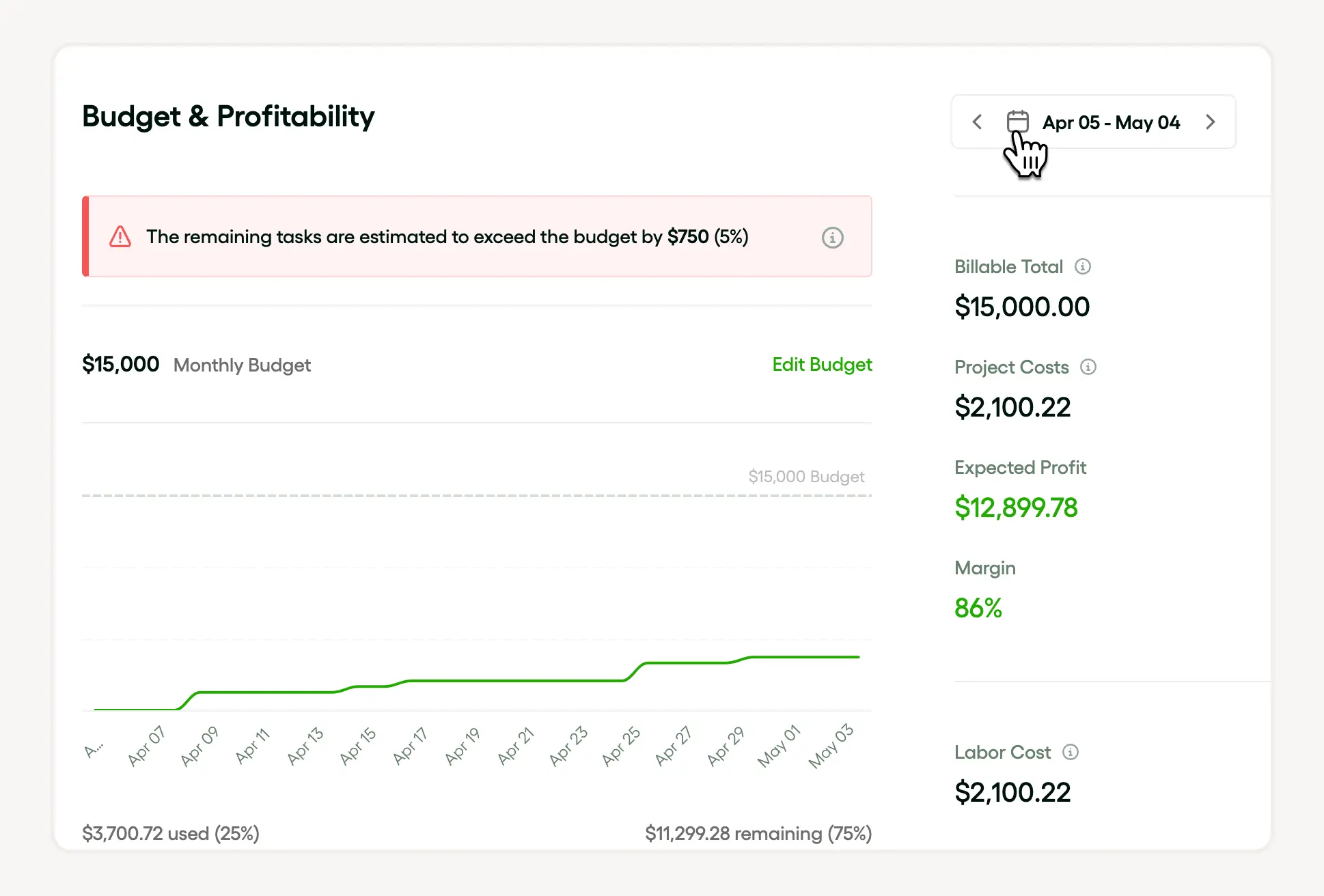
Efficient project management, smart task prioritization, and strategic resource allocation influence your profit optimization. When these components are implemented strategically, it leads to more project completion and large profit margins.
To be effective with project management, you need to plan and schedule projects. It allows you to better manage your time resources and team capacity. So, your team can work efficiently and stay within the project budget.
It is also crucial that all project components align with the project goals. Tracking and forecasting are the best ways to ensure everyone is on the same page. You have to ensure that everyone in the team is geared towards efficiency, growth, and success. These are secret formulas to increase profitability margins.
Time and resource management key principles
In order to have a successful approach to time and resource management it’s essential to accurately estimate the time needed for various tasks. A comprehensive understanding of time estimation can lead to streamlined operations and enhanced productivity. Therefore, investing time in learning about time estimation techniques can significantly benefit your project management skills.
A robust project planning and utilization of time-tracking tools helps you achieve effective time and resource management. It helps you optimize your time and resources, minimizing waste. Utilizing business intelligence tools such as data-driven forecasting enhances your overall efficiency. It also helps you make smarter and more strategic business decisions.
Setting clear goals and priorities
A clear, defined goal is the start of successful project management. Prioritizing tasks and creating a well-thought plan boost efficiency. It enables you to monitor your time and resources and ensure that everyone on the team is updated.
When you understand what you need to do and what you’re trying to achieve, you can improve your plan and allocate time and resources effectively. You can plan, schedule, and forecast better to align with your goals. It also helps you identify potential roadblocks, so you can prepare possible solutions to make adjustments.
Planning and scheduling
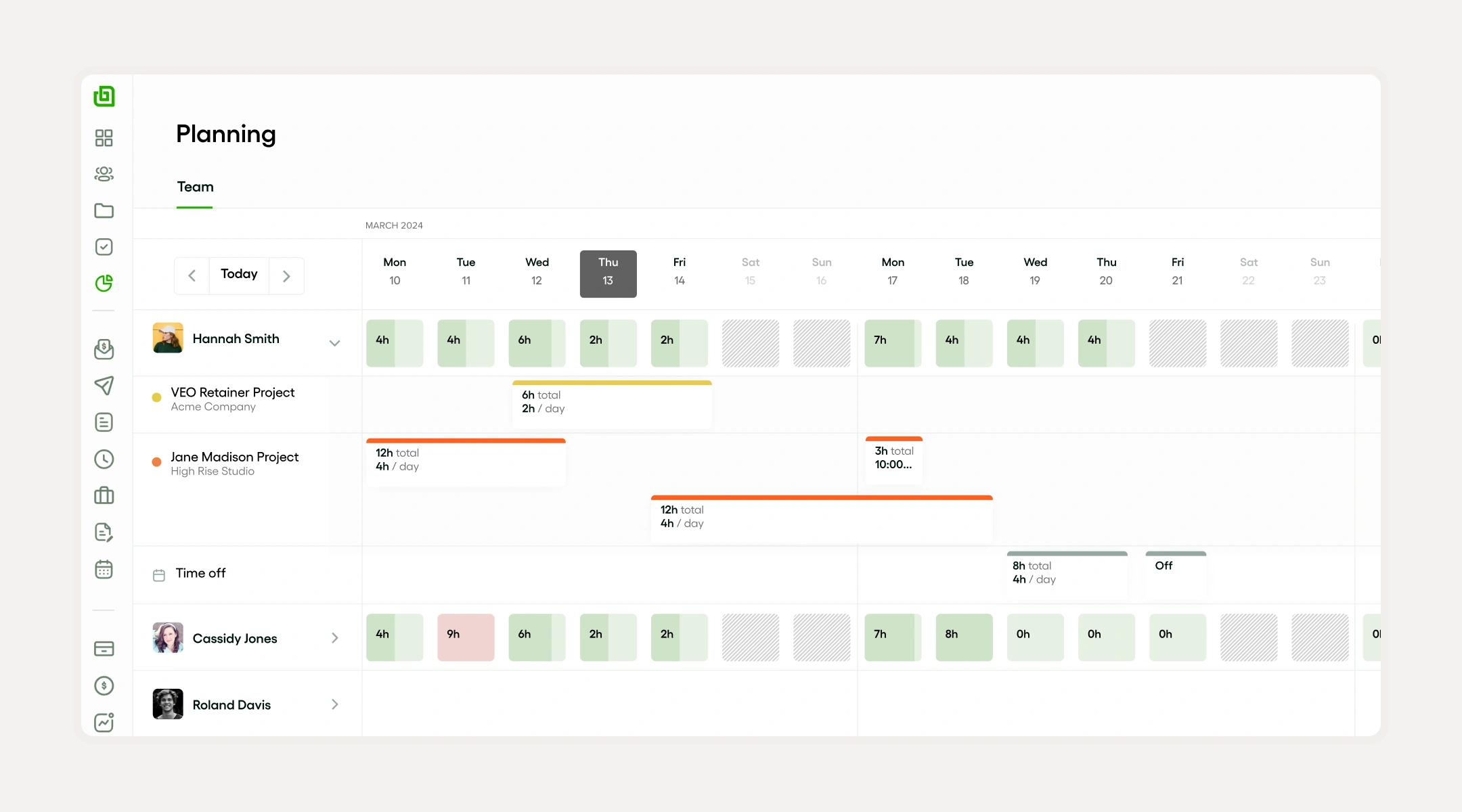
Resource planning and allocation are vital components for the smooth execution of project management. They help you stay on track of required tasks, stay within budget, and meet deadlines. Utilize tools like Microsoft Project, Asana, or Monday.com to optimize efficiency and create reliable forecasting.
Delegating tasks
Task assignment is a crucial step in project management. Avoid mismatching talents to prevent underutilization and overutilization. Assigning tasks effectively improves efficiency and supports wise business decisions.
Delegation goes beyond resource allocation; it is a helpful tool in planning and forecasting. When you delegate tasks well, setting project timelines and tracking your team’s time becomes easier.
Benefits of time tracking in resource management
Understand how you and your team spend time
Time tracking provides a clear picture of how work hours are distributed across tasks and projects. By recording time spent on activities, freelancers and small business owners can identify which tasks consume the most resources and which ones may be less productive. This insight helps prioritize high-value work and eliminate time-wasting activities.
Using tools like Toggl Track or Harvest in 2024 allows you to generate detailed reports showing time allocations by project or client. These reports reveal patterns such as frequent interruptions or excessive meetings, enabling you to adjust schedules and workflows accordingly. This transparency is crucial for efficient resource management.
To get started, set up time tracking for all active projects and review the data weekly. Use the insights to reassign tasks or adjust deadlines, ensuring your team focuses on the most impactful work. This practice prevents resource drain and improves overall productivity.
Avoid over-allocation and burnout
Tracking time helps prevent overloading yourself or your team by highlighting when workloads exceed sustainable limits. Over-allocation can lead to burnout, missed deadlines, and reduced quality. Time tracking data reveals how many hours each person spends on tasks, making it easier to balance workloads effectively.
If a freelancer consistently logs more than 50 hours per week on client work, it signals a risk of burnout. Using resource management platforms like Resource Guru or Clockify, you can set limits and alerts for maximum hours per week. This proactive approach allows you to redistribute tasks or negotiate deadlines before stress becomes unmanageable.
Regularly reviewing tracked hours and adjusting assignments ensures that no one is stretched too thin. This not only protects mental health but also maintains high-quality output, which is essential for client satisfaction and business growth.
Improve forecasting and budgeting accuracy
Accurate time tracking data enhances your ability to forecast project timelines and budget resources realistically. When you know exactly how long past tasks took, you can estimate future work more precisely, reducing the risk of underbidding or overpromising.
For instance, a small business owner using Harvest can analyze historical time entries to predict how many hours a similar project will require. This information feeds into better budgeting and resource allocation decisions, helping avoid unexpected costs or last-minute hiring needs.
To leverage this benefit, integrate time tracking with your project management and accounting tools. Review past projects quarterly to refine your estimates and adjust pricing strategies. This ongoing process builds trust with clients and supports sustainable business growth.
Prioritizing projects to maximize ROI and resource usage
Assess project value using clear ROI metrics
Start by evaluating each project’s potential return on investment (ROI) to prioritize effectively. Calculate ROI by estimating the expected profit or benefit divided by the time and money invested. For example, if a client project generates $5,000 in revenue and requires 50 hours of work, the ROI is $100 per hour.
Use tools like Microsoft Excel or Google Sheets to create a simple ROI calculator tailored to your projects. Include factors such as direct costs, estimated hours, and potential long-term benefits like referrals or recurring work. This approach helps you avoid spending time on low-value tasks that drain resources.
By quantifying project value, you can rank projects objectively and focus on those that deliver the highest returns. Start your next planning session by listing projects with their calculated ROI to guide where your time and resources should go first.
Balance resource availability with project deadlines
Effective project prioritization requires matching your available resources with project demands and deadlines. Begin by mapping out your current workload and resource capacity using project management tools like:
- Trello
- Asana
- Monday.com
These platforms provide visibility into task timelines and team availability.
For example, if you have two projects with similar ROI but one requires immediate completion while the other has a flexible deadline, prioritize the urgent project to avoid penalties or lost opportunities. Additionally, consider your team’s skill sets and availability to ensure you assign tasks to the right people without overloading anyone.
Regularly update your resource calendar and communicate with clients about realistic deadlines. This proactive approach prevents burnout and ensures you allocate time and resources where they can be most effective, improving overall project success.
Use time-blocking and resource tracking to stay on course
Once you have prioritized projects, implement time-blocking to allocate focused periods for each task. Tools like:
- Google Calendar
- Clockify
can help you schedule dedicated work sessions, reducing distractions and improving productivity. For instance, block mornings for high-priority client work and afternoons for administrative tasks.
Simultaneously, track resource usage by logging hours and expenses in apps such as:
- Toggl
- Harvest
This data helps you monitor if projects are staying within budget and time estimates, allowing for adjustments before overruns occur. Regular reviews of tracked data inform better future prioritization decisions.
By combining time-blocking with resource tracking, you maintain control over your workload and ensure your efforts align with maximizing ROI. Make it a habit to review your schedule weekly and adjust priorities based on progress and changing client needs.
Using time and resource management software effectively
Choosing the right software for your needs
Selecting the right time and resource management software starts with understanding your specific business needs. Freelancers and small business owners should consider factors like project complexity, team size, and budget before committing to a tool. For example, Trello works well for simple task tracking, while tools like:
- Asana
- Monday.com
offer more advanced resource allocation features.
Evaluate software based on features such as:
- Time tracking
- Calendar integration
- Reporting capabilities
Many platforms offer free trials or tiered pricing plans, which allow you to test functionality without upfront commitment. For instance, Clockify provides a free plan with unlimited users and projects, making it ideal for freelancers who want to monitor billable hours closely.
To choose effectively, list your top three requirements and compare how each software addresses them. This approach ensures you invest in a tool that streamlines your workflow rather than complicates it. Take action by signing up for a trial of at least two platforms and testing them during your next project cycle.
Setting up your software for maximum efficiency
Configuring your time and resource management software properly is crucial to gaining accurate insights and saving time. Start by inputting all active projects, deadlines, and team members or collaborators. This creates a centralized view that helps prevent overlooked tasks or resource conflicts.
Customize task categories and labels to match your workflow. For example, if you’re a freelance designer, create labels like:
- Client revisions
- Concept development
- Final delivery
This organization improves tracking and reporting accuracy. Additionally, integrate your calendar apps like Google Calendar or Outlook to synchronize deadlines and reminders automatically.
Regularly update your software with real-time progress and time entries to maintain data accuracy. Set aside 10 minutes daily or weekly to review and adjust your schedules. This habit ensures your resource allocation stays aligned with actual workload, preventing burnout or missed deadlines.
Using software insights to optimize your workflow
Time and resource management software generates valuable data that helps identify bottlenecks and improve productivity. Use built-in reports to analyze how much time you spend on different tasks and which projects consume the most resources. For example, Harvest provides detailed timesheet reports that highlight unprofitable activities.
Leverage these insights to adjust your project plans and prioritize high-impact tasks. If you notice repetitive delays in a specific phase, consider reallocating resources or automating parts of the process. Tools like ClickUp offer automation features that can trigger reminders or status updates, reducing manual follow-ups.
Make it a habit to review your software’s analytics monthly. Use the data to set realistic deadlines, balance workloads, and improve client communication by providing transparent progress updates. This proactive approach helps freelancers and small business owners deliver projects on time while maintaining healthy work habits.
Matching skills to tasks for optimal resource management
Identify the skills required for each task
Start by clearly defining the skills needed to complete each task in your project. Break down complex projects into smaller tasks and list the specific abilities required. Examples include:
- Graphic design
- Copywriting
- Data analysis
This clarity helps you assign the right person to each task, reducing wasted time and effort.
For example, if you are managing a website redesign, tasks like coding require technical skills in HTML and CSS, while content creation demands strong writing skills. Using tools like Trello or Asana can help you map out tasks and their skill requirements visually, making it easier to match resources effectively.
By identifying skill requirements upfront, you avoid overloading team members with tasks outside their expertise. This leads to faster completion times and higher quality work, which is crucial for freelancers and small businesses juggling multiple projects simultaneously.
Assess your team's strengths and availability
Evaluate the skills and current workload of each team member or freelancer before assigning tasks. Use tools like HelloBonsai’s time tracking and project management features to get real-time insights into availability and past performance. This ensures you don't assign tasks to someone who is already stretched thin or lacks the necessary skills.
For instance, if a graphic designer is booked for the next two weeks, assign design tasks to another qualified freelancer or reschedule to prevent bottlenecks. Also, consider soft skills such as communication and problem-solving, which can impact task success beyond technical ability.
Regularly updating this assessment helps you adapt to changing circumstances, such as new projects or shifting deadlines. This proactive approach minimizes downtime and keeps your projects on track.
Use software tools to streamline task assignment
Leverage project management software to automate and optimize the matching of skills to tasks. Platforms like Monday.com, ClickUp, or HelloBonsai allow you to tag team members with their skills and availability, then assign tasks accordingly. Benefits include:
- Reducing manual errors
- Speeding up resource allocation
For example, Monday.com’s skill matrix feature lets you visualize who is best suited for each task based on their expertise and current workload. This makes it easier to balance resources and avoid overloading any individual.
Implementing these tools also provides transparency for clients and team members, improving communication and accountability. Start by setting up skill tags and regularly updating availability to keep your resource management efficient and responsive.
Continuously review and adjust assignments for efficiency
Optimal resource management requires ongoing monitoring and adjustment of task assignments. Track progress with tools like HelloBonsai’s project dashboards and time reports to identify if tasks are being completed on schedule and if the skill-task match is effective.
If you notice delays or quality issues, reassess whether the assigned person has the right skills or if their workload is manageable. For example, reassigning a task to a specialist or breaking it into smaller parts can improve outcomes. Regular check-ins and feedback loops help catch problems early.
By continuously reviewing assignments, you maintain flexibility and can respond to unexpected changes, ensuring your time and resources are always used efficiently. This practice is especially important for small businesses aiming to maximize productivity with limited staff.
Managing scheduling conflicts collaboratively
Recognize scheduling conflicts early
Identifying scheduling conflicts as soon as possible is key to managing time and resources effectively. Use shared calendars like Google Calendar or Microsoft Outlook to keep visibility on team members’ availability. These tools allow you to spot overlapping appointments or deadlines before they become problematic.
For freelancers working with multiple clients, integrating scheduling apps such as Calendly or Acuity Scheduling can automatically detect double bookings and notify you immediately. Benefits include:
- Preventing last-minute rushes
- Avoiding missed deadlines
- Protecting client relationships
- Increasing productivity
To stay proactive, set up weekly check-ins or status updates with your team or clients. This habit ensures everyone is aware of upcoming commitments and can flag potential conflicts early. Taking these steps helps maintain smooth workflows and reduces stress caused by unexpected clashes.
Communicate openly to resolve conflicts
Open communication is essential when resolving scheduling conflicts collaboratively. Once a conflict is identified, promptly discuss it with all involved parties to understand priorities and constraints. Use video calls or messaging apps like Slack or Zoom to facilitate clear and immediate conversations.
For example, if two projects require the same resource at the same time, gather input on deadlines and flexibility. This approach helps everyone understand the impact of rescheduling and encourages cooperative problem-solving. Avoiding assumptions and clarifying expectations reduces misunderstandings and fosters trust.
Encourage a culture where team members feel comfortable voicing concerns about their workload or availability. This openness allows conflicts to be addressed constructively rather than ignored, which can lead to burnout or missed deliverables. Regular communication ensures that scheduling adjustments benefit the entire team or client base.
Use collaborative tools to adjust schedules efficiently
Collaborative scheduling tools streamline the process of resolving conflicts by providing real-time updates and easy access for all stakeholders. Platforms like:
- Asana
- Trello
- Monday.com
allow teams to visualize tasks, deadlines, and resource assignments in one place.
When a conflict arises, these tools enable quick adjustments and notify everyone involved automatically. For instance, dragging and dropping tasks to new time slots or reassigning resources can be done without lengthy email chains. This transparency minimizes confusion and keeps projects on track.
To maximize efficiency, integrate your scheduling tools with calendar apps and communication platforms. This integration ensures that any changes are reflected across systems, reducing the risk of overlooked updates. Implementing these tools helps freelancers and small business owners manage time and resources collaboratively with minimal friction.
Establish clear conflict resolution protocols
Having predefined protocols for handling scheduling conflicts enables faster and fairer resolutions. Define who has decision-making authority when conflicts arise, such as a project manager or lead freelancer. This clarity prevents delays caused by uncertainty or disagreements.
For example, you might establish a rule that deadlines take precedence over less urgent meetings, or that client projects with higher revenue impact get priority. Document these guidelines and share them with your team or clients to set expectations upfront.
Regularly review and update your conflict resolution policies based on feedback and changing business needs. Clear protocols reduce stress and keep your time and resource management process consistent and efficient, empowering your team to focus on delivering quality work.
How to conduct effective resource and time audits
Start by tracking your time and resources accurately
Effective time and resource audits begin with accurate tracking. Use tools like:
- Toggl Track
- Clockify
to log your daily work hours and categorize tasks by project or client. For resource tracking, software such as Microsoft Excel or Airtable can help you monitor expenses, equipment usage, and team availability.
For example, a freelancer working on multiple projects can allocate time blocks to each client in Toggl, providing clear data on where their hours go. Similarly, a small business can track resource consumption like software licenses or office supplies in Airtable, identifying areas of overuse or waste.
To get started, set a tracking period of at least two weeks to gather enough data. Consistent tracking during this time will form the foundation for a meaningful audit that highlights inefficiencies and opportunities for improvement.
Analyze the collected data to identify bottlenecks and inefficiencies
Once you have tracked your time and resources, the next step is to analyze the data to uncover bottlenecks and inefficiencies. Look for tasks that consume disproportionate amounts of time or resources without corresponding value. For instance, if administrative work takes up 30% of your time but contributes little to revenue, it may need streamlining.
Use visualization tools like:
- Google Sheets charts
- Project management platforms such as Asana
to map out time spent on different activities. This helps highlight patterns, like frequent task switching or resource underutilization. For example, a small business might discover that certain equipment sits idle 40% of the workweek, suggesting a need to reallocate or share resources.
After pinpointing inefficiencies, prioritize them based on impact and ease of resolution. This targeted approach allows you to focus on changes that will deliver the most significant improvements in productivity and cost savings.
Implement changes and schedule regular audits to maintain efficiency
Conducting a time and resource audit is only valuable if you act on the findings. Implement changes such as:
- Automating repetitive tasks with tools like Zapier
- Delegating low-value work
- Renegotiating supplier contracts to reduce costs
For example, automating invoice reminders can save freelancers several hours monthly.
After making adjustments, schedule regular audits—quarterly or biannually—to track progress and adapt to new challenges. Regular reviews ensure that your time and resources remain aligned with your business goals as projects evolve or your team grows.
By committing to ongoing audits and improvements, freelancers and small business owners can continuously optimize their workflows, reduce waste, and increase profitability in 2024 and beyond.
Time and resource management strategies
Time and resource management are paramount to streamline operations effectively for any organization. A project management checklist can be a critical tool in addressing various aspects of project planning, execution, and completion. By employing these guiding principles and tools, companies can improve efficiency and reduce wastage of resources.
Project managers excel at planning and making decisions. One effective way to improve project management is to focus on task prioritization. Prioritizing tasks helps you run projects smoothly and efficiently. It also makes it easier to use your time and resources strategically.
Utilizing time tracking and resource planning tools gives you valuable insights into how to plan and schedule tasks and projects. It helps you make better decisions based on data. You can also visualize these insights with a free infographic maker to create clear charts and timelines for your team.
To make the most of your time and resources, follow these strategies:
- Time blocking
- Task prioritization using the Eisenhower Matrix
- Applying the Pareto principle (80/20 rule)
- Using technology tools for project and resource management
- Plan your projects based on priority level. You can rank them based on their importance and urgency.
- Determine how many resources each task needs.
- Use essential tools to track your team's time. It is to ensure that I stay on top of everything.
Time blocking
Time blocking is also a significant tool to run projects efficiently. Project managers and planners widely use it. When you implement time blocking, you allocate specific times to complete certain tasks. It can help you use your resources more efficiently and schedule your work better.
Here’s how you can do time blocking:
- Prioritize tasks based on their importance and urgency.
- Allocate time and resources for each time block.
- To ensure you stay on schedule, track your time.
Time blocking is an effective strategy to achieve better project outcomes and make better decisions.
Eisenhower Matrix
Another way to be effective at project management is using the Eisenhower Matrix. It is a method of prioritizing tasks that lets you focus on the most important projects or tasks. The Eisenhower Matrix is very effective in project planning.
Benefits of using the Eisenhower Matrix
- Enhanced utilization of resources - You can allocate time and resources based on their importance and urgency.
- Improved time tracking and management - It boosts your efficiency in staying on track of project timelines.
- Boosts capacity planning and resource forecasting - You can make smarter decisions about how to optimize time and resources.
Pareto principle
The Pareto principle is the popular 80/20 rule. A project management concept that says 80% of the results come from the 20% of the effort. It has benefited project management in several ways:
- Prioritizing tasks based on the value that you will get from each task.
- Allocate resources where they will have the best impact.
- Spending time on activities that speed up your project.
The Pareto Principle helps you make strategic decisions on optimizing your time and resources.
Time and resource management role of technology
Technology revolutionizes project management by helping you get things done with minimal time and sufficient resources. To understand how technology can assist, see this resource management tool article. Technology can help improve time and resource management in these ways:
- Automating routine tasks
- Improving communication and collaboration
- Providing real-time data and analytics
- Enabling better scheduling and resource allocation
- Resource allocation and utilization - Digital tools help you visualize who’s doing a particular task and when it is due. It helps you achieve the right balance of task assignments and project milestones.
- Time tracking and management - With technology, you can precisely track time and plan capacity effectively. It allows everyone in the team to meet deadlines easily.
- Project management - Utilization of technology in project management streamlines planning, scheduling, tracking, and reporting. It helps your team become more organized and productive.
Use bonsai to automate tasks, track time, and manage resources in one place
Bonsai is a powerful project management tool designed specifically for agencies. It simplifies your planning and scheduling process. It enables users to allocate time and resources based on their importance and urgency. The visual presentation makes it easy for everyone to stay on track. It not only streamlines your project but also helps you save time and resources.

Main features include:
- Task prioritization
- Resource allocation
- Time tracking
- Planning
- Scheduling
- Intuitive user interface for smooth task management.
- Project planning and scheduling effectively.
- Accurate time tracking and reports on time tracked on tasks vs estimates.
- Business intelligence features like forecasting and performance insights.
- Accurate team capacity planning to ensure project completion.
- Integration of visual representations through graphs etc.
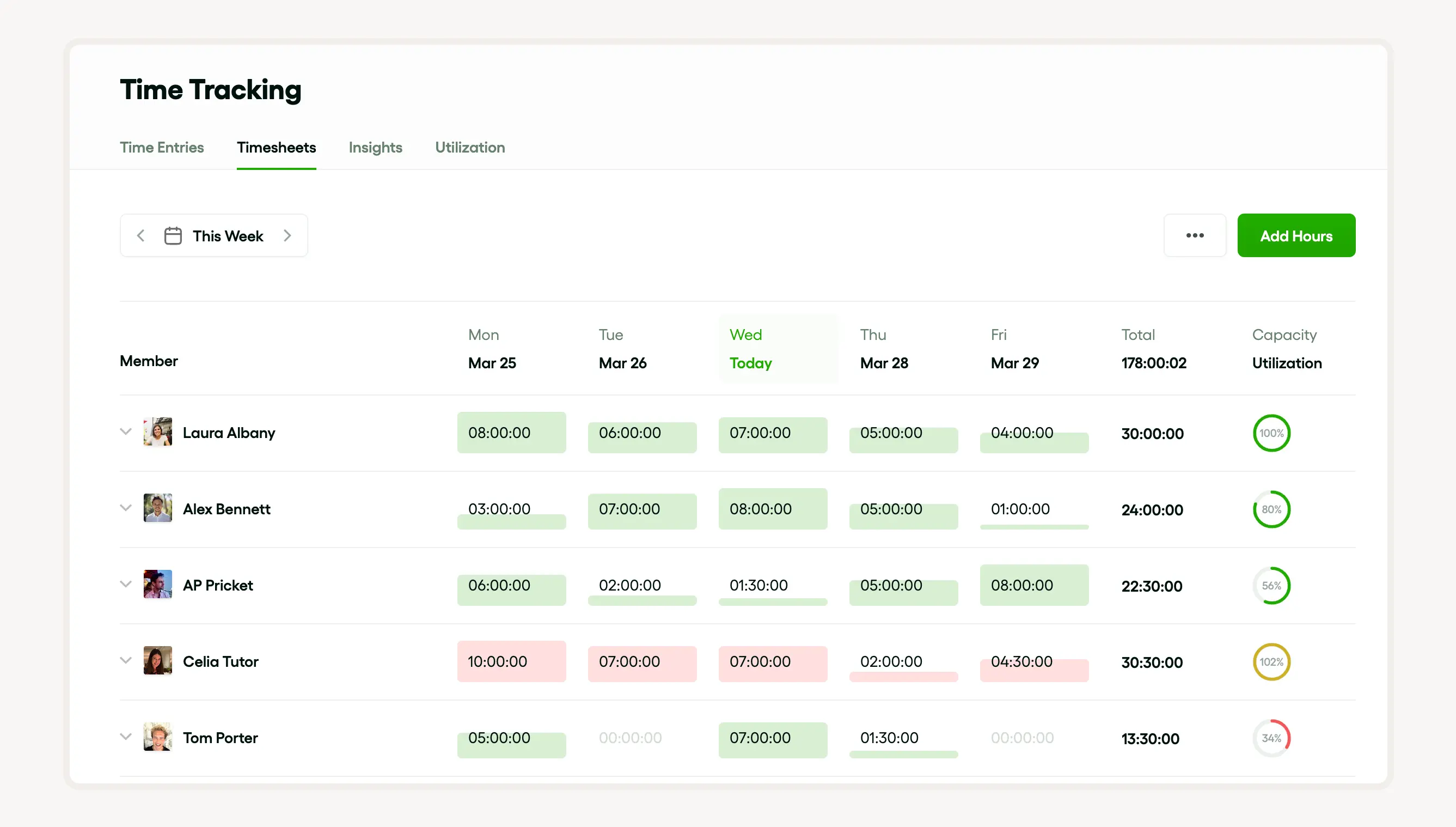
Bonsai boasts advanced features in task prioritization, resource allocation, time tracking, planning, and scheduling. These features help you strategize based on data. You can easily spot what adjustments are needed throughout the project lifecycle.
Time and resource management common challenges and solutions
Time and resource management involve challenges. Unexpected circumstances can occur. You must stay updated and implement necessary adjustments and solutions.
Here's how to better your project management activities:
- Strategic decision making - Set specific time and resources, and plan your team’s capacity to achieve your project goals.
- Resource planning and forecasting - Leverage the power of forecasting to stay ahead of potential roadblocks.
- Time tracking - Track your time and resources effectively.
Dealing with overload and burnout
Overload and burnout can reduce the efficiency of project management. Apply these approaches to manage them effectively:
- Identify workload limits
- Encourage regular breaks
- Delegate tasks appropriately
- Use automation tools
- Prioritize tasks, allocate resources, and track time.
- Use efficient time management techniques and capacity planning to achieve a balanced workload.
- Create a reliable forecast to assess your resource needs and evenly distribute tasks to prevent overload.
Managing remote teams
Remote teams are the new normal for delegating tasks and projects efficiently. However, when you’re new to this approach, it can be challenging. Focus on these areas:
- Effective communication
- Defined roles and responsibilities
- Use of collaboration tools
- Regular check-ins
- Task Prioritization
- Time and Resource Allocation
- Project Planning
- Time Tracking
- Resource Planning and Capacity Planning
Handling unexpected changes and delays
Handling unexpected changes and delays requires a flexible strategy. You must find solutions and make adjustments. Implement these steps to stay on track during delays and changes:
- Maintain buffer time in schedules
- Prioritize tasks dynamically
- Communicate changes promptly
- Review and update plans regularly
- Efficient decision-making and task prioritization - Quickly decide and prioritize tasks when resource constraints arise.
- Resource allocation and project planning - Review project planning to mitigate delays.
- Resource utilization and forecasting - Optimize resource use and anticipate resource needs to manage changes.
- Resource tracking - Track resources to respond swiftly to unexpected changes.
- Time tracking - Stay on top of developments through effective time tracking and planning.
Time and resource management conclusion
Successful project completion hinges on efficient project management. Prioritizing tasks based on importance and urgency allows you to focus on urgent tasks, and simplifies tracking a project’s progress.
Time management is crucial for successful project outcomes. It involves creating schedules, setting specific timelines, and matching the right talent to the right project. Efficiency starts with understanding your time and resources. Human resources play a vital role in organizing tasks, implementing the right software or tools, and maximizing their features and benefits.
Increased project efficiency improves business performance. Improved performance helps you retain and attract customers. It not only streamlines your processes but also boosts profitability.


'%3e%3cg id='Final-Copy-2_2_' transform='translate(1275.000000, 200.000000)'%3e%3cpath class='st0' d='M7.4,12.8h6.8l3.1-11.6H7.4C4.2,1.2,1.6,3.8,1.6,7S4.2,12.8,7.4,12.8z'/%3e%3c/g%3e%3c/g%3e%3c/g%3e%3cg id='final---dec.11-2020'%3e%3cg id='_x30_208-our-toggle' transform='translate(-1275.000000, -200.000000)'%3e%3cg id='Final-Copy-2' transform='translate(1275.000000, 200.000000)'%3e%3cpath class='st1' d='M22.6,0H7.4c-3.9,0-7,3.1-7,7s3.1,7,7,7h15.2c3.9,0,7-3.1,7-7S26.4,0,22.6,0z M1.6,7c0-3.2,2.6-5.8,5.8-5.8 h9.9l-3.1,11.6H7.4C4.2,12.8,1.6,10.2,1.6,7z'/%3e%3cpath id='x' class='st2' d='M24.6,4c0.2,0.2,0.2,0.6,0,0.8l0,0L22.5,7l2.2,2.2c0.2,0.2,0.2,0.6,0,0.8c-0.2,0.2-0.6,0.2-0.8,0 l0,0l-2.2-2.2L19.5,10c-0.2,0.2-0.6,0.2-0.8,0c-0.2-0.2-0.2-0.6,0-0.8l0,0L20.8,7l-2.2-2.2c-0.2-0.2-0.2-0.6,0-0.8 c0.2-0.2,0.6-0.2,0.8,0l0,0l2.2,2.2L23.8,4C24,3.8,24.4,3.8,24.6,4z'/%3e%3cpath id='y' class='st3' d='M12.7,4.1c0.2,0.2,0.3,0.6,0.1,0.8l0,0L8.6,9.8C8.5,9.9,8.4,10,8.3,10c-0.2,0.1-0.5,0.1-0.7-0.1l0,0 L5.4,7.7c-0.2-0.2-0.2-0.6,0-0.8c0.2-0.2,0.6-0.2,0.8,0l0,0L8,8.6l3.8-4.5C12,3.9,12.4,3.9,12.7,4.1z'/%3e%3c/g%3e%3c/g%3e%3c/g%3e%3c/g%3e%3c/svg%3e)