





Social media project management involves orchestrating strategies such as:
- Social media marketing
- Campaign planning
- Content creation
- Scheduling posts
- Tracking analytics
- Maintaining a content calendar
- Social media listening
- Project planning
- Team collaboration
Effective management ensures streamlined operations and alignment with business goals, especially when leveraging social media project management software.
Project social media introduction
Social media project management is a cornerstone of digital marketing today. It includes:
- Strategy planning
- Content creation
- Scheduling posts
- Monitoring performance
- Campaign planning
- Social media listening
- Competitive analysis
Utilizing social media project management software enhances task management and team collaboration, helping you keep a tight grip on your content calendar and social media performance for a successful marketing strategy.
Why project social media management matters
In the digital age, social media project management is crucial for success. It involves tasks like:
- Campaign planning
- Post scheduling
- Content creation
- Monitoring analytics
These elements are integral to a robust social media strategy and effective content calendar.
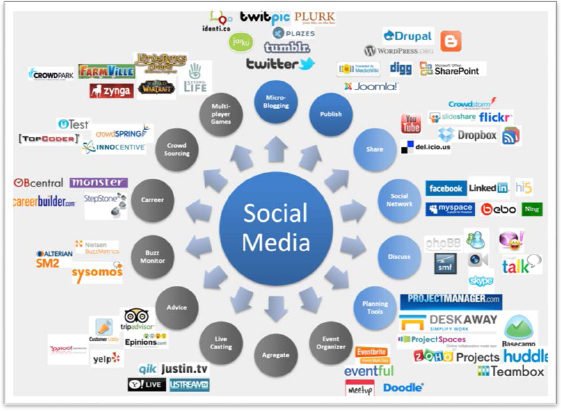
Social media project management software can significantly boost efficiency, allowing for better social media listening and performance tracking. This data-driven approach is key to enhancing user engagement and building brand recognition.
Social media project management vs traditional project management
Understanding the core differences
Social media project management focuses on fast-paced content creation, audience engagement, and platform-specific strategies. Unlike traditional project management, which centers on long-term deliverables and fixed scopes, social media projects require constant monitoring and quick adjustments based on real-time feedback from followers and analytics.
For example, a social media campaign might need daily posts and instant responses to comments. In contrast, a traditional project like software development follows a structured timeline with milestones. Social media managers use agile tools like Trello or Asana to track daily tasks. Traditional projects might rely on Gantt charts and formal status reports.
Freelancers and small businesses should recognize these differences to allocate resources effectively. Emphasizing flexibility and rapid iteration is key for social media projects, while traditional projects benefit from detailed upfront planning and risk management.
How communication differs between the two approaches
Communication in social media project management is continuous and informal. It often happens through instant messaging apps like Slack or Microsoft Teams. This contrasts with traditional project management, where communication is typically scheduled through meetings, emails, and formal documentation.
Social media projects involve multiple platforms and content types. Teams need to share updates quickly to maintain brand consistency and respond to trends. For instance, a social media manager might coordinate daily with graphic designers and copywriters to ensure posts align with the latest campaign goals.
To improve efficiency, freelancers should set up dedicated communication channels for social media projects and encourage real-time collaboration. This approach reduces delays and helps teams adapt to sudden changes in audience engagement or platform algorithms.
Tools and techniques tailored for social media projects
Social media project management relies heavily on specialized tools that track content calendars, performance metrics, and audience interactions. Platforms like:
- Hootsuite
- Buffer
- Sprout Social
enable scheduling posts across multiple channels and analyzing engagement in one dashboard.
Unlike traditional project management tools such as Microsoft Project, these social media tools emphasize automation and analytics to optimize posting times and content types. For example, Buffer’s analytics can recommend the best hours to post based on follower activity, improving reach and interaction.
Small businesses and freelancers can leverage these tools to save time and make data-driven decisions. Integrating social media management platforms with project management software like Monday.com can streamline workflows and keep all team members aligned on campaign progress.
Project social media management with Bonsai
Successfully managing your social media projects requires a strategic mindset and the right tools. Bonsai, a comprehensive project management software, provides powerful features that simplify the entire process, from planning to execution.
Managing social media can be quite challenging. It requires jumping between various platforms, creating content, scheduling posts, and analyzing performance. To handle this efficiently, a strong project management tool is crucial. Bonsai, which emphasizes project planning, task management, and team collaboration, provides a well-rounded solution for managing social media projects.
Effective project planning is the cornerstone of successful social media management. With Bonsai, you can set clear objectives, establish timelines, and outline deliverables for each campaign. By breaking the project into manageable tasks, you ensure that every element of your social media strategy is addressed. This organized approach helps in setting achievable goals and prevents last-minute scrambles.
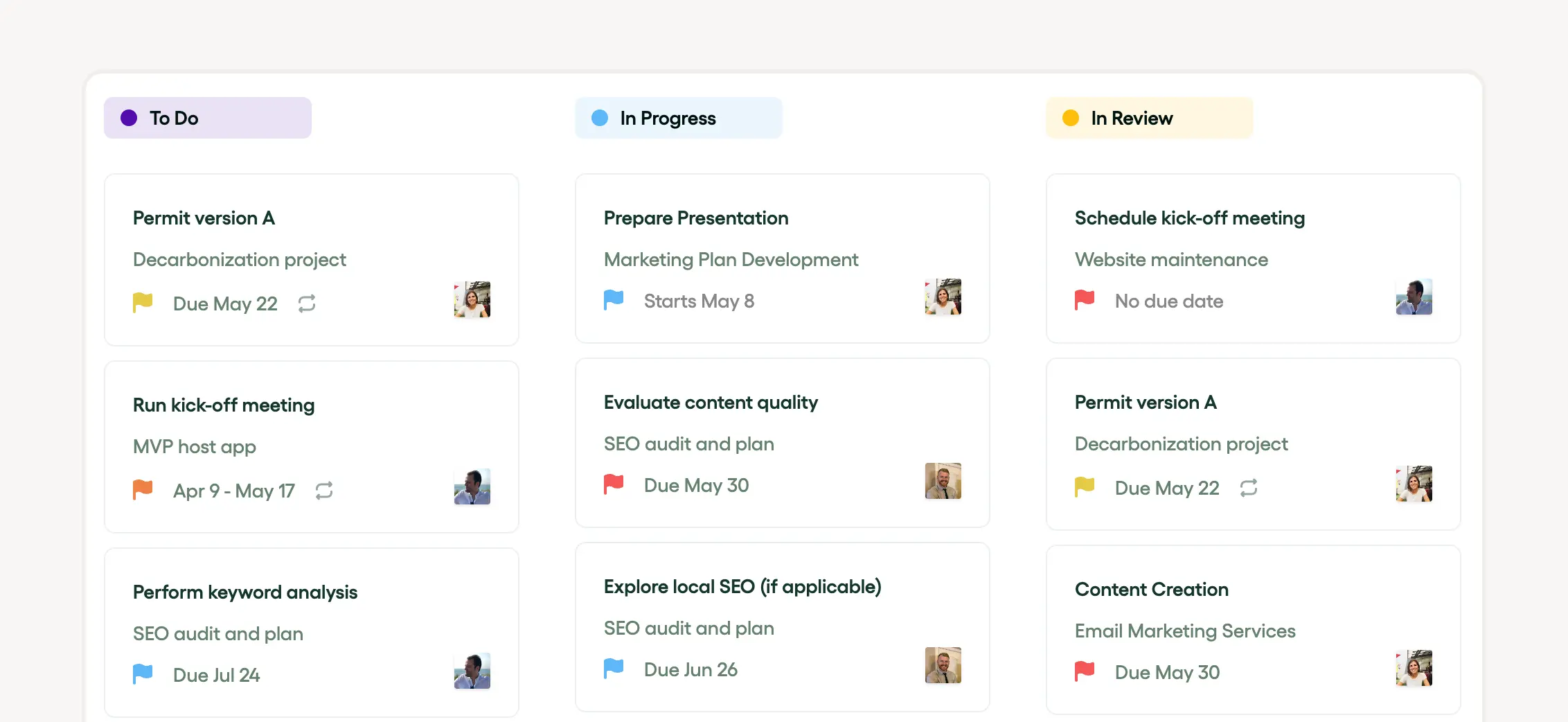
Bonsai's task management features are customized to keep your team organized and focused.
- Assign tasks to team members.
- Easily track task progress with Kanban and list views.
- Use integrated timers to manage time effectively.
- Invite collaborators to your projects to assign tasks.
Collaboration among team members is important for the success of any social media project. Bonsai offers one integrated, easy-to-use platform where team members can communicate, share files, and work together on tasks. Features like task comments, project notes, and direct messaging ensure that everyone stays aligned. This creates a collaborative atmosphere where ideas can flow freely, and challenges can be addressed promptly.
Bonsai offers a wide range of reporting tools to assist you in monitoring project performance and making data-driven decisions. Generate detailed reports on project progress, task completion, resource utilization, and financial metrics.
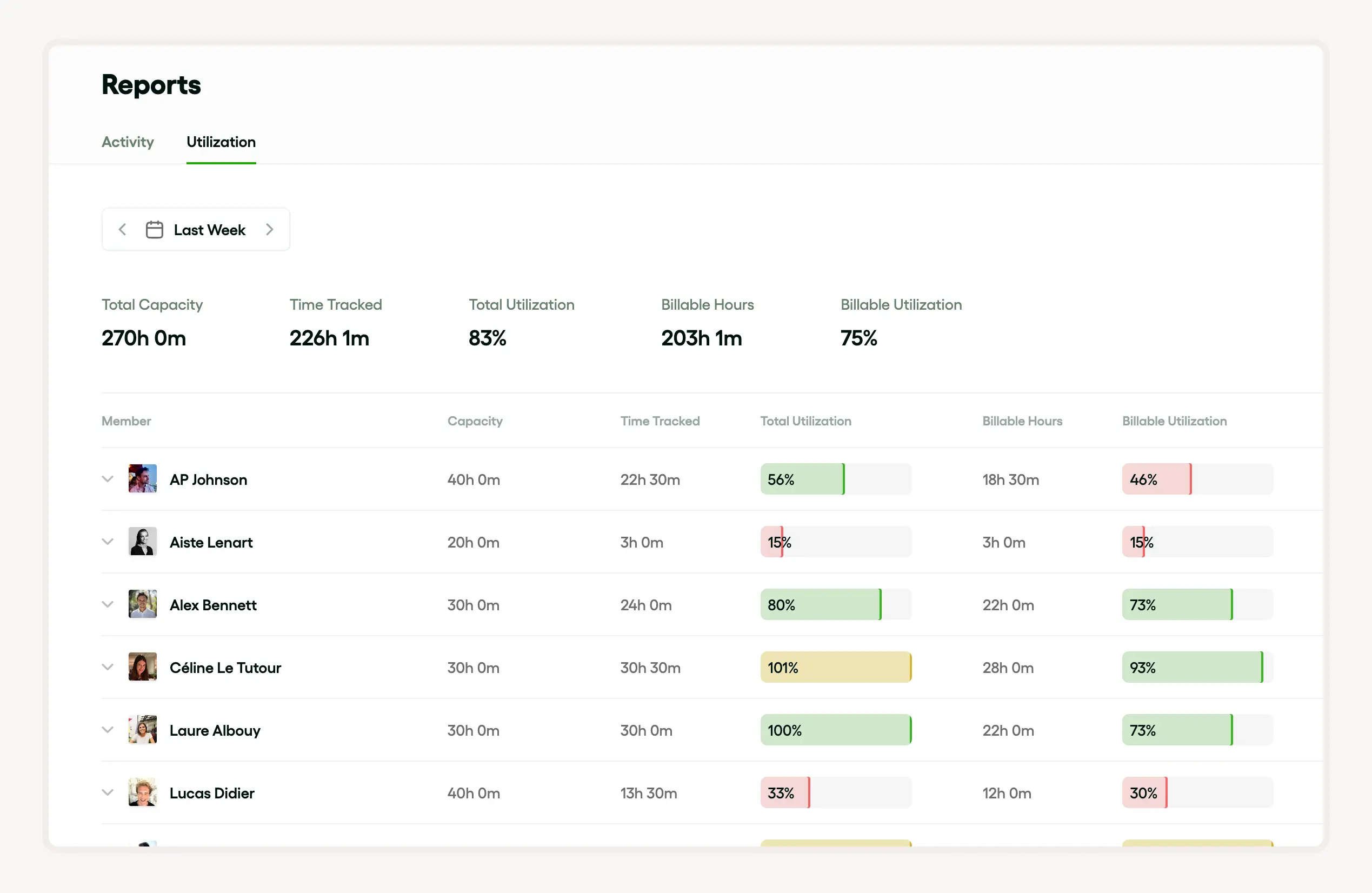
Check out this summary of the utilization report:
- Track the ratio of billable to total hours worked to gauge project financial efficiency.
- Access real-time team performance data for timely adjustments and better decisions.
- Use group utilization charts to visually represent and communicate utilization levels across the organization.
Visualize data through customizable charts and graphs to identify trends, bottlenecks, and areas for improvement. Bonsai's reporting features empower you to assess project health, measure team productivity, and make informed adjustments to optimize project outcomes.
Bonsai makes it easier to handle social media projects by offering a wide range of tools for project planning, task management, team collaboration, and performance tracking. With these features, you can guarantee that your social media campaigns are well-structured, effectively carried out, and ultimately achieve success.
How to enhance brand visibility with project social media
Boosting brand visibility hinges on effective social media marketing, strategic campaign planning, and engaging content creation. Key steps to enhance visibility include:
- Effective social media marketing
- Strategic campaign planning
- Engaging content creation
- Efficiently scheduling posts with social media project management tools.
- Monitoring analytics to gauge the effectiveness of your social media strategy.
- Engaging in social media listening to stay abreast of relevant conversations and competitive trends.
Good task management and team collaboration are essential for executing these strategies and achieving notable brand visibility.
How to improve customer engagement with project social media
Boosting customer engagement should be a top priority in any social media strategy. By leveraging social media monitoring tools and analyzing analytics, businesses gain insights into customer behavior and preferences, leading to more engaging content. Competitive analysis reveals successful tactics used by rivals. Social media project management software aids in campaign planning, task management, and content scheduling. These features ensure consistent engagement and enhance overall social media marketing effectiveness.
How to drive traffic and sales with project social media
To drive traffic and increase sales, a well-structured social media strategy is essential. This involves thorough campaign planning, agile content creation, and efficient task management. With a well-organized content calendar and regular post scheduling, businesses maintain a dynamic online presence.
Social media monitoring and listening help track trends, consumer sentiments, and competition. This allows for real-time adjustments. Advanced social media project management software streamlines team collaboration and performance analysis, paving the way for growth and success.
Social media campaign planning process
Define your campaign goals and target audience
Start your social media campaign planning by clearly defining your goals and target audience. Identify what you want to achieve, such as increasing brand awareness, driving website traffic, or generating leads. Set specific, measurable objectives like growing Instagram followers by 20% in three months to track progress effectively.
Next, research your target audience’s demographics, interests, and online behavior. Tools like Facebook Audience Insights and Google Analytics provide detailed data on age, location, and engagement patterns. For example, if your audience is primarily millennials interested in fitness, tailor content and ads that resonate with their lifestyle.
By focusing on precise goals and a well-understood audience, you ensure your campaign messaging is relevant and impactful. This foundation guides all other planning steps and maximizes your chances of success in 2024’s competitive social media landscape.
Develop a content strategy and calendar
Creating a content strategy is essential to keep your social media campaign organized and consistent. Decide on the types of content you will produce, such as:
- Videos
- Infographics
- User-generated posts
Base these choices on what performs best on your chosen platforms like Instagram or LinkedIn.
Use tools like Trello or Asana to build a content calendar that schedules posts around key dates and campaign milestones. For instance, plan daily posts for a product launch week, mixing promotional and educational content to engage your audience without overwhelming them.
Maintaining a content calendar helps you stay on track and ensures timely delivery. Regularly review engagement metrics through platforms like Hootsuite Analytics to adjust your strategy and improve results throughout the campaign.
Allocate budget and select advertising channels
Budget allocation is a critical part of the social media campaign planning process. Determine how much you can spend on paid ads, influencer partnerships, and content creation. In 2024, small businesses often allocate between 10-20% of their marketing budget to social media advertising for optimal reach.
Choose advertising channels based on your audience and goals. For example, Facebook Ads offer robust targeting for local businesses, while TikTok Ads might be better for reaching younger demographics. Use Facebook Ads Manager or Google Ads to set up and monitor campaigns efficiently.
Carefully tracking your ad spend and performance allows you to reallocate funds to the best-performing channels, maximizing ROI. Start with a small test budget, then scale up based on data-driven insights to avoid overspending.
Measure performance and optimize continuously
Measuring your social media campaign’s performance is vital to understand what works and what doesn’t. Use platform-specific analytics tools like Instagram Insights or Twitter Analytics to track engagement rates, click-throughs, and conversions in real time.
Set up key performance indicators (KPIs) aligned with your goals, such as a 5% increase in website traffic or 1,000 new email sign-ups. Regularly review these metrics weekly or monthly to identify trends and areas for improvement.
Based on your analysis, optimize your campaign by tweaking content types, posting times, or ad targeting. For example, if video posts generate more engagement, increase their frequency. Continuous optimization ensures your social media project remains effective and delivers strong results throughout 2024.
Using a social media content calendar
How to create a social media content calendar
Creating a social media content calendar starts with outlining your posting schedule and content themes. Begin by choosing a calendar tool like Google Sheets, Trello, or specialized platforms such as Later or Buffer, which offer built-in scheduling features.
Define the frequency of posts per platform—whether daily, weekly, or biweekly—and assign content types like:
- Promotional posts
- Educational tips
- User-generated content
Next, map out key dates and events relevant to your project or industry for 2024, such as product launches, holidays, or awareness days. This helps ensure timely and engaging content. For example, a freelancer offering graphic design services might plan posts around National Creativity Day in May. Consistency is crucial, so set reminders and deadlines within your calendar to keep your posting on track.
To make your calendar actionable, review it weekly and adjust based on audience engagement metrics. This approach helps you stay organized and responsive, preventing last-minute content rushes and improving overall project social media management.
Benefits of using a social media content calendar for your project
A social media content calendar improves organization and saves time by consolidating all planned posts in one place. This clarity allows freelancers and small business owners to balance content creation with client work effectively. For example, scheduling posts in advance reduces daily decision-making and helps maintain a steady online presence.
Using a calendar also enhances content quality and consistency. By planning diverse content types ahead, you avoid repetitive posts and ensure a mix that appeals to your audience. Tools like Hootsuite report that businesses that plan content see a 30% increase in engagement, highlighting the calendar's impact on project success.
Finally, a content calendar supports better collaboration when working with clients or team members. Sharing the calendar allows for feedback and approvals before posts go live, reducing errors and last-minute changes. This leads to smoother project workflows and stronger social media results.
Tips for maintaining your social media content calendar in 2024
Maintaining your social media content calendar requires regular updates and flexibility. Set a weekly review session to assess post performance using analytics tools like Facebook Insights or Instagram Analytics. Use this data to tweak your content mix and posting times to maximize reach and engagement.
In 2024, consider integrating AI-powered tools such as Canva’s content planner or Later’s AI suggestions to generate creative ideas and optimize scheduling. These tools can save time and help you stay ahead of social media trends relevant to your project.
Lastly, stay adaptable by allowing room for spontaneous posts or trending topics. While planning is key, responding to real-time events can boost your project’s visibility and relevance. Balancing structure with flexibility will keep your social media efforts effective and aligned with your overall project goals.
Key elements of project social media management
Social media project management is a complex process that hinges on key elements such as campaign planning, content creation, and scheduling posts. A successful project manager needs to excel in these areas while monitoring social media performance and adjusting strategies based on analytical insights.
Vital tools for executing these tasks efficiently include social media project management software. This software aids in task management, team collaboration, and maintaining content calendars. Additionally, social media monitoring and listening tools are essential for competitive analysis and continuous improvement of social media marketing strategies.
How to plan and strategize project social media
Effective social media marketing kicks off with rigorous campaign planning and a robust social media strategy. This includes diligent content creation and meticulous scheduling of posts. By using a content calendar to enhance task management, all project planning details can be streamlined effectively.
Monitoring analytics is crucial for observing social media performance and for making necessary adjustments. Moreover, tools such as social media listening and social media monitoring pave the way for an effective competitive analysis.
Team collaboration is greatly boosted with the use of social media project management software. These tools simplify complex tasks and drive collaboration seamlessly, driving a successful social media marketing endeavor.
How to create content for project social media
Content creation plays a pivotal role in an effective social media marketing campaign. It involves producing content such as blog posts, infographics, videos, and more, which are integral to a well-rounded social media strategy. Consider using free infographic creators with AI and AI-powered video tools to produce visually engaging and impactful content that elevates your social media strategy. Carefully schedule posts to ensure timely delivery of your message, and monitor analytics to gather valuable data that guides future content direction.
Team collaboration, project planning, and task management are key operational elements of content calendar formation. Using social media project management software enhances campaign planning by simplifying social media monitoring, competitive analysis, and social media listening.
How to monitor and analyze project social media
Monitoring and analyzing social media performance is crucial for implementing an effective social media strategy. This involves constant social media listening and monitoring to ensure content creation and campaign planning align with the target audience’s preferences.
Organizations rely on social media project management software for scheduling posts, task management, and coordinating team collaboration. It also supports competitive analysis, monitoring analytics, and maintaining content calendars, fostering efficient project planning and effective execution of social media marketing efforts.
Best practices for project social media management
Best practices for social media project management include strategic campaign planning, efficient content creation, and timely scheduling of posts. Tools such as content calendars facilitate task management, ensuring a consistent and organized rollout of marketing material. High-performing project teams also practice social media monitoring and listening, leveraging insights to improve overall social media marketing.
Meticulous social media strategy is crucial and includes competitive analysis, team collaboration, and monitoring analytics. Leveraging social media project management software streamlines these tasks, ensuring optimal social media performance and successful campaigns.

How to set clear goals for project social media
Clear goals are the bedrock of effective social media marketing. Whether it’s campaign planning, content creation, or scheduling posts, goals provide focus and direction. They streamline team collaboration and task management while ensuring alignment with your broader strategy. Well-defined objectives also enhance social media monitoring, making it easier to track performance. Leveraging social media project management software helps in project planning and competitive analysis, keeping your content calendar on point. Start with clear goals for a winning social media strategy.
How to choose the right platforms for project social media
Selecting the right platforms is crucial for social media success. Understanding where your target audience hangs out helps tailor your campaign planning and content creation. This knowledge simplifies task management and makes scheduling posts more effective. A solid social media project management tool can boost your efforts by assisting with project planning, team collaboration, and performance monitoring. Features like social media listening offer valuable insights, refining your strategy and ensuring you’re on the right track.
How to maintain consistent branding in project social media
Consistency is key in social media marketing. Your brand’s voice and visual identity should be uniform across all platforms to build awareness and trust. This consistency involves meticulous content creation, optimal post scheduling, and regular performance monitoring. Social media project management software can aid in maintaining brand coherence with features like:
- Centralized content calendars
- Automated scheduling
- Team collaboration tools
- Performance analytics dashboards
- Social media listening and monitoring
- Task management and team collaboration
- A content calendar for streamlined project planning
A consistent brand paired with a strong strategy will give you a competitive edge and enhance brand recognition.
How to engage with the audience in project social media
Effective social media marketing revolves around engaging your audience. Strategic campaign planning, team collaboration, and the right social media project management software play vital roles. Key strategies include targeting the right audience, scheduling posts efficiently, and creating compelling content. Utilize a content calendar for organized scheduling and social media listening for actionable consumer insights. Competitive analysis and efficient task management further enhance audience engagement and boost your return on investment.
Challenges in project social media management
Managing social media projects can be daunting. The complexity increases with the need for robust campaign planning, strategic content creation, and continuous post scheduling. Staying on top of trends, adjusting strategies based on performance analytics, and monitoring competition adds to the challenge. Key hurdles include fostering team collaboration, maintaining an organized content calendar, and implementing effective social media listening.
Choosing the right social media project management software is crucial for overcoming these challenges and achieving efficiency.
How to keep up with trends in project social media
In the fast-paced digital landscape, staying updated is essential. This involves effective campaign planning, creative content creation, and strategic post scheduling. Social media project management software helps maintain an organized content calendar and streamline task management. Monitoring analytics is crucial for assessing performance and making necessary adjustments. Social media listening and monitoring offer insights into audience behavior and competitor activities. Team collaboration also plays a key role in executing a successful strategy and driving business growth.
How to manage multiple platforms in project social media
Managing multiple platforms is crucial for effective social media marketing and project planning. It involves content creation, scheduling posts, and monitoring analytics across various media platforms. An efficient content calendar and task management system are essential to align team collaboration and ensure smooth and consistent marketing campaign operations.
Social media project management tools automate these tasks, making campaign planning more effective. Additionally, employing social media monitoring and listening techniques enhances competitive analysis and refines social media strategies based on performance metrics.
How to measure ROI in project social media
Effective social media marketing requires comprehensive tools for campaign planning, content creation, and post scheduling. The overall performance of social media activities hinges on robust data analysis, typically facilitated by tools integrated within social media project management software. Key performance indicators include trends in customer engagement, conversion rates, and overall ROI. These are achieved by:
- Tracking customer engagement metrics
- Measuring conversion rates
- Calculating overall return on investment (ROI)
- Regularly monitoring analytics.
- Utilizing social media listening for real-time feedback.
- Employing competitive analysis to optimize strategies.
Benefits of social media project management
Improved organization and workflow
Social media project management improves organization by centralizing tasks, deadlines, and content calendars in one platform. Tools like Trello, Asana, or Monday.com allow freelancers and small business owners to visualize their entire social media strategy, making it easier to track progress and avoid missed posts.
For example, using a content calendar in a project management tool helps schedule posts across multiple channels like Instagram, Facebook, and LinkedIn, ensuring consistent publishing. This reduces last-minute scrambling and keeps campaigns aligned with marketing goals.
To get started, create a clear workflow that assigns responsibilities and sets deadlines for each piece of content. This actionable step helps maintain steady momentum and prevents bottlenecks in your social media efforts.
Enhanced collaboration and communication
Managing social media projects through dedicated platforms enhances team collaboration by providing a shared space for feedback, approvals, and updates. Freelancers working with clients or small teams can use Slack integrations or built-in comment features in tools like ClickUp to streamline communication.
For instance, when a client reviews a draft post, comments can be left directly on the task, reducing email back-and-forth and speeding up revisions. This clarity improves response times and ensures everyone stays on the same page.
To leverage this benefit, set up notification preferences and encourage regular check-ins within your project management tool. This keeps conversations organized and focused on specific social media tasks.
Data-driven decision making and performance tracking
Social media project management tools often integrate with analytics platforms like Google Analytics or native channel insights, enabling users to track campaign performance in real time. This data-driven approach helps freelancers and small businesses identify which posts generate engagement and conversions.
For example, by linking your project management tool with Facebook Insights, you can monitor key metrics such as reach, click-through rates, and follower growth directly within your workflow. This makes it easier to adjust strategies based on actual results.
To take advantage of this, schedule regular reviews of your social media analytics within your project timeline. Use the insights to optimize content types, posting times, and audience targeting for better ROI.
How do project management tools support project social media?
Project management tools are essential in social media management, ensuring well-organized and successful strategy execution.
- They help map out social media marketing strategies by offering features like task management, content calendars, and campaign planning.
- These tools are crucial for facilitating team collaboration, enabling everyone to stay updated with content creation, post scheduling, and analytics monitoring.
- They also support social media listening and competitive analysis, ensuring comprehensive management of social media performance.
How to streamline workflow with project social media tools
Streamlining workflow is crucial for successful social media marketing. This includes efficient project planning, task management, and team collaboration to devise an effective social media strategy. Utilize tools for content creation, scheduling posts, and monitoring analytics to significantly improve campaign planning and execution. Additionally, employ a content calendar for optimal organization.
The integrative features of social media project management software assist in social media listening and monitoring, enhancing overall performance and competitive positioning.
How to improve collaboration and communication with project social media tools
Success in social media marketing depends largely on effective team collaboration and communication. This includes comprehensive project planning, content creation, and campaign execution. Using social media listening and monitoring enhances strategy and campaign effectiveness. Social media project management software is crucial for scheduling posts, monitoring analytics, performing competitive analysis, and streamlining task management. These tools improve team collaboration by making social media performance easily traceable and manageable.
Top project social media management tools
Numerous social media project management tools help boost a brand's online presence. These tools are designed to simplify task management, monitor analytics, and enhance team collaboration.
Key features include content creation and post scheduling, making campaign planning more organized and efficient.
Key elements include maintaining a content calendar for planning posts and implementing a social media strategy. Tools like social media listening and monitoring offer insights into audience behavior and competitive analysis. Investing in robust social media project management software is key for optimal performance and achieving market goals.
Overview of Hootsuite
Hootsuite is a widely used social media project management platform that includes a broad range of tools designed to enhance social media strategy and campaign planning. It boosts productivity and effectiveness in areas such as scheduling posts, content creation, and social media monitoring. This comprehensive platform fosters team collaboration with its shared content calendar and built-in task management.
Additionally, Hootsuite offers social media listening capabilities to better understand audience behavior and facilitate strategic decision-making, leading to superior social media performance.
Features of Buffer
Buffer is a robust social media project management platform that facilitates effective team collaboration in campaign planning and post scheduling. Known for its strength in monitoring analytics, Buffer provides valuable insights to enhance social media marketing efforts.
Buffer features a content calendar that seamlessly organizes various content creation tasks. This tool excels in social media listening and monitoring, crucial aspects of any successful project social media strategy. Buffer's competitive analysis capabilities give users an edge in campaign strategies, making it indispensable for tracking social media performance.
Benefits of Sprout Social
Sprout Social is a leading project social media management platform that significantly streamlines content creation, campaign planning, and overall social media marketing. It provides tools for competitively scheduling posts and monitoring analytics, thus enhancing social media performance. The platform excels in task management, with features that boost team collaboration on a shared content calendar.
Additionally, it offers solutions for social media monitoring and listening and facilitates project planning for a more effective project social media strategy. Fundamentally, with Sprout Social, businesses gain access to deep competitive analysis, essential for effective market penetration.
Project social media management future outlook
The future of project social media project management points to a more integrated, strategic approach focusing on content creation, social media marketing, and campaign planning. Techniques such as scheduling posts, monitoring analytics, and using a content calendar will become even more crucial. Social media listening and monitoring will reshape competitive analysis. Project planning and team collaboration tools will be increasingly utilized.
The application of project social media management software will also streamline task management and enhance monitoring of social media performance. This ensures that every strategy is executed effectively and efficiently.


'%3e%3cg id='Final-Copy-2_2_' transform='translate(1275.000000, 200.000000)'%3e%3cpath class='st0' d='M7.4,12.8h6.8l3.1-11.6H7.4C4.2,1.2,1.6,3.8,1.6,7S4.2,12.8,7.4,12.8z'/%3e%3c/g%3e%3c/g%3e%3c/g%3e%3cg id='final---dec.11-2020'%3e%3cg id='_x30_208-our-toggle' transform='translate(-1275.000000, -200.000000)'%3e%3cg id='Final-Copy-2' transform='translate(1275.000000, 200.000000)'%3e%3cpath class='st1' d='M22.6,0H7.4c-3.9,0-7,3.1-7,7s3.1,7,7,7h15.2c3.9,0,7-3.1,7-7S26.4,0,22.6,0z M1.6,7c0-3.2,2.6-5.8,5.8-5.8 h9.9l-3.1,11.6H7.4C4.2,12.8,1.6,10.2,1.6,7z'/%3e%3cpath id='x' class='st2' d='M24.6,4c0.2,0.2,0.2,0.6,0,0.8l0,0L22.5,7l2.2,2.2c0.2,0.2,0.2,0.6,0,0.8c-0.2,0.2-0.6,0.2-0.8,0 l0,0l-2.2-2.2L19.5,10c-0.2,0.2-0.6,0.2-0.8,0c-0.2-0.2-0.2-0.6,0-0.8l0,0L20.8,7l-2.2-2.2c-0.2-0.2-0.2-0.6,0-0.8 c0.2-0.2,0.6-0.2,0.8,0l0,0l2.2,2.2L23.8,4C24,3.8,24.4,3.8,24.6,4z'/%3e%3cpath id='y' class='st3' d='M12.7,4.1c0.2,0.2,0.3,0.6,0.1,0.8l0,0L8.6,9.8C8.5,9.9,8.4,10,8.3,10c-0.2,0.1-0.5,0.1-0.7-0.1l0,0 L5.4,7.7c-0.2-0.2-0.2-0.6,0-0.8c0.2-0.2,0.6-0.2,0.8,0l0,0L8,8.6l3.8-4.5C12,3.9,12.4,3.9,12.7,4.1z'/%3e%3c/g%3e%3c/g%3e%3c/g%3e%3c/g%3e%3c/svg%3e)