


Project management email templates are a game changer for project managers. They ensure clear, consistent communication and save you time by offering a ready-made structure for common scenarios. These scenarios include:
- Status reports
- Change requests
- Resource requests
These templates streamline your workflow.
Templates also come in handy for:
- Project meetings
- Gathering feedback
- Closing out projects
- Client communication
With the shift towards remote work and digital tools, mastering email communication and automating workflows has never been more crucial.
Make sure your project plans, milestones, and objectives are crystal clear with well-designed templates to keep your project management efforts on track.
Project management email examples: why templates matter
Email templates are pivotal in project management. They make the communication process smoother, helping you dispatch project status reports, change requests, and resource needs with ease. Templates bring consistency and a professional touch to every email.
Whether it's updating after a meeting, collecting feedback, or wrapping up a project, templates simplify these tasks. They also play a vital role in client communication, ensuring your messages are precise. Workflow automation can further enhance these templates' effectiveness.
Role of email communication in project management
Email is a cornerstone of project management. It’s essential for sharing project plans, milestones, and objectives with your team. Through email, you can quickly and effectively distribute status reports, handle change requests, and manage resource needs.
Emails facilitate project meetings and feedback collection. Plus, they offer a seamless way to communicate with clients, ensuring clear understanding of project demands and expectations throughout. Email communication also supports templates and automations, making project management processes smoother and leading to successful project outcomes.
Benefits of using email templates
Email templates bring several benefits to project management. They simplify client communication, speeding up the process of sharing project plans, milestones, and objectives. Templates also streamline feedback collection and project closure, contributing to more efficient workflows.
Status reports, change requests, and resource needs become easier to handle with these pre-built formats. This not only accelerates communication but also ensures clarity and consistency across various project interactions.
In essence, email templates are crucial for effective project management.
Project management email examples to streamline communication
Effective communication is crucial for successful project management. Bonsai offers a comprehensive platform for project planning, task management, and collaboration. Mastering email communication is essential to fully using its capabilities. Personalized and efficient email templates can streamline workflows, improve client communication, and ensure projects are delivered on time.
Learn how to communicate efficiently and manage your projects successfully:
A well-defined project plan is essential. Bonsai's project planning tools help outline goals, deliverables, timelines, and responsibilities. With a solid plan in place, you can customize email templates for different project phases and milestones.
Bonsai enables users to create personalized email templates that match their project management style and branding. Identify common email types such as project kickoffs, progress updates, and client meeting requests. Pre-written templates save time and maintain consistent messaging.
Key elements to include in your email templates:
- Project proposals
- Project updates
- Invoicing
- Feedback requests
- Clear subject lines
- Personalized greetings
- Concise content
- Call to action
- Professional closing
Effective email templates help build strong client relationships and trust. Develop templates for:
- Project proposals
- Updates
- Invoicing
- Feedback requests
Bonsai's workflow automation alongside email templates for efficient communication. Configure automated notifications for task assignments, due date reminders, and project milestones. This approach saves time and ensures timely information delivery.

By using email templates and workflow automations, you can streamline project management processes and enhance client communication. Bonsai equips users with the necessary tools for professional and efficient email interactions that contribute to project success. Personalize each email to maintain authentic connections with clients and team members.
Key elements of project management emails
A top-notch project management email template should include key elements like:
- Project objectives
- Milestones
- Status reports
These components set clear expectations and provide timely updates to stakeholders.

Essential elements also include:
- Resource requests
- Change requests
These facilitate task coordination and provide flexibility in adjusting the project plan. Include sections for feedback collection after project closure to drive continuous improvement.
The template should support client communication and workflow automations, and encourage regular updates on project meetings.
Subject line
Effective project management involves creating robust project plans, hitting milestones, and achieving objectives. Successful managers use workflow automations, appropriate email templates, and hold regular meetings to keep everything on track.
Core tools include:
- Project status reports for progress tracking
- Change requests for handling alterations
- Resource requests for efficient use
Effective email communication is vital for client interactions, feedback gathering, and project closure.
Incorporating these elements can significantly boost project management efficiency and lead to successful project completions.
Body of the email
As a project manager, juggling milestones, resources, and communications can be challenging. But with the right strategies and tools—like email templates and workflow automations—you can navigate these hurdles with ease.
Email templates improve communication, making it easier to handle project status reports, change requests, and feedback collection. Workflow automations help manage project objectives and resource requests, keeping your process streamlined.
Clear client communication and efficient meetings are also crucial. By enhancing communication, you ensure thorough understanding and execution of your project plan, paving the way for a successful project closure.
Call to action
You've already invested a lot into your project plan, objectives, milestones, and client communication strategy. Don’t let the small details derail your efforts.
Keep your project on track with streamlined email templates for:
- Status updates
- Change requests
- Resource needs
- Meetings
- Feedback
- Closures
Simplify your workflow with automations to boost email efficiency.
Maximize your project’s success by using your resources wisely. Remember, a great project manager is more than just a task manager—you're a key player in driving success.
Types of project management emails

Project management email templates are indispensable tools for project managers, ensuring effective communication and workflow automations. These templates can range from project status reports, which detail the strides towards project objectives and project milestones, to change requests or resource requests, which outline any tweaks in the project plan or additional resources needed.
Project management email templates can be used for scheduling project meetings, gathering feedback, and wrapping up the project. These templates ensure all participants are kept in the loop about developments. Client communication is another key email template type that maintains a clear line of sight and mutual understanding between the project team and the client.
Project kickoff email template
Dear Team,
We’re thrilled to kick off our new project. As project managers, we’ll harness the power of project management, providing a detailed project plan, setting crystal clear project objectives, and regularly updating project status reports.
Key aspects of this project include:
- Regularly scheduled project meetings and open channels for feedback collection
- Efficient workflow automations and prompt processing of change and resource requests
- Dedicated client communication through email templates for consistent email communication
Together, we can collaborate effectively towards a successful project closure.
Project update email template
Dear Team,
I am writing to share updates regarding our current project management. The project plan has progressed with the accomplishment of major milestones. However, further objectives require resource requests. Please see these main points:
- Project status reports indicate slight deviations which we are addressing.
- A projected change request has been identified and is under review.
- A project meeting is planned to discuss workflow automations.
Use the provided email templates for client communication and feedback collection. Please note to share your thoughts before project closure comes to effect.
Best, [Your Name]
Project completion email template
Project managers must maintain clear and concise email communication. Following a standardized format enhances workflow automation. Here is a simple project completion email template:
Dear [Recipient’s Name],
I’m delighted to report the successful completion of [Project Name].
Through effective project management, we’ve achieved our project objectives within the scheduled project plan.
Here are some significant project milestones we reached:
- Milestone 1
- Milestone 2
- Milestone 3
I appreciate your ongoing support and welcome any feedback for the project closure process.
Best regards, [Your Name]
Examples of effective project management email examples
Streamline your project management process with customized email templates. Utilize a project status report template to regularly update stakeholders on progress, making sure to include:
- Updates on project milestones
- Project objectives
For workflow automation, consider templates for resource requests and change requests. These can speed up response times and help maintain the project schedule.
Improve client communication with a project meeting follow-up template that meticulously recaps decisions made and next steps. Similarly, use a feedback collection template to facilitate constructive dialogue with the team. Lastly, a project closure email template can efficiently wrap up the workflow by documenting successes and lessons learned for future endeavors.
Example of a project kickoff email
Dear Team,
I’m excited to kick off our new project! We’ve been hard at work on the project plan and workflow automations to ensure a smooth start. Here’s a quick rundown:
- Project Objectives: Laying down the fundamentals
- Project Milestones: Regular updates through status reports
- Resource Requests & Change Requests: Anticipated and manageable
Your collaboration and feedback will be key to our success. We’ll keep you in the loop with regular email updates and project meetings.
Best regards,
[Your Name]
Example of a project update email
Dear Team,
Here is a quick update on our project’s status. We’ve hit recent milestones and adjusted the project plan based on change requests. We are working to align these changes with our project objectives.
We will cover these updates in our next meeting and address any resource requests. Your feedback is vital; please contribute to the feedback collection process. We will also share client feedback as part of ongoing communication.
Best regards,
[Your Name]
Example of a project completion email
Dear Team,
We have successfully achieved our project objectives and milestones. Effective management, client communication, and handling of change requests led to a successful closure. Consistent feedback collection and well-used email templates were key to our success.
Thank you all for your hard work and dedication.
Best regards,
[Your Name]
Template 2: project status update email
how to structure a project status update email
A project status update email should start with a clear subject line that includes the project name and update date, such as "Project Alpha status update - April 2024." This helps recipients immediately understand the email's purpose. Begin the body with a brief greeting and a summary sentence that highlights the current project phase or milestone.
Next, provide specific details about progress made since the last update. Include:
- Completed tasks
- Upcoming deadlines
- Any changes to the project timeline
For example, "We completed the design phase ahead of schedule and are on track to start development by May 1." Use bullet points or short paragraphs to keep information digestible.
End the email by addressing any challenges or risks, along with your plan to resolve them. Finally, invite questions or feedback and include your contact information. This clear structure ensures stakeholders stay informed and engaged throughout the project lifecycle.
examples of effective status update emails
An effective status update email clearly communicates progress and next steps. For instance, a freelancer managing a website redesign might write: "As of April 20, the homepage layout is finalized, and content creation is 50% complete. We anticipate completing content by May 5, followed by testing." This example uses precise dates and percentages to provide measurable updates.
Small business owners can also benefit from including visuals or links to shared project dashboards, such as Trello or Asana. For example, "You can view the updated project timeline here: [link]." This transparency helps clients or team members track progress without needing constant emails.
Using tools like HelloBonsai or Microsoft Outlook templates can save time when sending regular updates. These platforms allow you to customize and automate status emails, ensuring consistency and professionalism in your communications.
tips for writing clear and actionable updates
Keep your language simple and avoid jargon to ensure everyone understands the update. Use active voice and precise terms, such as "completed," "delayed," or "in progress." This clarity prevents confusion and helps recipients quickly grasp the project's status.
Include deadlines and responsible parties to make the update actionable. For example, "The marketing team will deliver the campaign draft by May 10." This approach assigns accountability and sets expectations for next steps.
Finally, tailor the tone and detail level to your audience. Clients may prefer high-level summaries, while internal teams might need more technical details. Adjusting your email accordingly improves engagement and reduces unnecessary follow-up questions.
Template 6: feedback collection email
feedback collection email sample
A feedback collection email should clearly ask for specific input on the project to improve communication and outcomes. Start by greeting the recipient and briefly summarizing the project stage or deliverable you want feedback on. Then, explain why their opinion matters and how it will be used to enhance the project.
For example, you might write: "Hi [Name], I hope you're doing well. We've just completed the initial draft of the website design, and your feedback would be invaluable to ensure it meets your expectations. Could you please share your thoughts on the layout and color scheme by Friday?" This direct approach helps recipients understand the context and urgency.
To make it easier for clients or team members to respond, include specific questions or areas you'd like feedback on. You can also suggest a deadline to keep the project on track. Using tools like Google Forms, Typeform, or Microsoft Forms can streamline collecting and organizing responses, especially for larger projects. Remember to thank recipients in advance and offer to clarify any questions they might have.
how to customize feedback emails for different projects
Customizing feedback emails ensures you get relevant and actionable insights. For design projects, focus on visual elements like colors, fonts, and layout. For writing projects, ask about tone, clarity, and completeness. Tailoring your questions shows clients or team members that you value their specific expertise and time.
For instance, if you are managing a software development project, your email could ask for feedback on functionality, user experience, or bug reports. Including screenshots or links to prototypes can help recipients provide more precise feedback. Adjust your tone depending on the recipient’s familiarity with the project—use simpler language for clients and more technical terms for team members.
Finally, always align your feedback requests with project milestones. This keeps communication timely and relevant, preventing overload. Setting clear expectations about the type and depth of feedback needed will improve response quality and speed.
best practices for sending feedback collection emails
Timing your feedback emails is crucial. Send them shortly after a key deliverable or milestone to capture fresh impressions. Avoid sending requests during busy periods or holidays to increase the likelihood of prompt responses. For example, mid-week mornings tend to have higher email engagement rates according to 2024 email marketing data.
Keep your email concise and focused. Long or vague requests can overwhelm recipients and reduce response rates. Use clear subject lines like "Feedback needed: draft proposal review by April 15" to highlight urgency and purpose. Including a call-to-action button or direct reply instructions can simplify the process for recipients.
After collecting feedback, acknowledge responses promptly and explain how you will incorporate the suggestions. This closes the communication loop and encourages ongoing collaboration. Using project management tools like Asana or Trello to track feedback and follow-ups can also enhance transparency and accountability.
Template 5: meeting follow-up email
meeting follow-up email sample
A meeting follow-up email should clearly summarize key points and next steps to keep everyone aligned. Start by thanking attendees for their time and briefly recap the main topics discussed. For example, "Thank you for attending today’s project kickoff meeting. We reviewed the timeline, assigned tasks, and addressed potential risks."
Next, outline specific action items with assigned owners and deadlines. This helps prevent confusion and keeps the project on track. You might say, "John will deliver the initial design draft by May 10, and Sarah will finalize the budget estimates by May 15." Including these details ensures accountability and transparency.
End your email by inviting questions or clarifications to maintain open communication. A closing like, "Please let me know if you have any questions or need further information," encourages collaboration. Using a clear subject line such as "Project kickoff meeting follow-up and next steps" also helps recipients prioritize your message.
how to write an effective meeting follow-up email
Writing an effective meeting follow-up email requires focus on clarity and brevity. Begin by reviewing your meeting notes immediately after the session to capture accurate details. This practice ensures your summary reflects the discussion accurately and avoids miscommunication.
Use bullet points or numbered lists to highlight decisions and responsibilities, but introduce them with a short paragraph to maintain a natural flow. For instance, "Here are the key takeaways and assigned tasks from today’s meeting:" followed by the list. This structure helps busy clients or team members quickly grasp the essentials.
Finally, set expectations for the next communication or meeting. Specify when you will provide updates or schedule the next check-in, such as "I will send the progress report by May 20." This proactive approach demonstrates professionalism and keeps your project moving forward smoothly.
tools to streamline meeting follow-up emails
Several tools can help freelancers and small business owners create and send meeting follow-up emails efficiently. Email platforms like Gmail and Outlook offer templates and scheduling features that save time. For example, Gmail’s canned responses allow you to insert prewritten follow-up emails with one click.
Project management software such as Asana and Monday.com often includes built-in communication tools that automatically generate follow-up messages based on task updates. These integrations reduce manual work and ensure consistency in your communication.
Using tools like Grammarly can also improve the professionalism of your emails by checking grammar and tone before sending. Combining these resources helps you maintain clear, timely follow-ups that strengthen client relationships and project outcomes.
Template 4: request for resources email
request for resources email sample
A request for resources email should clearly state what you need, why you need it, and when it is required. Start by addressing the recipient professionally and briefly explaining the project context. For example, you might write, "To meet the upcoming deadline for the XYZ project, we require additional graphic design support." This sets the stage for your request and helps the recipient understand its urgency.
Next, specify the exact resources you need. This could include personnel, software tools, equipment, or budget increases. For instance, "We need two additional freelance designers for the next four weeks to handle the increased workload." Be precise to avoid confusion and facilitate faster approval. Including deadlines, such as "by April 15, 2026," helps prioritize your request within the recipient’s schedule.
Finally, close the email by inviting questions or offering to discuss the request further. A sentence like, "Please let me know if you need more details or if we can arrange a quick call to discuss this," encourages open communication. This approach increases the chances of a positive response and ensures all parties are aligned on next steps.
how to write an effective resource request email
Writing an effective resource request email requires clarity and a focus on benefits. Begin by explaining how the additional resources will impact the project’s success. For example, "Adding two developers will help us complete the backend integration two weeks ahead of schedule, reducing overall costs." This demonstrates the value of your request to stakeholders.
Use data or past project examples to support your request. If you previously completed a similar project with extra resources, mention the positive outcomes. For instance, "In our last project, increasing the design team by 30% improved delivery time by 15%." Concrete evidence builds credibility and makes your email more persuasive.
Keep your tone professional but approachable. Avoid jargon or overly technical language that might confuse non-specialist recipients. Also, make sure to proofread your email for grammar and clarity before sending. Clear communication increases the likelihood that your request will be understood and approved promptly.
tools to streamline resource requests
Using project management tools can make resource requests more organized and trackable. Platforms like Asana, Monday.com, and Jira allow you to attach resource request forms directly to project tasks, ensuring transparency. For example, you can create a task titled "Request additional QA testers" with details and deadlines, which keeps everyone informed.
Email templates integrated with tools like Gmail, Outlook, and Microsoft Teams can save time when sending repeated requests. HelloBonsai offers customizable email templates that freelancers and small business owners can adapt for resource requests, ensuring consistency and professionalism. Automating follow-ups through these tools also helps keep requests on the radar without manual effort.
Finally, consider using collaboration tools like Slack or Microsoft Teams to supplement emails. Sending a quick message to notify stakeholders about your resource request email can speed up responses. Combining email with real-time communication tools creates a more dynamic and efficient workflow for managing project resources.
Template 3: change request email
how to write a change request email
A change request email should clearly state the modification needed and explain why it is necessary. Begin by addressing the recipient and referencing the original project or task to provide context. Then, describe the specific change you want to make, such as altering deadlines, scope, or deliverables.
Next, explain the reason for the change, whether it’s due to unforeseen challenges, client feedback, or resource availability. Be concise but provide enough detail to justify the request. Finally, propose a solution or alternative plan, and ask for confirmation or approval to proceed.
To make your email effective, keep the tone professional and collaborative. This approach helps maintain trust and encourages a positive response. Always include a clear subject line like “Change request for [Project Name]” to ensure your message gets prompt attention.
change request email sample
Here is a practical example of a change request email you can adapt for your projects:
Subject: Change request for website redesign project
Hi [Client Name],
During the development phase of the website redesign, we identified that additional time is needed to optimize the mobile user experience. To ensure the final product meets your expectations, I propose extending the deadline by two weeks, moving the delivery date from May 15 to May 29.
This change will allow us to conduct thorough testing and implement improvements without compromising quality. Please let me know if you approve this adjustment or if you’d like to discuss alternative options.
Thank you for your understanding.
Best regards,
[Your Name]
This example balances clarity and professionalism, making it easy for clients to understand the request and respond quickly.
tips for managing change requests effectively
Managing change requests efficiently is crucial to keeping your project on track. Always document every change request in writing, using emails or project management tools like Asana or Trello to track approvals and updates. This practice helps avoid misunderstandings and scope creep.
Respond promptly to change requests and communicate any impact on timelines, budgets, or resources. For example:
- If a change will increase costs, clearly state the new estimate.
- Get client approval before proceeding.
Transparency builds trust and helps maintain good client relationships.
Finally, consider setting up a formal change management process in your contracts or project plans. This process should outline how change requests are submitted, reviewed, and approved. Having this structure reduces confusion and ensures everyone is aligned on expectations.
Best practices to use project management email examples
Project management email templates are a game changer. They can streamline communication, enhance client interactions, and improve workflow efficiency. To get the most out of them, consider these key benefits:
- Streamlining communication
- Enhancing client interactions
- Improving workflow efficiency
- Customization: Tailor templates to fit various project objectives, milestones, and status reports.
- Categories: Include sections for change requests, resource needs, meetings, feedback, and closures.
- Workflow Automations: Use these to save time and boost efficiency. Remember, templates should aid, not replace personal touch.
Personalization
Personalization is key in project management. Workflow automations help craft detailed project plans and generate automated email templates for status updates, streamlining client communication.
Customization makes resource and change requests, as well as feedback collection, smoother. Regularly scheduled meetings can also be automated, leading to more efficient project closures.
Clarity and conciseness
Effective project management hinges on clear objectives and milestones. Email templates are vital for client communication, feedback collection, and status reporting.
A solid project plan addresses resource and change requests ahead of time. Workflow automations streamline meetings and task execution. Ensuring all project deliverables are met showcases the essential role of project management in business success.
Timely communication
Timely communication is a linchpin in project management. Keeping the team aligned on project objectives, status updates, and change requests is essential. It ensures everyone is on the same page, aware of milestones, and adjusts to any plan changes promptly.
Efficient communication strategies include leveraging email templates for routine updates, using workflow automations for resource requests, and organizing project meetings for real-time clarifications. Keeping feedback, project closures, and client communications timely helps maintain smooth project momentum.
- Email templates for routine updates
- Workflow automations for resource requests
- Organized project meetings for real-time clarifications
- Timely feedback, project closures, and client communications
Tools to create and manage project management email examples
There’s a range of tools designed to create and manage project management email templates. These tools are indispensable for streamlining client communication, feedback collection, and status reporting. They help project managers outline objectives, manage milestones, and handle change and resource requests effectively.
Key tools include automated workflow systems and customizable sequences for various project stages, such as meetings or closures. Using these tools simplifies email communication and ensures that all team members are consistently updated throughout the project’s lifecycle.
Bonsai
Bonsai is a fantastic tool for creating and managing email templates for project management, making communication smoother and ensuring consistency in all project-related messages. Whether you need to send updates, schedule meetings, or follow up, Bonsai has customizable templates to meet your specific needs. This not only saves time but also guarantees that all communications remain professional and uniform.
Bonsai also offers a white-labelled client portal, allowing you to share project updates and documents with your clients.
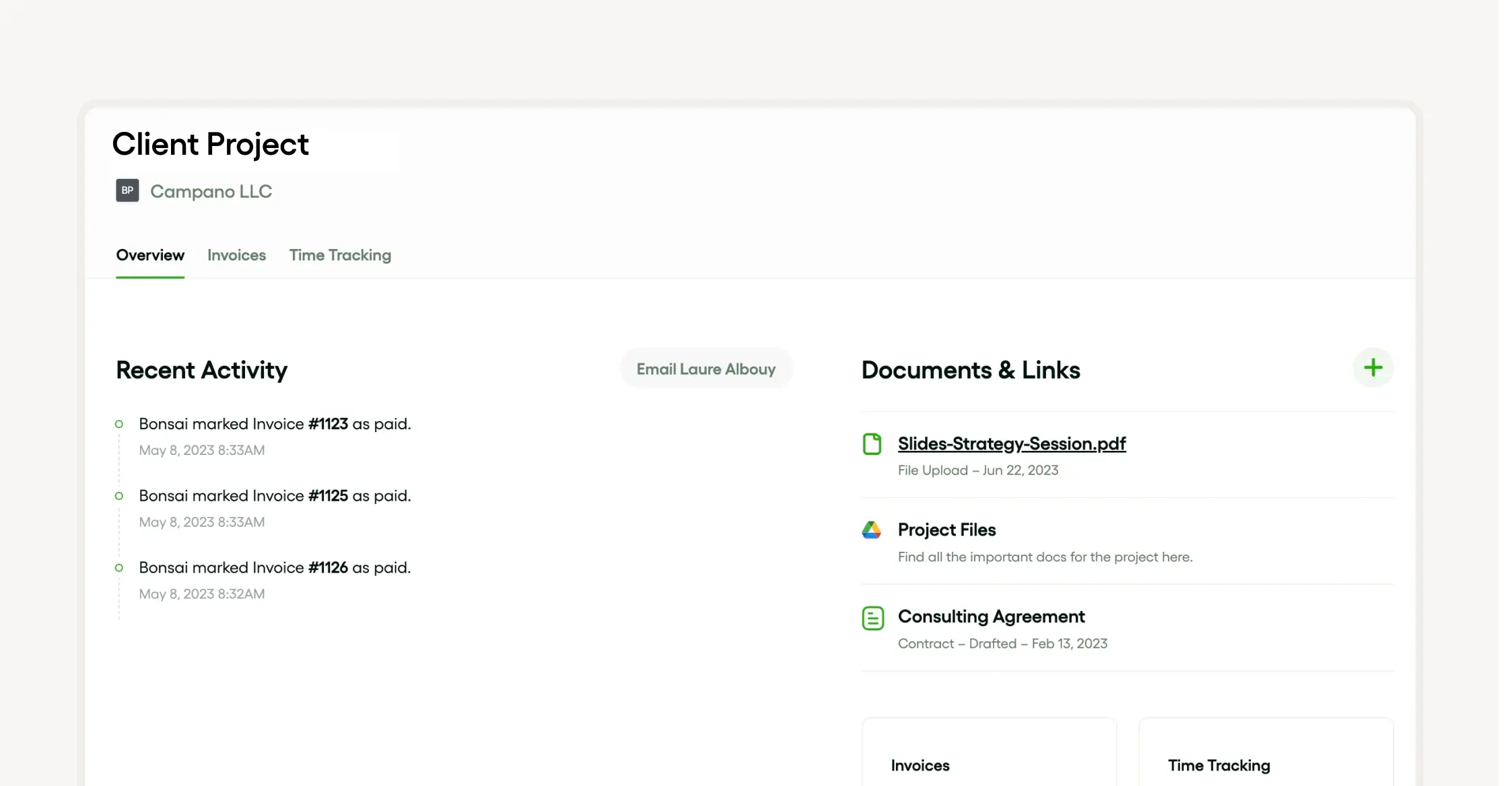
By using Bonsai for creating and managing project management email templates, you can ensure that your communications are effective, consistent, and professional, ultimately leading to improved project results and stronger client relationships.

Microsoft Outlook
Microsoft Outlook is a powerhouse for project management. It offers a suite of features that streamline workflows and enhance coordination. Outlook allows project managers to:
- Create and use email templates
- Set project objectives
- Maintain timely client communication
With functionalities for managing milestones, generating status reports, and handling resource and change requests, Outlook covers the full spectrum of project management needs. It supports:
- Scheduling meetings
- Collecting feedback
- Automating workflows
This makes it a comprehensive tool for managing projects efficiently.
Gmail
Gmail is a solid choice for project management. It simplifies communication with team members and clients, and its pre-made email templates streamline workflow automation.
Gmail’s features support managing project plans, change requests, resource needs, milestones, and status reports. It also facilitates project meeting scheduling and feedback collection. By enhancing client communication, Gmail ensures smooth project progression and effective task execution.
Conclusion: enhancing project management with effective email examples
Strategically using email templates can greatly enhance project management. They facilitate clear distribution of project plans, milestones, and status reports, streamlining communication and keeping all stakeholders informed.
Email templates also support:
- Change and resource requests
- Meeting agendas
- Feedback collection
- Project closure summaries
This approach not only optimizes workflow automation but also improves overall communication, contributing to successful project execution.


'%3e%3cg id='Final-Copy-2_2_' transform='translate(1275.000000, 200.000000)'%3e%3cpath class='st0' d='M7.4,12.8h6.8l3.1-11.6H7.4C4.2,1.2,1.6,3.8,1.6,7S4.2,12.8,7.4,12.8z'/%3e%3c/g%3e%3c/g%3e%3c/g%3e%3cg id='final---dec.11-2020'%3e%3cg id='_x30_208-our-toggle' transform='translate(-1275.000000, -200.000000)'%3e%3cg id='Final-Copy-2' transform='translate(1275.000000, 200.000000)'%3e%3cpath class='st1' d='M22.6,0H7.4c-3.9,0-7,3.1-7,7s3.1,7,7,7h15.2c3.9,0,7-3.1,7-7S26.4,0,22.6,0z M1.6,7c0-3.2,2.6-5.8,5.8-5.8 h9.9l-3.1,11.6H7.4C4.2,12.8,1.6,10.2,1.6,7z'/%3e%3cpath id='x' class='st2' d='M24.6,4c0.2,0.2,0.2,0.6,0,0.8l0,0L22.5,7l2.2,2.2c0.2,0.2,0.2,0.6,0,0.8c-0.2,0.2-0.6,0.2-0.8,0 l0,0l-2.2-2.2L19.5,10c-0.2,0.2-0.6,0.2-0.8,0c-0.2-0.2-0.2-0.6,0-0.8l0,0L20.8,7l-2.2-2.2c-0.2-0.2-0.2-0.6,0-0.8 c0.2-0.2,0.6-0.2,0.8,0l0,0l2.2,2.2L23.8,4C24,3.8,24.4,3.8,24.6,4z'/%3e%3cpath id='y' class='st3' d='M12.7,4.1c0.2,0.2,0.3,0.6,0.1,0.8l0,0L8.6,9.8C8.5,9.9,8.4,10,8.3,10c-0.2,0.1-0.5,0.1-0.7-0.1l0,0 L5.4,7.7c-0.2-0.2-0.2-0.6,0-0.8c0.2-0.2,0.6-0.2,0.8,0l0,0L8,8.6l3.8-4.5C12,3.9,12.4,3.9,12.7,4.1z'/%3e%3c/g%3e%3c/g%3e%3c/g%3e%3c/g%3e%3c/svg%3e)