


Priority listing is a crucial skill for effective task management, allowing individuals to organize and prioritize tasks based on urgency and importance. Key techniques include:
- The ABCDE method
- Scrum prioritization
- The 1-3-9 trick
These help in sorting tasks efficiently. Tools like the Eisenhower Matrix and MoSCoW method are invaluable for handling top-priority tasks. Implementing strategies such as the Two Lists method or the Pareto Principle ensures focus on high-impact activities. By mastering these techniques, you can enhance productivity, meet deadlines, and achieve better work-life balance. Effective priority listing is essential for anyone looking to manage their workload like a pro.
Priority list importance and benefits
Creating a priority list is key to handling your tasks like a boss. Use various prioritization techniques like:
- MoSCoW
- ABCDE
- 1-3-9
These methods help you split your to-do list into bite-sized pieces, making it easier to tackle what’s important and urgent.
Tools like the Eisenhower Matrix or a simple priority matrix can give you a clear picture of what’s on your plate. For a no-fuss approach, methods like:
- The Two Lists
- Pareto Principle
- Scrum
can be handy. Keeping a simple to-do list is still a solid way to keep track of what needs doing and in what order.
Why priority lists matter for agencies
Agencies juggle a ton of stuff, so a priority list is a must to keep things running smoothly. Techniques like:
- The priority matrix
- MoSCoW
- Pareto Principle
help nail down what’s important and line up tasks just right.
The Eisenhower Matrix and Scrum prioritization are great for setting up a clear and organized workflow. Tools like:
- The ABCDE method
- 1-3-9 prioritization
- Two Lists
- Simple to-do lists
can keep those tasks in check.
Having a priority list not only boosts productivity but also helps agencies zero in on their goals and hit those deadlines.
How to streamline and automate client workflows with Bonsai
Bonsai is designed to be an all-in-one solution for creative service providers, consultants, and agencies, helping them streamline and automate various client workflows. Key features of the Bonsai tool are:
1. Client Workflows
- Automate client interactions by setting up custom workflows, reducing manual steps and enhancing the client experience.
- Provide clients with secure access to project details, files, and discussions through a dedicated portal. This improves transparency and keeps everyone on the same page.

2. Proposals
- Utilize Bonsai's library of proposal templates or create your own to quickly generate customized proposals for each new project.
- Manage proposals, contracts, invoices, projects, tasks, time tracking, and client communication all within Bonsai.
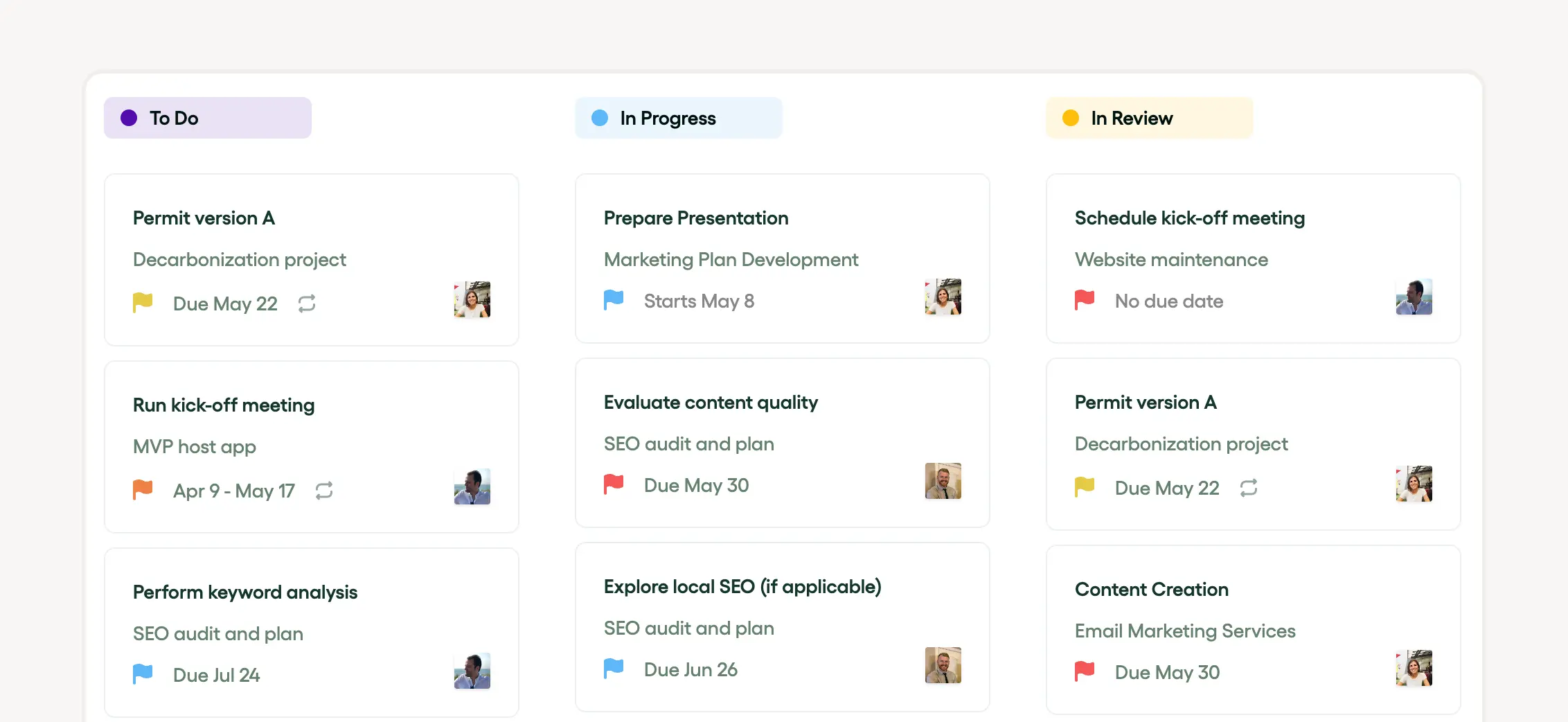
3. Task Automation
Identify repetitive tasks within your workflow and use Bonsai's automation tools to handle them, saving time and effort.
4.Integration
Bonsai integrates with other tools and platforms, allowing for a seamless workflow and easier management of documents and billing. Connect Bonsai with tools you use, like calendars or communication apps, to have a smooth workflow.
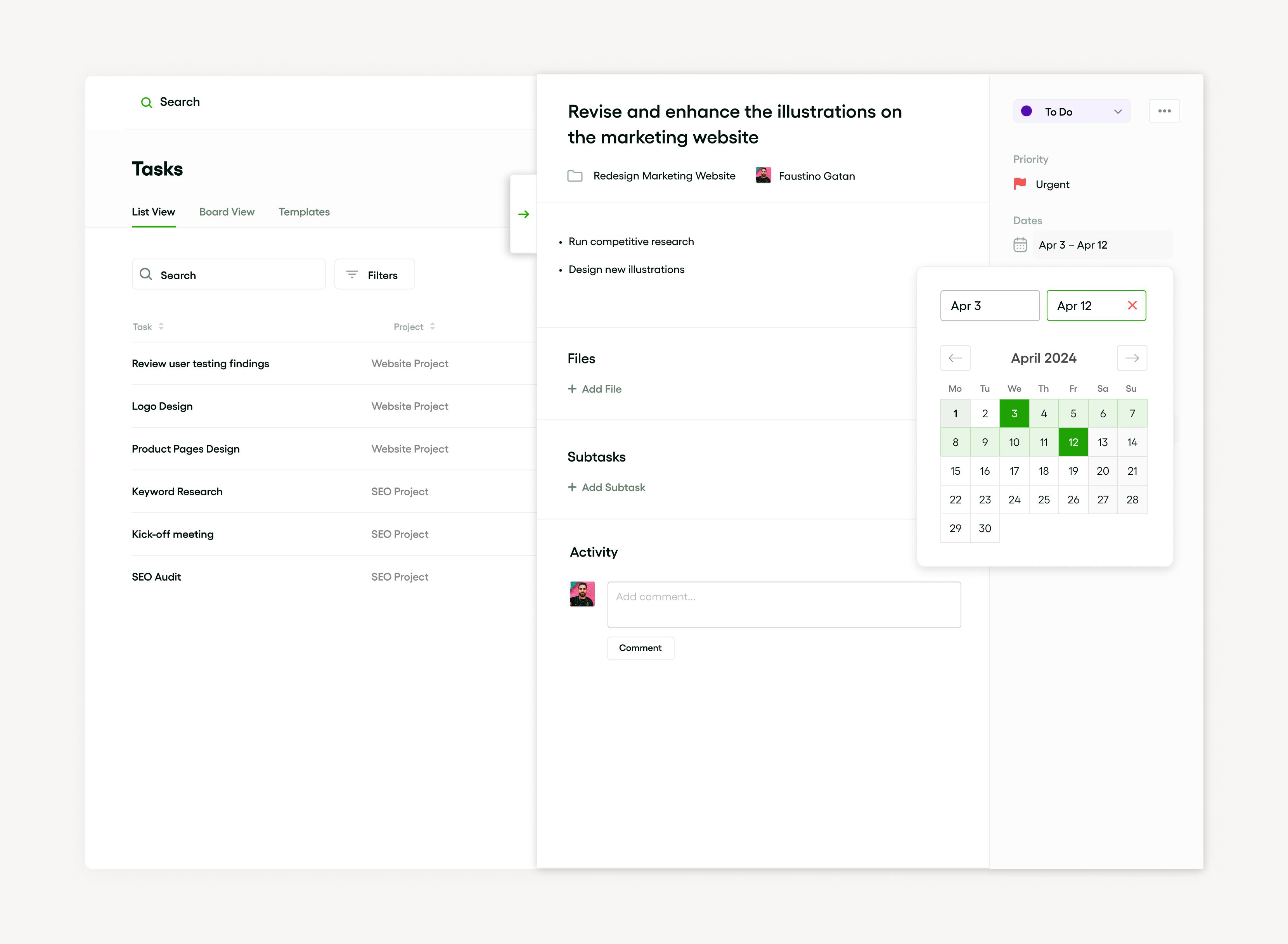
By implementing these features, you can spend less time on administrative tasks and more time focusing on creative work, ultimately leading to a more streamlined business operation.
Priority list role in time management
A priority list is a game-changer for time management, steering you to organize and tackle tasks effectively. Whether you’re using a priority matrix, the 1-3-9 technique, ABCDE method, or Eisenhower Matrix, it’s all about focusing on what matters most.
Applying the Pareto Principle – spending 80% of your time on the crucial 20% of tasks – is a smart move. Arrange to-do lists using the Two Lists technique or the MoSCoW method to make organizing your tasks a breeze, boost your productivity, and ensure nothing slips through the cracks.
Eisenhower matrix and its application
What is the Eisenhower matrix and why it matters for your priority list
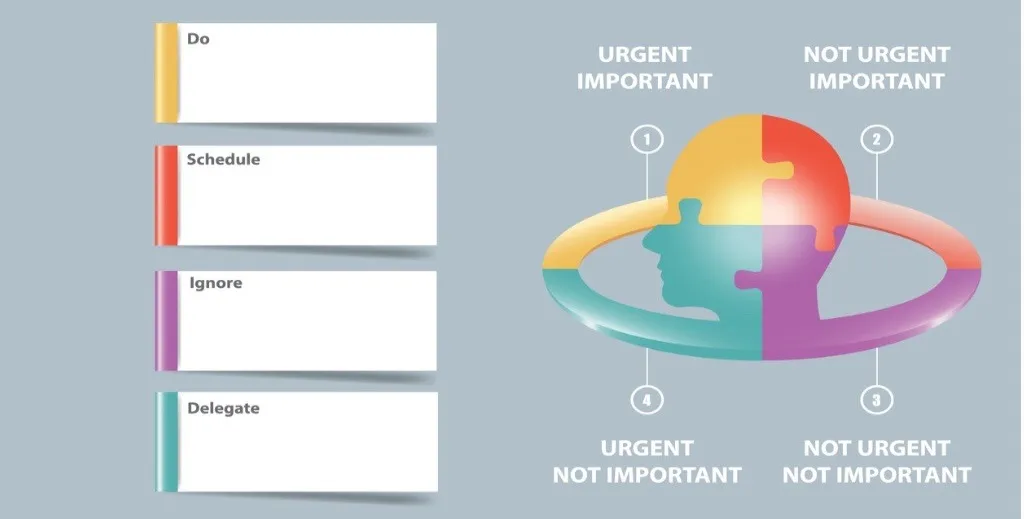
The Eisenhower matrix is a simple yet powerful tool to organize your priority list by urgency and importance. It divides tasks into four quadrants:
- Urgent and important
- Important but not urgent
- Urgent but not important
- Neither urgent nor important
This helps freelancers and small business owners decide what to focus on first and what to delegate or eliminate.
Using this matrix prevents common productivity pitfalls like spending too much time on urgent but low-value tasks. For example, responding to non-critical emails might feel urgent but can distract from strategic work like client acquisition. The matrix encourages you to prioritize tasks that drive your business forward, especially those in the important but not urgent quadrant.
Applying the Eisenhower matrix to your priority list ensures you allocate time effectively and reduce stress. It creates clarity on what deserves immediate attention and what can wait or be outsourced. This clarity is crucial in 2024 when freelancers juggle multiple roles and deadlines.
How to create your priority list using the Eisenhower matrix
Start by listing all your tasks for the day or week. Next, categorize each task into one of the four Eisenhower matrix quadrants. For example, a client deadline due tomorrow fits into the urgent and important quadrant, while planning next month’s marketing strategy falls under important but not urgent.
Once categorized, focus first on completing tasks in the urgent and important quadrant. Then schedule time blocks for important but not urgent tasks to prevent them from becoming urgent later. Delegate or automate urgent but not important tasks, such as scheduling social media posts using tools like Buffer or Hootsuite. Finally, eliminate or postpone tasks that are neither urgent nor important.
Using digital tools like Trello or ClickUp can help you visualize and manage your Eisenhower matrix. These platforms allow you to create boards or lists representing each quadrant, making it easier to track progress and adjust priorities dynamically.
Common mistakes to avoid when applying the Eisenhower matrix
A frequent mistake is misclassifying tasks due to emotional bias or underestimating deadlines. For example, some freelancers treat all client communications as urgent, even when they can wait a day. This leads to an overloaded urgent quadrant and burnout.
Another pitfall is neglecting the important but not urgent quadrant. These tasks, like skill development or business planning, are essential for long-term success but often get postponed. Scheduling regular weekly time for these tasks can prevent this issue.
Lastly, avoid overloading the matrix with too many tasks. Limit your daily priority list to a manageable number, such as 5-7 tasks, to maintain focus and productivity. Regularly review and update your matrix to reflect changing priorities and deadlines.
Understanding urgent vs important tasks
Defining urgent and important tasks
Urgent tasks require immediate attention because they have clear deadlines or consequences if delayed. Important tasks contribute directly to your long-term goals, growth, or values but may not demand instant action. Understanding this difference is crucial for creating an effective priority list that helps you focus on what truly matters.
For example, responding to a client’s last-minute request is urgent, while planning your quarterly marketing strategy is important. Both may seem pressing, but urgent tasks often interrupt your workflow, whereas important tasks drive your business forward. Recognizing these distinctions prevents you from spending all your time on urgent but less impactful activities.
To start, categorize your daily tasks by asking: "Does this task need to be done today, or does it move my business closer to a goal?" This mindset helps you allocate time wisely and avoid burnout from constant firefighting.
How to prioritize urgent and important tasks effectively
Use the Eisenhower Matrix to separate tasks into four categories: urgent and important, important but not urgent, urgent but not important, and neither. This framework helps you decide what to do immediately, schedule, delegate, or eliminate. For freelancers and small business owners, this method clarifies where to invest your limited time.
For instance, urgent and important tasks like submitting a project proposal due tomorrow should be done first. Important but not urgent tasks, such as updating your portfolio, can be scheduled during less hectic periods. Tools like Trello or Asana support this by allowing you to tag tasks with urgency and importance labels, making your priority list more actionable.
Regularly reviewing and adjusting your priority list based on this matrix ensures you stay focused on growth while managing deadlines. Set weekly reminders to reassess your tasks and avoid letting urgent but less important activities dominate your schedule.
Common pitfalls when mixing urgent and important tasks
One common mistake is treating all urgent tasks as equally important, leading to constant stress and reactive work. This can cause important tasks like client acquisition or skill development to be neglected, harming long-term success. Recognizing that not all urgent tasks have the same impact is key to balanced prioritization.
Another pitfall is procrastinating on important but non-urgent tasks because they lack immediate deadlines. For example, delaying tax planning until the last minute can result in penalties or missed deductions. Using calendar alerts or project management apps like HelloBonsai can help you schedule and track these critical tasks well in advance.
To avoid these traps, commit to daily or weekly planning sessions where you consciously assign time blocks to important tasks. This habit builds momentum and reduces the risk of urgent tasks overwhelming your priority list.
Integrating priority lists with task management tools
How to sync priority lists with popular task management apps
Syncing your priority list with task management apps like Trello, Asana, or Monday.com keeps your workflow organized and focused. These apps allow you to create custom fields or tags to mark tasks by priority, such as:
- High
- Medium
- Low
In Trello, you can add colored labels to cards to visually separate urgent tasks from less critical ones.
To integrate a priority list, start by importing your tasks into the app, then assign priority levels using built-in features. Asana’s custom fields let you add dropdown menus for priority, while Monday.com offers priority columns that automatically sort tasks. Using these features ensures your priority list stays dynamic and accessible across devices.
To get started, choose the app that fits your workflow best and set up priority labels or fields. Regularly update these priorities as deadlines or project scopes change. This practice helps freelancers and small business owners focus on what matters most, reducing overwhelm and improving productivity.
Using automation to keep priority lists up to date
Automation tools like Zapier and Make (formerly Integromat) can keep your priority lists synchronized across multiple platforms without manual updates. For instance, you can set up a Zapier workflow that automatically adds new high-priority emails from Gmail to your task list in ClickUp or Todoist.
These automations save time by updating your priority list in real time. For example, if you mark a task as "urgent" in Microsoft To Do, Zapier can trigger an update in your Google Sheets priority list, ensuring consistency. This reduces the risk of overlooking critical tasks due to outdated information.
To implement automation, identify repetitive actions related to your priority list and connect the relevant apps via Zapier or Make. Start with simple triggers and gradually build more complex workflows as you become comfortable. This approach helps maintain an accurate priority list effortlessly.
Best practices for maintaining priority lists within task tools
Maintaining a priority list inside task management tools requires regular review and adjustment. Set weekly or daily check-ins to reassess priorities based on project progress and deadlines. For example, freelancers working with multiple clients can update priorities in Asana to reflect urgent client requests or shifting timelines.
Another best practice is to limit the number of high-priority tasks to a manageable number, such as three to five per day. This prevents burnout and keeps focus sharp. Tools like Todoist allow you to filter tasks by priority, helping you concentrate on top priorities without distraction.
Finally, use notifications and reminders strategically to prompt action on high-priority tasks. Most task apps support custom alerts that can be set based on priority levels. By combining regular reviews with smart notifications, freelancers and small business owners can stay on track and meet deadlines consistently.
Priority list steps to create
Getting a priority list going is key for keeping tasks in check. Start by pinpointing what’s crucial and slotting them into a task priorities matrix like the Eisenhower Matrix or ABCDE method. The Eisenhower Matrix, for instance, sorts tasks by urgency and importance.
Loads of prioritization techniques are out there, including:
- Scrum
- MoSCoW
- Pareto Principle
- 1-3-9 technique
- Two Lists
These methods are gold for setting up effective to-do lists.
How to identify your tasks
Nailing down and managing your tasks is crucial for staying productive. The trick is to set task priorities and know how to rank them. Techniques like the Eisenhower Matrix, 1-3-9, and Scrum are your allies in taming your to-do lists.
The Eisenhower Matrix, or priority matrix, helps you slot your tasks into urgent and important buckets, letting you zero in on top priorities.
The 1-3-9 method ranks tasks by importance and urgency.
Scrum is perfect for project management when teamwork is key.
Mastering these techniques makes prioritizing tasks a breeze and ensures your most critical tasks get tackled first.
How to rank your tasks based on importance
Task prioritization is the heart of productivity and smart time management. Techniques like a priority matrix, MoSCoW, or 1-3-9 help you rank tasks by their importance and urgency.
Other handy methods include:
- ABCDE method
- Scrum
- Two Lists
- Eisenhower Matrix
- Pareto Principle
Each one offers a game plan for identifying top priorities, helping you focus on big-ticket tasks while still managing smaller tasks effectively.
Putting prioritized tasks into manageable to-do lists is a great way to keep track of your progress and maintain a steady workflow, ticking off tasks as you go.
How to set deadlines for each task
Setting deadlines for tasks is key for effective prioritization. It keeps your priorities in check and ensures the top items get tackled first. Structures like the Pareto Principle and Eisenhower Matrix can help here.
Techniques like the 1-3-9 and Two Lists lend clarity to your to-do lists, making it easy to tell which tasks are high priority.
The ABCDE method, Scrum, and MoSCoW also provide solid frameworks for setting deadlines based on urgency and importance.
Prioritization methods to try
Use the Eisenhower matrix to separate urgent from important tasks
The Eisenhower Matrix helps you prioritize tasks by urgency and importance, making your priority list more effective.
It divides tasks into four categories:
- Urgent and important
- Important but not urgent
- Urgent but not important
- Neither urgent nor important
This method prevents you from focusing solely on urgent tasks that may not contribute to your long-term goals.
For example, a freelancer might place a client deadline in the urgent and important quadrant, while scheduling time for skill development goes into important but not urgent. Tools like Trello or Microsoft To Do allow you to create custom boards or lists to visually organize tasks using this matrix.
Start by listing all your tasks, then assign each to a quadrant. Focus first on urgent and important tasks to meet deadlines, then allocate time for important but less urgent tasks to avoid last-minute stress. This approach keeps your priority list balanced and actionable.
Apply the ABCDE method for clear task ranking
The ABCDE method assigns a letter grade to each task based on its priority, helping you build a clear and actionable priority list. 'A' tasks are high-priority and must be done today, while 'E' tasks can be eliminated or postponed. This method forces you to evaluate the value and consequences of completing or ignoring each task.
For instance, a small business owner might label paying invoices as 'A' tasks, responding to non-urgent emails as 'C', and social media browsing as 'E'. Digital planners like Todoist support custom labels or tags, making it easy to categorize tasks using this method.
Begin by listing your tasks, then assign each a letter based on urgency and impact. Focus on completing all 'A' tasks before moving on to 'B' or 'C'. This method keeps your priority list focused and prevents distractions from low-value activities.
Try the MoSCoW method for project prioritization
The MoSCoW method divides tasks into Must have, Should have, Could have, and Won't have categories, making it ideal for managing projects and complex priority lists. This method clarifies what is essential versus optional, helping freelancers and small business owners allocate resources wisely.
For example, a web designer working on a client project might label core website features as 'Must have', additional design tweaks as 'Should have', optional animations as 'Could have', and features to exclude as 'Won't have'. Project management tools like ClickUp and Asana support custom fields to implement MoSCoW easily.
To use this method, list all project tasks and categorize them accordingly. Focus on completing 'Must have' tasks first to meet deadlines and client expectations. Then, address 'Should have' and 'Could have' tasks if time permits. This approach makes your priority list manageable and aligned with project goals.
Leverage time-blocking to prioritize and schedule tasks
Time-blocking assigns specific time slots to tasks on your priority list, improving focus and productivity. Instead of a vague to-do list, you create a schedule that reserves dedicated periods for high-priority work, reducing procrastination and multitasking.
A freelancer might block 9 a.m. to 11 a.m. for client work, 11 a.m. to 12 p.m. for administrative tasks, and 1 p.m. to 2 p.m. for marketing efforts. Digital calendars like Google Calendar or Outlook make it easy to set recurring time blocks and reminders.
Start by reviewing your priority list and estimating how long each task takes. Then, create calendar events for these tasks, treating them like appointments. This method ensures your priority list translates into focused action, helping you meet deadlines and reduce overwhelm.
Priority list tools to help create
There are several tools available to facilitate the creation of a priority list. One popular approach is the MoSCoW prioritization method, which segments tasks into four categories:
- Must have
- Should have
- Could have
- Won't have this time
- Must have
- Should have
- Could have
- Won’t have
Another helpful technique is the Eisenhower Matrix, which helps clarify priority items by dividing tasks based on their urgency and importance. For those preferring more numerical methods, the 1-3-9 prioritization technique may be a good fit. These techniques can greatly improve task prioritization.
Moreover, Scrum prioritization and the Pareto Principle are also beneficial tools for setting task priorities. The Scrum method focuses on delivering the highest value first in project management, while the Pareto Principle advocates focusing on the top 20% of tasks that yield 80% of results. Finally, the ABCDE method and the Two lists technique make it easier to sift through to-do lists and distinguish between prioritized tasks.
How to integrate Bonsai for task management
Integrating Bonsai for task management is a strategic approach to enhancing productivity and prioritization within teams. Bonsai's platform offers a Kanban view and integrated timers, which are essential for visualizing task progress and tracking time spent on each task. The ability to assign tasks, set deadlines, and prioritize work helps teams focus on what's most important.
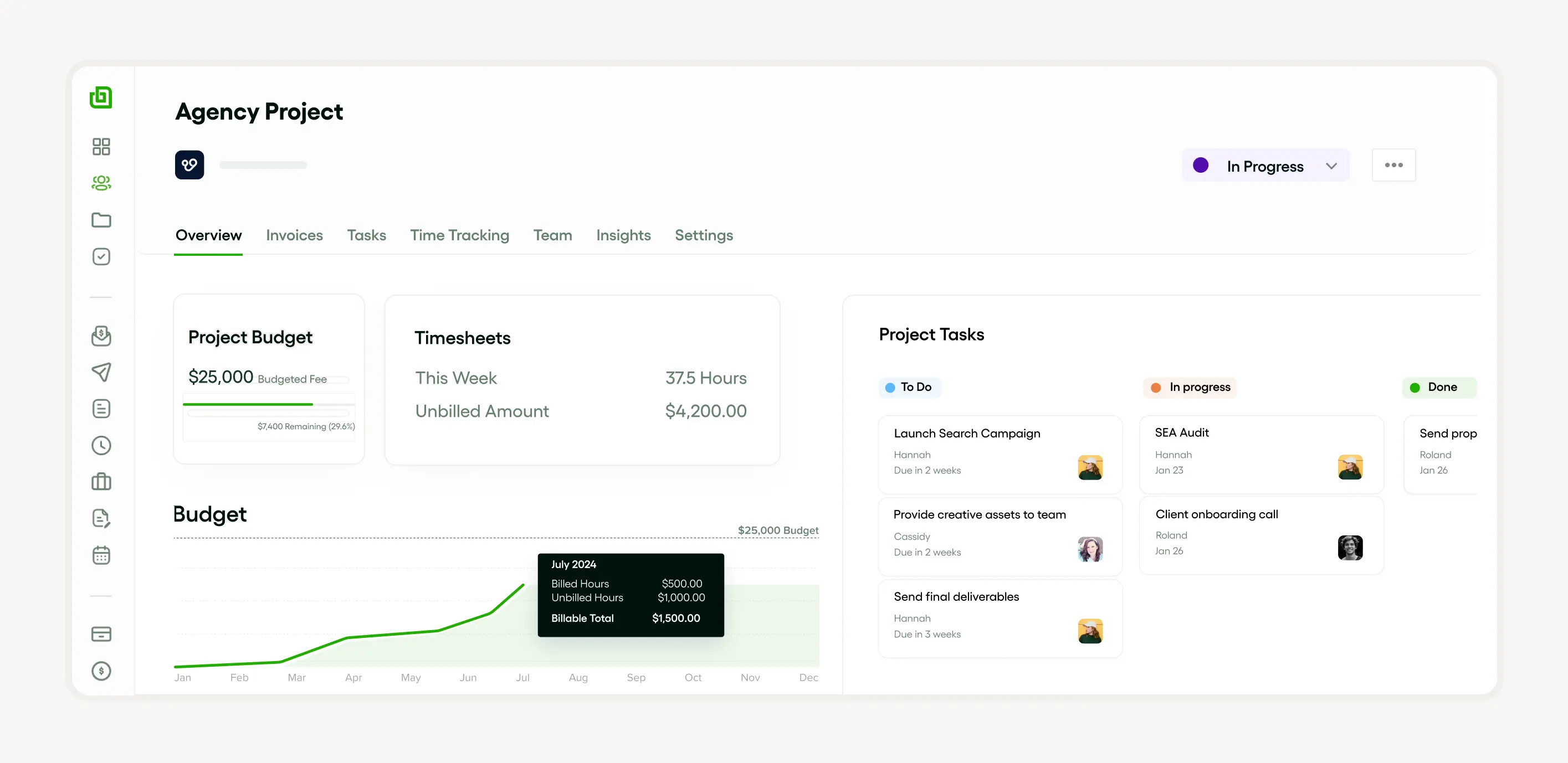
Tools like Bonsai are invaluable for creating a priority list. They allow for the designation of task priorities as Urgent, High, Medium, or Low, ensuring that team members are clear on their immediate focus points. Additionally, Bonsai's task templates and recurring task configurations streamline the process of managing regular and ad-hoc tasks.
How to use Microsoft To Do for task management
Microsoft To Do is a powerful tool for managing your tasks efficiently. One of the key features is its ability to let you prioritize tasks by assigning importance to them. By categorizing your to-do lists into priority items and non-priority items, you can efficiently allocate time and resources using prioritization techniques like the Eisenhower Matrix, the ABCDE method, and the 1-3-9 prioritization technique.
You can also manage complicated tasks with the MoSCoW prioritization method and even apply the Pareto Principle for task prioritization. This utility lets you create multiple lists—a unique feature known as the Two lists technique—helping you segregate and handle prioritized tasks in a more organized way.
How to organize tasks with Trello
Using Trello, one can effectively prioritize tasks and manage task priorities by applying various techniques. This includes using a priority matrix on the platform or deploying the MoSCoW prioritization method and the 1-3-9 prioritization technique for efficient task management. These prioritization techniques aid in organizing priority items and prioritized tasks.
Trello is flexible enough to adapt to other methods like the ABCDE method or the Eisenhower Matrix. The Two lists technique and the Pareto Principle can also be employed on the platform for effective task handling. Constructing to-do lists through Trello ensures your important work receives the attention it requires.
How to manage priorities with Asana
Managing priorities with Asana involves applying various prioritization techniques to help streamline the workflow. Key features of this process are the implementation of a priority matrix and the use of task prioritization, adding structure and order to your to-do lists.
Prioritization methods such as the Eisenhower Matrix, the 1-3-9 prioritization technique, and the MoSCoW prioritization method can be used to identify and manage priority items meticulously. With Asana's abilities, you can effectively prioritize tasks, ensuring prioritized tasks are handled effectively and efficiently.
Priority list strategies to utilize effectively

If you want to make your priority list effective, use smart strategies like the Eisenhower Matrix or the 1-3-9 method. These techniques help you sort your tasks by urgency and importance or score them based on effort and impact.
Depending on your work, Scrum prioritization might be effective. Breaking down complex projects into bite-sized, manageable, prioritized tasks with the ABCDE method or the MoSCoW technique can improve task management.
Balance your long-term goals with immediate tasks. The Pareto Principle, or the '80/20 Rule', shows which tasks will provide the most value. Visualizing with a priority matrix or the Two Lists Technique keeps your priorities clear and manageable.
How to regularly update your priority list
Keep your priority list fresh by revisiting and tweaking it regularly to ensure you always tackle the most important tasks. Methods like the ABCDE method, Pareto Principle, and Eisenhower Matrix support ongoing task prioritization.
Categorize prioritized tasks using a priority matrix to visualize your work. Techniques like MoSCoW, 1-3-9, Scrum, and Two Lists help rank tasks and structure your to-do lists. Regularly updating your list keeps you on track with your goals.
How to break down large tasks into manageable parts
Chopping big tasks into bite-sized pieces is key. The Eisenhower Matrix is a classic for sorting and prioritizing tasks by urgency and importance, helping you handle your priorities efficiently.
Techniques like ABCDE, 1-3-9, and MoSCoW effectively declutter your to-do list and help you focus on high-priority tasks. Using these methods to break down complex tasks boosts productivity and keeps workflows smooth.
The Pareto Principle highlights vital tasks with the biggest impacts. Mastering these breakdown techniques helps you stay on top of your workload and maintain efficiency.
How to delegate tasks when necessary
Knowing when to delegate is a key part of smart task management. Techniques like the Eisenhower Matrix and ABCDE method streamline decision-making and ensure tasks are delegated to the right people.
For bigger teams, use the 1-3-9 method or Scrum prioritization to keep focus on high-value tasks. MoSCoW and Pareto Principle are also effective for identifying priorities. Remember, good delegation is about what’s best for the project, not just offloading work.
Priority list common mistakes to avoid
Avoid overloading your priority list. Be realistic with task priorities to prevent burnout. Stay flexible as priorities can shift. Techniques like MoSCoW and 1-3-9 are helpful but avoid rigidity.
Do not rely solely on to-do lists without tools like a priority matrix, the Pareto Principle, or Eisenhower Matrix. These methods help manage task priorities effectively, preventing underestimations and overloads.
How to avoid overloading your priority list
Overloading your priority list reduces effectiveness. It’s like juggling too many balls—tasks can be dropped. Prioritization techniques like the Eisenhower Matrix and MoSCoW method keep priorities clear and manageable.
The Eisenhower Matrix separates urgent from important tasks, while MoSCoW categorizes tasks as must-haves, should-haves, could-haves, and won’t-haves. Keeping your list realistic avoids stress and maintains high productivity. Balance is key.
Why you should not ignore the importance of breaks
Taking breaks is essential regardless of how well you prioritize. Techniques like the Eisenhower Matrix, Pareto Principle, or Two Lists emphasize the importance of downtime.
Breaks refresh your mind, boost focus, and keep productivity on point. Even with a perfect priority matrix or to-do list, neglecting breaks can tank your performance. Make rest a part of your plan.
How to adapt your priority list to changes
Failing to adapt your list is a recipe for disaster. Techniques like the Eisenhower Matrix or MoSCoW are built to help you stay flexible. Reassess and reprioritize as things shift.
In Agile methods like Scrum, updating your priority matrix is a constant task. The Pareto Principle, 1-3-9 method, and ABCDE technique all stress the need for adaptable to-do lists and priorities. Keep your list dynamic to stay on top of changing circumstances.
Getting your tasks in order with methods like:
- MoSCoW
- 1-3-9
- Pareto
can really amp up your productivity and keep the stress at bay. Plus, when you’ve got your priorities straight, you’re less likely to miss out on crucial tasks.
The Eisenhower Matrix? Think of it as your trusty compass, guiding you through the sea of to-dos, helping you spot what’s truly vital and what’s just fluff. Combine these techniques with a solid to-do list, and you’re set for a systematic and efficient task management journey.
Improved productivity and efficiency
When you nail task prioritization, you’ll see a boost in productivity and efficiency. Using techniques like:
- MoSCoW
- The Eisenhower Matrix
- ABCDE
helps you pinpoint what’s most important, making your to-do list a lean, mean machine.
Scrum or 1-3-9 methods? They’re perfect for cutting out time-wasting tasks and letting you laser-focus on the big hitters. Throw in a priority matrix or Two Lists technique, and you’re channeling the Pareto Principle, where 80% of your results come from 20% of your efforts. Sweet, right?
Better team collaboration and communication
Proper task prioritization can be the secret sauce for team collaboration and communication. Techniques like:
- MoSCoW
- 1-3-9
- The Eisenhower Matrix
are your allies here.
Create a priority matrix that spells out all the key tasks and their statuses. Keeping everyone in the loop with regular updates ensures everyone’s rowing in the same direction. Using to-do lists or the Two Lists technique can also keep the team clued in on what’s what, fostering a transparent and efficient work environment.
Reduced stress and increased job satisfaction
Want to slash stress and up your job satisfaction? Get into the groove of effective task prioritization. Tools like:
- The Pareto Principle
- Eisenhower Matrix
- Scrum
can sharpen your focus on high-priority tasks, boosting your efficiency.
Methods like:
- 1-3-9
- MoSCoW
- ABCDE
also ramp up productivity. By crafting clear to-do lists and a priority matrix, you can ease work-related stress. In the end, being more productive can make your job feel more satisfying and less like a grind.


'%3e%3cg id='Final-Copy-2_2_' transform='translate(1275.000000, 200.000000)'%3e%3cpath class='st0' d='M7.4,12.8h6.8l3.1-11.6H7.4C4.2,1.2,1.6,3.8,1.6,7S4.2,12.8,7.4,12.8z'/%3e%3c/g%3e%3c/g%3e%3c/g%3e%3cg id='final---dec.11-2020'%3e%3cg id='_x30_208-our-toggle' transform='translate(-1275.000000, -200.000000)'%3e%3cg id='Final-Copy-2' transform='translate(1275.000000, 200.000000)'%3e%3cpath class='st1' d='M22.6,0H7.4c-3.9,0-7,3.1-7,7s3.1,7,7,7h15.2c3.9,0,7-3.1,7-7S26.4,0,22.6,0z M1.6,7c0-3.2,2.6-5.8,5.8-5.8 h9.9l-3.1,11.6H7.4C4.2,12.8,1.6,10.2,1.6,7z'/%3e%3cpath id='x' class='st2' d='M24.6,4c0.2,0.2,0.2,0.6,0,0.8l0,0L22.5,7l2.2,2.2c0.2,0.2,0.2,0.6,0,0.8c-0.2,0.2-0.6,0.2-0.8,0 l0,0l-2.2-2.2L19.5,10c-0.2,0.2-0.6,0.2-0.8,0c-0.2-0.2-0.2-0.6,0-0.8l0,0L20.8,7l-2.2-2.2c-0.2-0.2-0.2-0.6,0-0.8 c0.2-0.2,0.6-0.2,0.8,0l0,0l2.2,2.2L23.8,4C24,3.8,24.4,3.8,24.6,4z'/%3e%3cpath id='y' class='st3' d='M12.7,4.1c0.2,0.2,0.3,0.6,0.1,0.8l0,0L8.6,9.8C8.5,9.9,8.4,10,8.3,10c-0.2,0.1-0.5,0.1-0.7-0.1l0,0 L5.4,7.7c-0.2-0.2-0.2-0.6,0-0.8c0.2-0.2,0.6-0.2,0.8,0l0,0L8,8.6l3.8-4.5C12,3.9,12.4,3.9,12.7,4.1z'/%3e%3c/g%3e%3c/g%3e%3c/g%3e%3c/g%3e%3c/svg%3e)