





.webp)

.webp)
What is a freelance designer contract template?
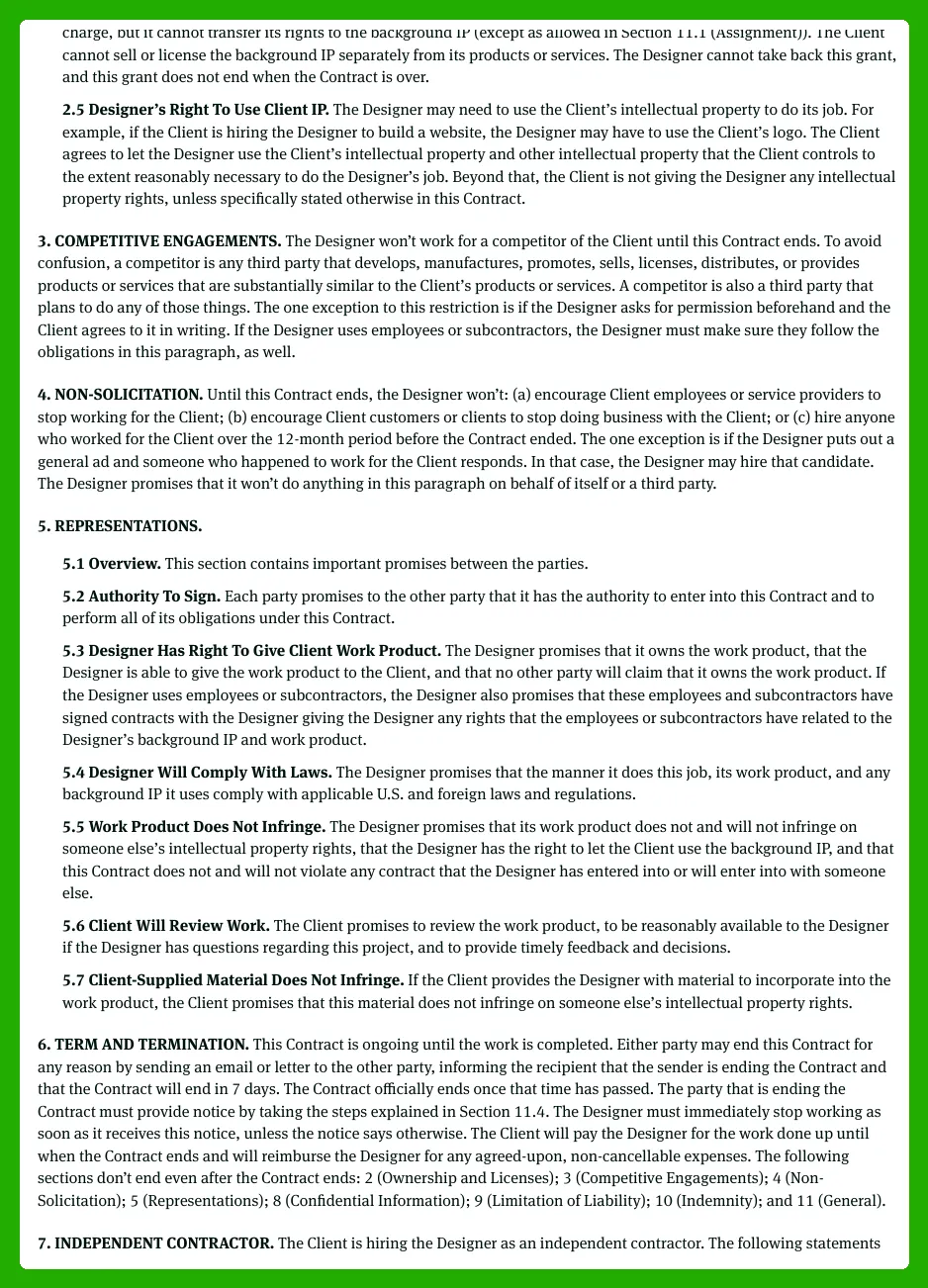
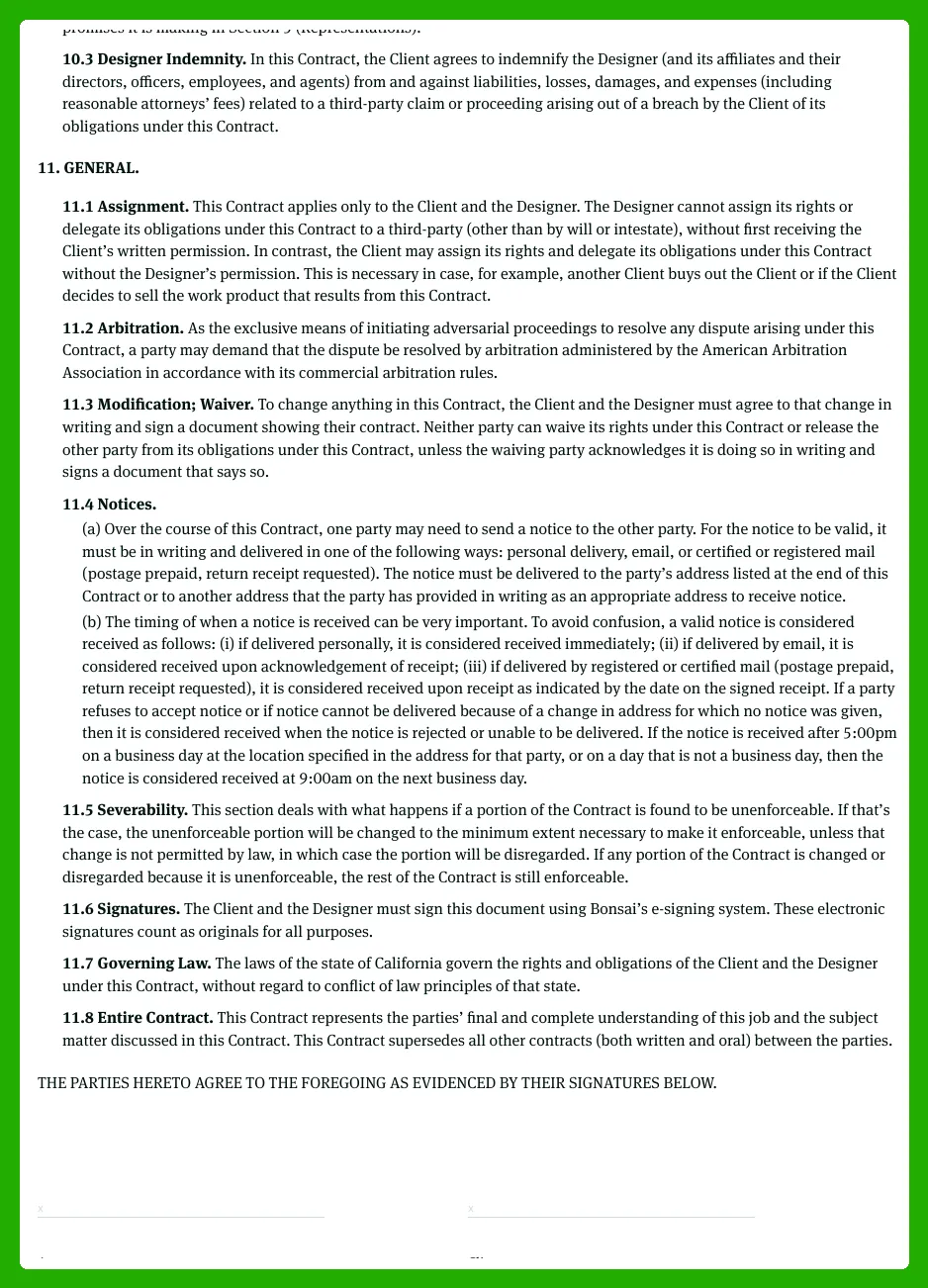
A freelance designer contract template is a reusable, customizable framework that guides the agreement between a designer and a client. It acts as a blueprint you can reuse across projects, saving time and helping terms stay consistent from one job to the next. This kind of template covers typical design work like branding, website redesigns, and campaign visuals, so you’re prepared whether you’re creating a logo, a website mockup, or a package design.
Definition and purpose
A plain-language definition of the template is that it’s a pre-structured agreement designers can adapt for each project. It’s a repeatable framework you can reuse for different clients, saving time and keeping terms consistent. Its main purposes are to describe the work to be done, set boundaries and expectations, protect both parties legally, and serve as a reference if there’s confusion or a dispute.
The template also ensures you cover both web and graphic design use cases, while staying broad enough to apply to branding projects, website redesigns, social campaigns, packaging, and other freelance work. By using these standard terms, you create a safe starting point for negotiations and reduce back-and-forth, letting you focus on creative work instead of drafting from scratch each time.
How it supports freelance graphic design work
This template fits the typical graphic design workflow by clearly capturing project phases—from concept development to revisions and final delivery. It helps you lay out what you’ll deliver, when you’ll deliver it, and what constitutes approval, so both sides share the same expectations from day one.
Common deliverables in a graphic design project include logos, brand guidelines, social media graphics, packaging, and web layouts, with file formats like AI, EPS, PSD, PNG, JPG, and SVG. By tying these deliverables to specific milestones and timelines, you create a repeatable process that makes onboarding new clients faster and more consistent. Additionally, a structured contract reduces scope creep, because changes are documented and priced before work begins, which keeps projects on track.
Using a structured freelance design contract template also helps you standardize client communications. With clear milestones and acceptance criteria, you can move from concept to final delivery smoothly, and you’ll have a reference point if questions arise during revisions or after handoff. This clarity pays off in faster approvals and better relationships with clients, especially on larger branding or website projects.
Key components of a designer contract
Here's a concise set of non-negotiable sections you should include in every designer contract, with a one-line explanation for each.
- Party details: Names, addresses, and contact information for both designer and client to identify the parties clearly.
- Project overview: A brief summary of the project goals and context to align expectations from the start.
- Scope of work: The exact design tasks included, such as logos, brand identity, UI mockups, and social assets.
- Deliverables: Specific files and formats the designer will provide (e.g., AI, EPS, PSD, PNG, SVG, PDF).
- Schedule/milestones: Key dates and deadlines that mark phases like concepts, revisions, and final delivery.
- Revisions policy: The number of rounds included and how additional revisions are priced to manage scope creep.
- Payment terms: Amounts, currency, milestones, due dates, and late fee terms to keep cash flow clear.
- Intellectual property and copyright: Who owns the final designs and when ownership transfers after payment.
- Usage rights and licensing: The scope and duration of rights granted to the client for use of the designs.
- Client responsibilities: What the client must provide or approve (brand assets, feedback, access) to keep the project moving.
- Approvals and sign-off: How and when final approval is given to mark project completion.
- Change requests: Process for requesting scope changes and how they affect price and timelines.
- Cancellation/termination: Terms if either party ends the engagement early, including refunds and work completed.
- Confidentiality: Protection of private information and non-disclosure obligations as needed.
- Attribution/credits: How the designer receives recognition in publicly released work, if applicable.
- Dispute resolution: Steps to resolve disagreements and the governing law or venue for disputes.
Why freelance designers need a written contract
A contract isn’t just legal paperwork. It aligns expectations, protects income, and signals professionalism. For freelance designers in 2025, a well-crafted contract helps manage risk across varied clients—from startups needing branding to established firms needing a website refresh—and across many project types, from logos to full brand systems. A single document, like a Freelance Designer Contract Template, can cover scope, payments, IP, and renewal terms, saving countless hours in back-and-forth and preventing costly disputes.
To set clear scope and expectations
A written contract prevents scope creep by clearly defining what is and isn’t included. For example, a logo project might include the logo in AI, EPS, and PNG formats, plus a basic color palette and a small brand guide, but not a full brand system or ongoing marketing assets. Without this clarity, clients may request extra formats, social assets, or new website features after work starts. The contract should spell out exact deliverables, the number of revision rounds included, and the timeline for each milestone, so both sides know what “done” looks like.
Equally important are responsibilities and response times. The agreement can require the client to provide all necessary assets within a defined window and to respond to feedback within a set number of days. It should outline a simple Change Order process for any requested additions, with concrete boundaries on timelines and costs. By using precise scope language, you save time and avoid awkward, late-night conversations about what’s allowed or expected.
To protect payment and project revenue
Contracts safeguard income with clear payment terms, including deposits, staged payments, late fees, and kill fees if a project is cancelled. A typical setup might be 30% upfront, 50% on concept approval, and 20% on final delivery, with a 1.5% monthly late fee on overdue balances. For a project expected to total $3,000, that means payment milestones of $900 upfront, $1,500 at concept approval, and $600 at delivery, with payment due within 7 days of each milestone. If the client cancels after work begins, a kill fee of 20-40% of the remaining balance protects the designer’s time and effort.
Even a free graphic design contract template is better than informal emails, because it captures terms in one place and reduces back-and-forth. Tools like HelloBonsai, PandaDoc, or DocuSign make signing easy, and a well-structured template ensures you can quickly customize terms for different clients. By starting with a solid framework, you close deals faster and minimize disputes when payment becomes due or a milestone shifts.
To manage legal and intellectual property risks
Describe the legal protection angle without heavy jargon. Clear IP clauses explain who owns the final design, what the client is allowed to do with it, and what happens to unused concepts. A typical clause states that the designer retains ownership of the underlying files and concepts until full payment is received, at which point the client gains a non-exclusive license to use the final deliverables for the agreed purposes. If the client wants ownership of every concept, you can set that as a paid option in your Freelance Designer Contract Template.
Well-written IP terms also prevent misuse or misrepresentation. The contract should specify licensing scope (media, territory, duration) and prohibit sublicensing or reselling the work beyond the agreed use. It’s common to grant non-exclusive, worldwide rights for the project duration plus an optional extension period, for a defined fee. If the client wants exclusive rights, price it accordingly—often 2–3x the base project fee—and document the exact rights acquired to avoid future disputes.
To build trust and professionalism with clients
Having a clear, well-structured contract signals that the designer takes the business seriously. Contracts aren’t adversarial; they show clients that you have a defined process, protect both sides, and care about clarity. Clients often feel safer signing a professional agreement than working on a handshake or informal messages, and this sense of security can speed up onboarding. In practice, a polished contract makes the first meeting smoother and sets a professional tone that lasts beyond project kickoff.
To implement this effectively, use a reputable contract template as your starting point. The Freelance Designer Contract Template can be customized for each client and project, then signed electronically with HelloSign, PandaDoc, or DocuSign. When you present the agreement with a clear kickoff plan and a timeline for next steps, most clients respond quickly—often signing within 24–72 hours and moving straight into the work with confidence.
Risks of not using a freelance designer contract
Using a Freelance Designer Contract Template isn't just about legality—it's a practical safeguard for cash flow, creative control, and client relationships. In 2025, more designers rely on well-drafted contracts to set expectations and prevent disputes. This section lays out the tangible downsides of skipping a formal agreement and shows how a clear template can turn risks into protections.
Unpaid work and delayed payments
Without a written contract, payment terms stay unclear, and designers often end up delivering work without guaranteed pay.
In practice, you might finish a branding package and invoice after delivery, but with no deposit or due date, payment drags for weeks. For example, a $2,500 project could slip to 60 days late, leaving you short on cash and unable to pay your own bills on time.
To fix this, specify deposits, due dates, and late fees in advance. A realistic plan is 30% upfront, 50% on draft delivery, and 20% on final delivery, with payment due within 15 days of invoice and a 1.5% monthly late fee. The contract also provides a clear remedy if payment is late, such as pausing work or suspending access to final files, until terms are met. Use invoice tools like QuickBooks, FreshBooks, or Wave and store signed terms in HelloSign or DocuSign to keep proof of agreement.
Unlimited revisions and scope creep
Without a revisions clause, projects can spiral out of control as clients request endless tweaks and new deliverables with no extra pay.
Imagine a logo project that starts with three rounds of changes, then expands to 15 tweaks and a full brand guide, all while the original quote remains the same. The timeline stretches, and your hours multiply, but you’re not compensated for the extra work.
A freelance graphic designer contract template helps by setting a cap on revisions, clarifying what counts as a revision versus new work, and outlining how change orders are handled. For example, specify two revision rounds, define that any additional changes are charged at an agreed hourly rate or a new quote, and require written change orders signed by both sides. This keeps the project on track and ensures you’re paid for all extra work.
Loss of control over your creative work
Not defining intellectual property, licensing, and usage rights can let clients use designs beyond the original agreement, hurting your rights and your reputation.
Without clear rights, a logo could appear on new product lines, templates could be resold, or edits could be made to harm how your work is perceived. The contract should state who owns the final design and what license is granted to the client—ideally, ownership remains with you until full payment is received, and the client gets a well-defined license to use the work after payment.
Include specifics about scope, territory, duration, and purpose. For example, grant a non-exclusive, non-transferable license worldwide for the agreed uses, with ownership transferring only upon full payment if you choose to do that. Also reserve moral rights and describe whether you can showcase the work in your portfolio after completion. These terms protect your creative output and future opportunities.
Confusion and disputes with clients
Vague verbal agreements raise the risk of misunderstandings about scope, deadlines, or deliverables.
When deadlines shift or deliverables aren’t clear, you spend time re-explaining what was promised, and clients push back against work you never intended to perform. A clear freelance designer contract template serves as a single reference point for both sides, reducing friction and helping resolve questions quickly.
By outlining scope, milestones, acceptance criteria, and a clear dispute clause, you create a predictable process. For example, include a fixed delivery schedule, an explicit list of deliverables, and a defined acceptance process. When disagreements arise, you can point back to the contract, pause work if needed, and use a simple escalation path to keep the project moving smoothly.
What to include in a freelance designer contract template
Creating a strong freelance designer contract template helps you set expectations, protect your work, and keep projects moving smoothly. This guide walks you through the core sections graphic and web designers should customize. You’ll learn what each part should cover, why it matters, and how to phrase it in plain, client-friendly language. The focus here is on typical design projects, including scope, deliverables, rights, and payments, with practical examples you can adapt in 2025.
Project overview and scope of work
Start with a clear project description that outlines the main goal, what you will deliver, and what is outside the scope. This drives expectations from day one and helps prevent scope creep.
Break the scope into concrete bullet points so both sides know exactly what’s included. For example, list elements like the number of concepts or directions, final file formats, responsive layouts, and the number of pages or screens. Be explicit about exclusions to avoid future debates. This section should align with your proposal or statement of work, so the contract mirrors exactly what was sold. If you’ve already referenced a SOW, reference it clearly and attach it as an exhibit for clarity.
In practice, your scope might look like this: “Deliver up to 3 design concepts for the homepage and 2 internal pages; final deliverables include print-ready PDFs and web-ready assets in PNG, JPG, SVG, and editable AI or XD/figma files; responsive layouts for desktop, tablet, and mobile; up to 5 pages total.” These specifics help ensure you and the client share a common understanding from the start.
- Number of concepts or directions
- Final formats and file types
- Responsive layouts (desktop/tablet/mobile)
- Page or screen count
- Out-of-scope items
Deliverables, timeline, and milestones
Specify concrete deliverables and tie them to dates or milestones so progress is transparent.
List the exact file types, resolutions, color versions, and sizes you will provide, along with target delivery dates. For web work, include assets in web-ready formats (PNG, JPEG, SVG) and provide editable source files (AI, PSD, XD, or Figma) if permitted. To keep things organized, present milestones in a simple, table-like structure that pairs each milestone with a due date and who is responsible. This keeps the contract client-friendly while giving you a clear schedule to follow.
Additionally, set client review windows and your turnaround times. For example, “Discovery by May 5; First draft due May 12; Client review window 5 business days; Final delivery by May 26.” A visible schedule helps everyone plan around feedback cycles and avoids delays when a client takes too long to respond.
| Milestone | Deliverables | Due Date | Client/Designer |
|---|---|---|---|
| Discovery & brief | Project brief, assets list | 2025-05-05 | Designer/Client |
| First draft | Homepage concept, internal pages concept | 2025-05-12 | Designer |
Revisions, change requests, and out-of-scope work
Include a clear revisions policy and a process for handling new requests that come up during the project.
Specify the number of revision rounds included and what counts as a minor revision versus a major redesign. For example, color tweaks or small layout shifts may be considered minor, while new concepts or major changes to the overall direction would count as out-of-scope and require a change order. Out-of-scope work should trigger an estimate and approval process before work begins again, so there’s no surprise billing at the end of the project.
Address how to handle new requests that exceed the initial scope. A simple process works well: the designer provides a quick estimate, the client approves via written confirmation (email is fine), and then the work is added as a supplemental exhibit to the contract. This approach helps you avoid endless tinkering and protects both sides from late-night scope creep.
Payment terms, invoices, and late fees
Outline how and when you get paid, and what happens if a payment is late.
Cover the total project fee or hourly rate, the deposit or retainer amount, and how milestone payments align with deliverables. List accepted payment methods (ACH, credit card, PayPal, or bank transfer) and the due dates for each invoice. To keep things clear, tie invoice timing to milestones defined earlier, so the client sees a concrete payment schedule. Add reasonable late fees—such as 1.5% per month on overdue balances—and specify when interest starts accruing.
Include a few practical notes, like kill fees if the client cancels mid-project and a policy to hold back final deliverables until payment is received. Use neutral language to avoid putting buyers on edge, while still protecting your cash flow. For example: “Final deliverables will be released upon receipt of the last approved invoice.”
Intellectual property, licensing, and usage rights
Explain IP terms in plain language so non-lawyers can understand what they’re agreeing to.
Clarify ownership of source files versus final export assets, and distinguish between exclusive and non-exclusive licenses. A practical approach is to state that the designer retains copyright but grants the client a license for specified uses (e.g., print, web, territory, duration). If you want to provide broader rights, outline the scope clearly (geographic area, duration, and media). It’s crucial to spell out what’s included and what would require a separate agreement. This section protects both sides and prevents implied rights from taking hold later.
As an example concept, you might include language like: “Designer retains copyright in the design files, but grants Client a non-exclusive, non-transferable license for use in [specified media], in [geographic territory], for [time period].” If applicable, mention freelance rights for portfolio display after project completion with client consent.
Client responsibilities and collaboration
Outline what the client must provide to keep the project on track.
Specify the content, brand assets, and any approvals or feedback timelines the client must meet. For example, request approved copy, logos, product photos, and brand guidelines within 5 business days of delivery. Clarify how access to tools, systems, or shared folders will be provided and how login details will be handled securely. Emphasize that timely client input keeps the project schedule intact and delays can shift milestones. This section should present collaboration as a shared responsibility that directly affects outcomes and deadlines.
To keep things practical, you can include a short note: “Client will provide all approved materials in editable formats by the agreed dates; delays may adjust the project timeline.” This helps set expectations early and reduces friction later.
Approvals, sign-off, and project completion
Define what constitutes final approval and how final acceptance is documented.
Explain acceptable forms of sign-off (written email approval, e-signature, or a signed document) and specify how deliverables are deemed accepted once approved. Clarify that once a project is approved and delivered, any further changes are treated as new work and billed accordingly. This reduces the risk of “zombie projects” where work keeps looping without a formal end. Clear sign-off language helps both sides celebrate completion and move on to the next project with confidence.
In practice, include a simple clause such as: “Final delivery will be considered accepted upon written confirmation by Client or automated confirmation by acceptance within 5 business days of delivery.”
Cancellation, termination, and refunds
Explain what happens if either party wants to end the project early.
Describe notice requirements (for example, 14 days), what fees remain due, and whether any portion of the deposit is refundable. Outline how partially completed work is handled and how deliverables in progress are managed. This section should cover worst-case scenarios so both sides know what to expect if the project ends before completion. Include a clear process for winding down, protecting work in progress, and returning client data or assets.
By setting expectations up front, you reduce disputes and keep relationships professional. A practical approach is to state: “Either party may terminate with 14 days’ notice; work completed to date will be invoiced, deposits may be retained to cover non-recoverable costs, and client will receive all work completed to date as provided.”
Confidentiality, attribution, and portfolio use
Explain confidentiality requirements and how you’ll handle attribution and portfolio rights.
Include simple confidentiality language that covers unreleased products or campaigns, and specify how long the obligation lasts. Discuss attribution or credit—for example, whether a footer link on web designs or public acknowledgment in publications is required or allowed. Also address portfolio rights, including permission to showcase the work in your own case studies or on your website. Balance client privacy concerns with your need to market your services, and provide a clear window for portfolio use after project completion if applicable.
In practice, you might include language like: “Designer may display work in portfolio, website, and case studies, subject to Client’s confidentiality restrictions and approval where required.” This keeps marketing open while respecting privacy.
How to customize a freelance designer contract template
Transforming a generic freelance designer contract into a practical, project-ready agreement is easier than it looks. This step-by-step guide helps you tailor a template to fit different design specialties, project types, and client relationships without over-complicating things. You’ll learn how to adjust key clauses so each engagement feels relevant, clear, and fair for both sides.
Step 1: Match the template to your design services
Begin by aligning the template with your core design services.
Start by listing your primary offerings—branding, web design, UI/UX, illustration, packaging, and more—and map the template’s deliverables and timelines to those services. For branding, you might specify deliverables such as 3 logo concepts, a color palette, typography, and a brand guidelines document, with a typical concept phase of 7–10 days followed by 1–2 rounds of revisions over the next 5–7 days. For web design, outline a deliverable bundle like a 5-page site, responsive layouts, CMS setup, and a 2–3 week discovery/design phase. Update terminology so phrases feel natural to your niche, and remember: a freelance contract is a starting point, not a rigid rulebook. Finally, ensure the language mirrors how you actually work to avoid a mismatch later on.
Step 2: Adjust scope and deliverables for each project
Alter scope and deliverables project by project while keeping the core structure intact.
Take the base scope and tailor it to the specific engagement. For a logo project, clarify the scope as 3 concepts, 2 rounds of revisions, and final deliverables in vector and raster formats. For a website project, specify 5 pages, responsive design, accessibility tweaks, and content integration. Reference your proposal or statement of work to translate those details into contract bullets, and insist on project-specific details such as the number of logo concepts or the exact page count. This keeps expectations clear and helps prevent scope creep while preserving a simple, repeatable framework you can reuse across clients.
Step 3: Calibrate payment structure and schedule
Plug in different fee models while reusing the same contract framework.
Explain the common fee models you use—fixed-fee, hourly, day rate, or value-based pricing—and how they fit within a stable contract structure. For budgeting, small branding packages often run from $2,000 to $6,000, mid-size website projects from $3,500 to $20,000, and UI/UX engagements from $8,000 to $40,000, depending on scope. A practical payment schedule might look like a 50/50 split (50% upfront, 50% on completion), or milestones like 25% upfront, 25% after concept approval, and 50% on final delivery. Be explicit about when invoices are issued and when payments are due (Net 15 or Net 30), and keep these terms consistent with your overall pricing strategy to reduce confusion.
Step 4: Tailor intellectual property and licensing options
Customize IP and licensing terms based on project type and client needs.
Clarify who owns final deliverables and what rights are granted. For example, a logo often comes with broader usage rights than a limited campaign graphic, and you may want to offer a few standard licensing patterns you can reuse. Create and embed standard licensing options into your template: (a) full buyout with perpetual, worldwide usage for all media; (b) exclusive license for a defined period or geography; (c) non-exclusive license for specific uses (e.g., web, social, print) and time frames. Having these patterns ready allows you to tailor terms quickly without rewriting the contract every time, while keeping IP ownership and usage terms clear for both sides.
Step 5: Adapt tone and complexity for different clients
Match the contract language to the client while staying clear and professional.
Different clients respond to different tones. Startups typically prefer plain language and short sentences; define key terms like “revisions” and “acceptance,” and include a simple “what you’ll deliver” section. For startups, keep the contract readable and actionable, with a concise summary of deliverables and timelines. On the other hand, larger companies may expect a more formal tone and explicit risk terms, escalation paths, and change-order processes. In both cases, avoid heavy legal jargon and highlight the contract’s key points to make the agreement feel collaborative rather than intimidating. The goal is clarity that speeds approval without sacrificing protection.
Step 6: Save your contract as a reusable master template
Keep a master template updated for consistency and efficiency.
Maintain a master freelance designer contract template that’s regularly updated as your business evolves. Track which clauses work well and revise those that cause confusion, and document “house rules” such as standard payment terms, revisions policy, and IP stance so every new contract stays consistent and easy to manage. For example, you might standardize that two revision rounds are included, with additional rounds billed hourly at a set rate, and you update the IP schedule accordingly. Use version control and store the master in a central location (like Hello Bonsai’s contract templates library or a shared drive) with clear version numbers and dates. Finally, test the master template on a real engagement periodically to ensure language stays current with your processes and client expectations.
Common freelance design contract mistakes to avoid
Relying on generic or outdated Freelance Designer Contract Template can lock you into terms that don’t fit real freelance graphic design work. This section highlights the most common mistakes designers make when drafting or using contracts and provides concrete, practical fixes you can apply today. By tightening your agreements, you protect your time, money, and creative energy while keeping client relationships smooth and professional.
Leaving scope and revisions vague
Vague statements like “design a website” or “branding package” create mismatched expectations. When scope is loose, clients imagine different pages, features, and formats than you planned, and the project drags on while you guess what’s included. This ambiguity often leads to disappointment on both sides and extra round after round of edits that aren’t paid for.
To fix this, write scope lines with exact deliverables, formats, quantities, and revision limits. For example, instead of a broad statement, specify: “Deliverables: a responsive website with up to 8 pages (Homepage, About, Services, Case Study, Blog, Contact, and two optional pages). Final files: Figma source, PNG and SVG exports, and a 1-page style guide; revisions: up to 2 rounds of edits; additional revisions billed at $50/hour. Timeline: project kickoff within 3 days, final delivery within 6 weeks.” Clear terms reduce back-and-forth and protect both parties. Also include acceptance criteria and client responsibilities, such as timely feedback, to keep the project moving.
Skipping payment and late fee details
Without explicit payment terms, invoices can sit unpaid and projects stall. Clients may question charges or delay payments, and you end up chasing money instead of focusing on design work. This disrupts cash flow and makes forecasting harder for you as a freelancer.
Best practice is to include deposit requirements, payment triggers, due dates, and late payment penalties. For example, require a 30% upfront deposit before work begins; milestone payments of 40% on draft delivery and 30% on final delivery; invoices due net 15 days from receipt; late payments incur 1.5% interest per month. Also specify accepted payment methods (Stripe, PayPal, ACH) to avoid friction. These terms help both sides plan cash flow and set expectations, which reduces disputes later on.
Ignoring intellectual property and usage rights
Omitting IP language leaves ownership unclear and can cause confusion about who can use the work, where, and for how long. If rights aren’t defined, clients may claim broad ownership, or you may lose the ability to reuse your own designs in your portfolio. This ambiguity can lead to disputes after delivery or make it hard to showcase your work publicly.
Always include at least a basic statement of ownership and usage rights. Usually, the client owns the final deliverables after full payment, while the designer retains rights to use the work in portfolios and marketing, unless you negotiate a separate license. Provide a clear license grant for the client’s defined purposes (e.g., marketing materials and website usage) and specify any restrictions or required approvals for modifications. If you want broader rights, list them as a separate license with added fees. Clear IP terms protect both sides and keep future reuse and disputes straightforward.
Using overly complex legal language
Copying dense legal text from random sources can confuse clients and even the designer. Jargon, long sentences, and unfamiliar terms make contracts harder to read and may hide important details. When terms are hard to understand, people sign without fully grasping what they’re agreeing to, which increases risk later on.
Rewrite clauses in plain, professional language that both parties can understand. Keep sentences short and concrete, and avoid archaic phrasing. For example, instead of “The parties shall hereinafter be referred to as the ‘Designer’ and the ‘Client’ with respect to the Deliverables,” say “This contract names the Designer and the Client and covers the Deliverables listed in this document.” If a clause involves complex topics like indemnity or liability, consider having a legal professional review it, but keep the everyday terms simple for the rest of the document. Plain language builds trust and reduces miscommunication.
Not aligning the contract with proposals and statements of work
Inconsistencies between what was pitched and what’s in the contract create friction with clients. If the proposal or SOW says one set of deliverables and the contract says something different, clients notice and become wary of signing. This friction can delay projects and harm your relationship with the client from the start.
Use a simple workflow: finalize the proposal first, then mirror its scope, deliverables, and pricing in the freelance designer contract template before sending it for signature. Attach the proposal or SOW as Exhibit A to the contract so both documents stay in sync. Include a line that the contract’s services match the dated proposal, and require any changes to go through an addendum signed by both parties. This approach keeps expectations aligned and speeds up the signing process.
Failing to revisit and improve your template
Many freelancers keep using the same contract for years, even after recurring issues keep popping up. Over time, pricing, policies, and legal requirements change, and an outdated template leaves you exposed. This stagnation makes it harder to handle new challenges or client types and can erode your profitability.
Create a habit of revisiting the template regularly. Schedule a monthly or quarterly review, especially after problematic projects, to tighten clauses, add missing sections, and reflect current pricing and policies. Maintain a master template and create project-specific versions from it, so you preserve consistency while letting room for customization. Keep a change log and note when laws or platform terms shift, so you stay compliant and competitive with every new client.”
How Bonsai helps manage freelance designer contracts
Bonsai turns static contract templates into a streamlined, repeatable process. It embeds legally-vetted freelance designer contract templates into a broader workflow that covers client onboarding, e-signature, project delivery, and payments. The result is practical benefits: saving time, increasing consistency, and reducing risk for freelance designers and creative teams.
To create reusable freelance designer contract templates
Set up your go-to freelance designer contract template once inside Bonsai, and save it for future use. Begin by creating a contract template under Templates > Contracts, and include your standard scope structure, payment terms, IP clauses, and branding. Name the template clearly so you can find it later, for example “Logo Design – 2 Concepts.” Save it as a reusable base that you can duplicate whenever you need a similar contract.
When you start a new project, you simply duplicate the base template and adjust client name, project scope, milestones, and any client-specific terms. Because the core terms are vetted and in one place, you avoid rewriting from scratch or missing important clauses. This approach keeps every new project aligned with your policy, reduces risk, and presents a professional, consistent contract to every client.
To track and manage freelance designer contracts in one place
Bonsai centralizes all graphic design contracts in one place, so you can see status at a glance. The dashboard shows whether a contract is Drafted, Sent, Viewed, or Signed, and you can access organized client records and a client portal. This means you can quickly pull up the latest agreement to confirm terms or reference scope and licensing without digging through emails or folders.
With project-linked records and a clear contract history, you can confirm what was agreed, when it was approved, and which version is active. If a client requests changes, you edit the contract in Bonsai, generate a new version, and share it from the same system. This focused, centralized approach keeps your documents tidy and your onboarding smooth for every client.
To automate signatures, reminders, and downstream workflows
Here are automation-focused benefits tailored to freelance designer contracts. These features save time by handling routine tasks and reducing manual data entry.
- Sending contracts for secure e-signature with a few clicks
- Triggering automatic reminders to clients who haven’t signed yet
- Auto-filling client and project data into contract templates
- Linking signed contracts to projects, invoices, and timelines
- Reducing manual errors by reusing approved clauses
Each automation helps you cut repetitive admin work and lowers the chance of mistakes. In practice, many freelancers report cutting routine admin tasks by about 40–60% after adopting Bonsai’s contract workflows, freeing up time for design work and faster project starts.


'%3e%3cg id='Final-Copy-2_2_' transform='translate(1275.000000, 200.000000)'%3e%3cpath class='st0' d='M7.4,12.8h6.8l3.1-11.6H7.4C4.2,1.2,1.6,3.8,1.6,7S4.2,12.8,7.4,12.8z'/%3e%3c/g%3e%3c/g%3e%3c/g%3e%3cg id='final---dec.11-2020'%3e%3cg id='_x30_208-our-toggle' transform='translate(-1275.000000, -200.000000)'%3e%3cg id='Final-Copy-2' transform='translate(1275.000000, 200.000000)'%3e%3cpath class='st1' d='M22.6,0H7.4c-3.9,0-7,3.1-7,7s3.1,7,7,7h15.2c3.9,0,7-3.1,7-7S26.4,0,22.6,0z M1.6,7c0-3.2,2.6-5.8,5.8-5.8 h9.9l-3.1,11.6H7.4C4.2,12.8,1.6,10.2,1.6,7z'/%3e%3cpath id='x' class='st2' d='M24.6,4c0.2,0.2,0.2,0.6,0,0.8l0,0L22.5,7l2.2,2.2c0.2,0.2,0.2,0.6,0,0.8c-0.2,0.2-0.6,0.2-0.8,0 l0,0l-2.2-2.2L19.5,10c-0.2,0.2-0.6,0.2-0.8,0c-0.2-0.2-0.2-0.6,0-0.8l0,0L20.8,7l-2.2-2.2c-0.2-0.2-0.2-0.6,0-0.8 c0.2-0.2,0.6-0.2,0.8,0l0,0l2.2,2.2L23.8,4C24,3.8,24.4,3.8,24.6,4z'/%3e%3cpath id='y' class='st3' d='M12.7,4.1c0.2,0.2,0.3,0.6,0.1,0.8l0,0L8.6,9.8C8.5,9.9,8.4,10,8.3,10c-0.2,0.1-0.5,0.1-0.7-0.1l0,0 L5.4,7.7c-0.2-0.2-0.2-0.6,0-0.8c0.2-0.2,0.6-0.2,0.8,0l0,0L8,8.6l3.8-4.5C12,3.9,12.4,3.9,12.7,4.1z'/%3e%3c/g%3e%3c/g%3e%3c/g%3e%3c/g%3e%3c/svg%3e)