


Project sign-off is a fundamental phase in project management. It signifies that a project has come to a successful end, meeting all outlined requirements. But what does this process really involve?
Utilizing a project sign-off sheet offers a structured way to verify that everything is delivered and that the client is happy with the outcome. By using standard project sign-off templates, you can streamline this process, ensuring every detail is accounted for.
Different templates suit different needs. Whether it's a project completion sign-off document, a software project sign-off document, or an IT project sign-off document, each serves to confirm that the project is done and dusted.
A project client acceptance sign-off form also plays a crucial role in sealing the deal—acknowledging that the client accepts the project as complete. This formalizes the project’s closure, providing a clear and unambiguous conclusion.
Project sign off introduction
Project sign-off is like the final tick in a checklist. It’s the point where you can officially say, “We’re done here!” This process involves specific documents, like:
- A project sign-off sheet
- Project delivery sign-off forms
These documents ensure everything aligns with the client’s expectations. They not only validate that the project requirements have been met but also that the client is satisfied. It’s all about confirming that the project has achieved what it set out to do.
In various types of IT projects, you might come across documents like software project sign-off templates or IT project sign-off templates.
Each type has its nuances, tailored to the nature of the project. These templates are essential in achieving project approval, confirming client satisfaction, and ensuring the smooth delivery of projects.
Definition and importance of project sign-off
Project sign-off isn't just a bureaucratic step. It’s the final handshake. It confirms that the project’s goals have been achieved, tasks have been wrapped up, and deliverables are in the client's hands, approved. Creating a project sign-off sheet and using relevant templates is a key part of this process, providing a formal way to capture that all requirements have been fulfilled.
Why is it important? Because it sets a clear end-point. It says to the client, “We’ve done what we promised,” and to the team, “Great job, let’s move on.” It minimizes disputes, prevents misunderstandings, and gives you a solid, documented record of project completion. Having these documents in place—whether a software project sign-off document or an IT project sign-off document—means everyone is on the same page.
How to follow the project sign off process
The project sign-off process isn’t just a formality—it’s a critical part of closing out a project. This process usually starts with a project sign-off sheet or a similar document, reviewed and signed by all relevant stakeholders. It acts as a tangible record, outlining what was delivered and that it meets the agreed requirements. This might include a project completion sign-off document or a project client acceptance sign-off form. Such tools ensure everyone agrees on what’s been achieved.
Think about it this way: a structured process, using project sign-off templates, can make this phase a lot smoother. It captures everything from initial requirements to final outcomes. For quicker approvals, you might use a project management sign-off email, maintaining both transparency and accountability.
What is a project sign-off sheet?
Defining the project sign-off sheet
A project sign-off sheet is a formal document that confirms the completion and approval of a project or its key phases. It serves as an official agreement between the project team and the client or stakeholders that the work meets agreed-upon standards and requirements. This sheet typically includes details like deliverables, acceptance criteria, and signatures from authorized parties.
For freelancers and small business owners, using a project sign-off sheet helps avoid misunderstandings and scope creep by clearly marking when a project is considered finished. It acts as proof that the client has reviewed and accepted the work, which is especially important before requesting final payment or moving on to the next stage.
To create an effective project sign-off sheet, include:
- Project name
- Description
- Deliverables
- Date
- Signature lines
Tools like HelloBonsai and PandaDoc offer customizable templates that simplify this process and ensure all necessary details are captured.
How to use a project sign-off sheet effectively
Using a project sign-off sheet effectively means integrating it into your project workflow at key milestones or at the end of the project. Present the sheet to your client once deliverables are complete and review it together to confirm everything meets expectations. This step helps catch any last-minute issues before final approval.
In 2024, digital signatures are widely accepted and legally binding, making it easier to get sign-offs remotely. Platforms like DocuSign, HelloBonsai, and Adobe Sign allow clients to sign electronically, speeding up the approval process and reducing paperwork. Always keep a copy of the signed sheet for your records and future reference.
Incorporate the sign-off sheet as part of your contract or project management system to maintain consistency. This practice builds trust with clients and protects your business by clearly documenting project completion and client acceptance.
Common elements included in a project sign-off sheet
A well-structured project sign-off sheet includes several key elements that ensure clarity and accountability. These elements include:
- Project details such as the project name, client name, and date of sign-off
- List of deliverables or milestones that have been completed and are subject to approval
It’s important to specify acceptance criteria or standards that the deliverables must meet. This might include quality benchmarks, functionality requirements, or compliance with initial project specifications. Including these criteria helps avoid disputes by making expectations transparent.
Finally, the sheet should have signature lines for both the client and the project manager or freelancer. This formalizes the acceptance and signals that both parties agree the project or phase is complete. Using a clear template with these elements ensures your sign-off sheet is professional and effective.
Why bonsai matters for the project sign off process
Using Bonsai for project sign-off enhances efficiency, accuracy, and client satisfaction. Bonsai, an all-in-one business management tool, offers features that streamline the project sign-off process, making it more seamless and less time-consuming. One of the primary benefits of Bonsai is its ability to centralize all project-related documents.
By keeping proposals, contracts, invoices, and final deliverables in one place, both you and your clients can easily access necessary documents. It reduces the risk of miscommunication or lost files. This centralization ensures that everyone is on the same page, which is important for a smooth sign-off process.
Another significant advantage of using Bonsai is its automated project workflows. With customizable templates for proposals, contracts, and invoices, you can quickly generate the necessary documents for each project. This automation not only saves time but also ensures consistency across all your projects, which is essential for maintaining a professional image.
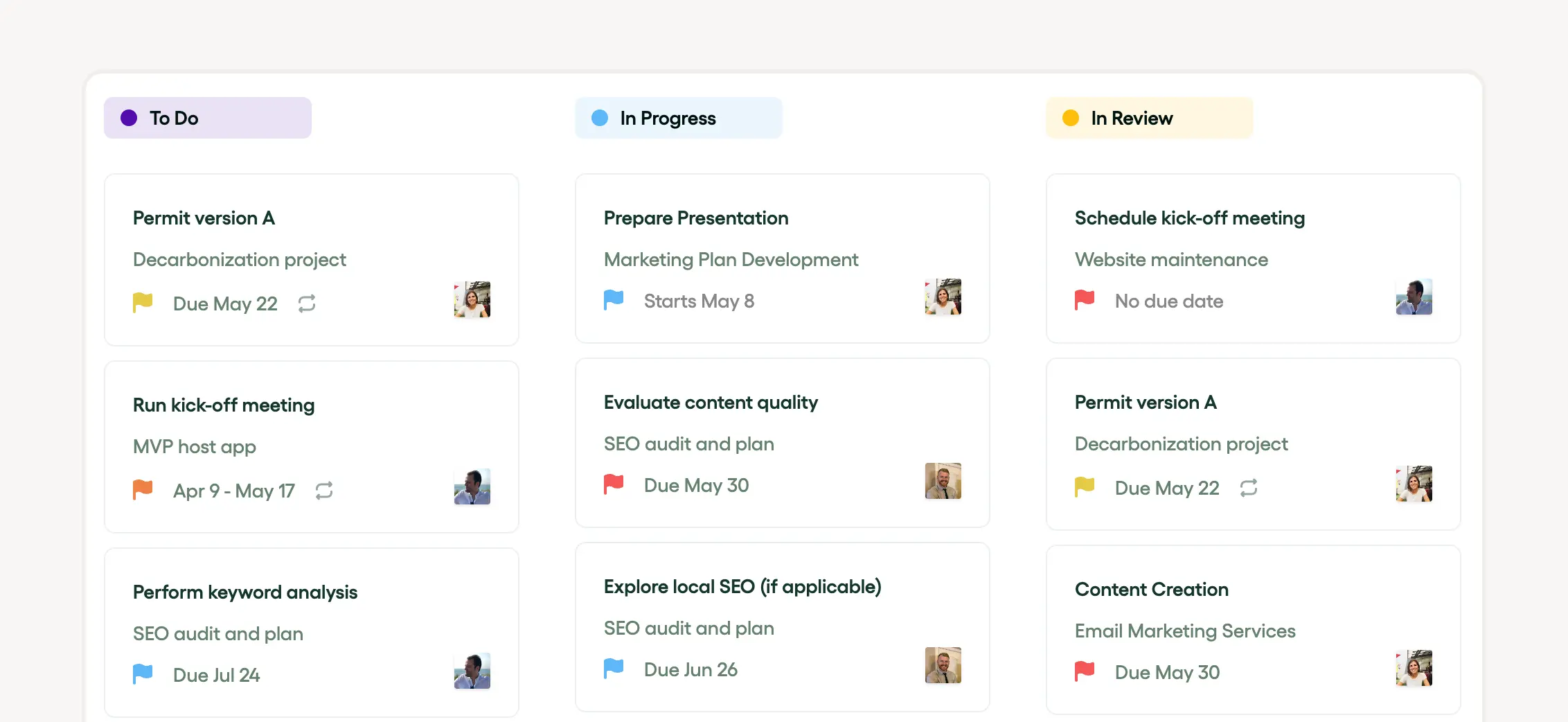
Effective task management is another critical aspect of Bonsai. The platform allows you to assign tasks, set deadlines, and track progress, ensuring that all tasks are completed before the project reaches the sign-off stage. This level of organization helps in delivering projects on time and within scope, which is crucial for client satisfaction.
Bonsai also includes built-in communication tools that facilitate seamless interaction with clients. Clear and consistent communication helps manage client expectations and ensures that the project meets their requirements before sign-off.
Financial management is simplified with Bonsai’s integrated invoicing and payment features. You can generate invoices based on the project scope and track payments within the platform, avoiding any financial discrepancies at the time of project sign-off.
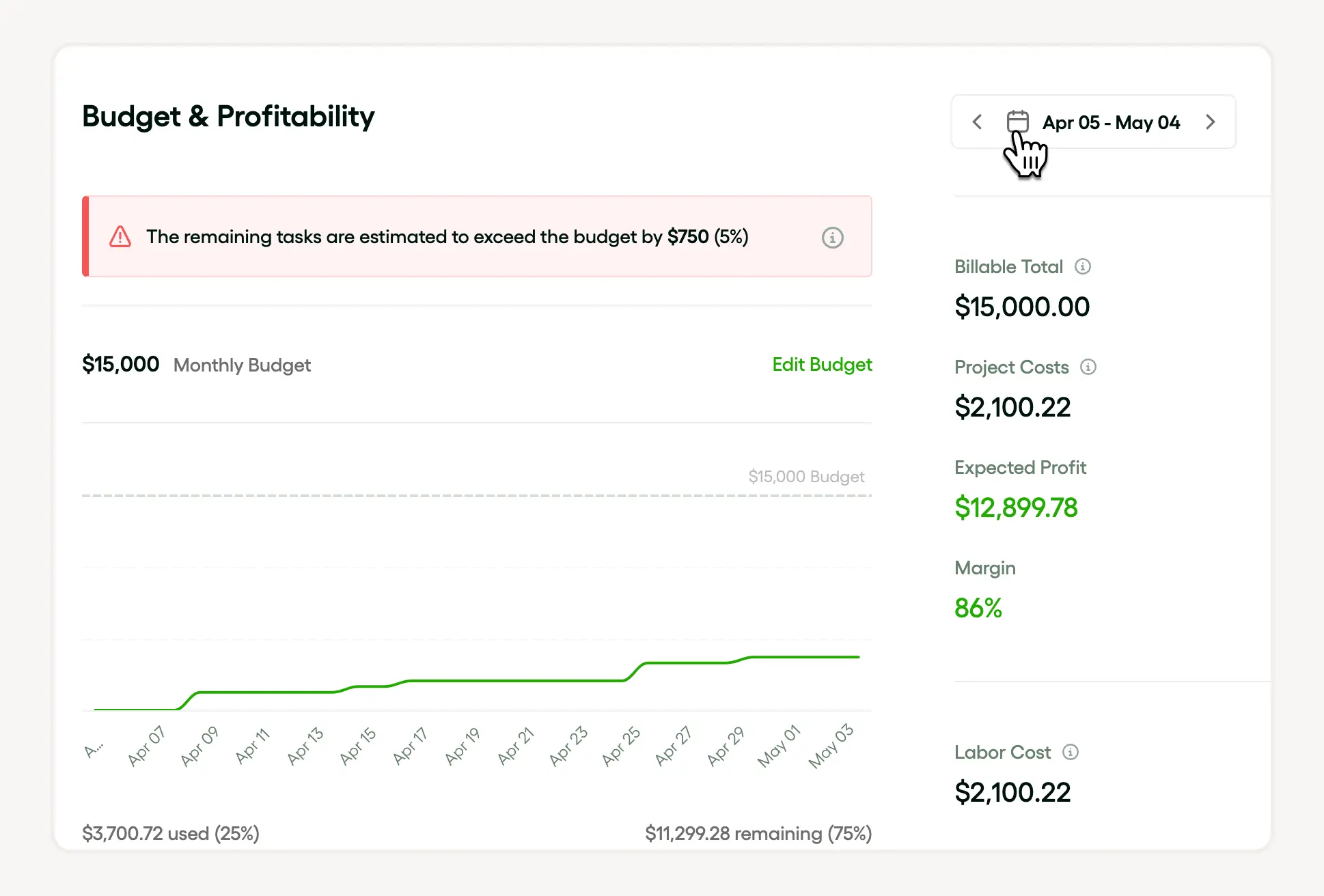
Bonsai provides detailed reports and analytics, giving you insights into project performance and helping you make informed decisions. By leveraging these features, Bonsai significantly enhances the project sign-off process, making it more efficient and less stressful for both you and your clients.
Project sign-off templates and examples
How to use a project sign-off template effectively
A project sign-off template provides a structured way to confirm that all project deliverables meet agreed standards before final approval. Using a template ensures clarity between freelancers, clients, and stakeholders, reducing misunderstandings and scope creep. It typically includes sections for:
- Deliverables
- Acceptance criteria
- Signatures
For example, a simple template might list each deliverable with a checkbox for client approval and a space for comments. Tools like HelloBonsai or Microsoft Word offer customizable templates that freelancers can adapt to their specific projects. This approach saves time and helps maintain professionalism by standardizing the sign-off process.
To maximize effectiveness, customize the template to reflect project specifics such as deadlines, payment terms, and any revisions allowed. Clear communication through the template can prevent disputes and speed up project closure, making it easier to invoice and receive payment promptly.
Examples of project sign-off documents for freelancers
Project sign-off documents vary depending on the industry and project type but share common elements such as:
- Project description
- Deliverables
- Approval signatures
For freelancers, a typical example is a one-page document summarizing completed work, client feedback, and final acceptance.
For instance, a graphic designer might include a list of finalized designs, file formats delivered, and a client sign-off section. A web developer’s sign-off document could specify completed features, testing results, and client confirmation. Including a date and contact information adds formality and traceability.
Freelancers can find free sign-off document examples on platforms like:
- HelloBonsai
- Canva
These platforms offer downloadable templates tailored for various professions. Reviewing these examples helps in crafting a clear and concise sign-off that protects both parties.
Tips for creating a clear and actionable sign-off document
Creating a clear project sign-off document starts with defining what constitutes project completion. Specify measurable criteria, such as "all deliverables submitted in agreed formats" or "functionality tested and approved." This clarity avoids ambiguity that can delay approval.
Next, include a section for client comments or requests for revisions. This helps document any last-minute changes or concerns. Using digital signature tools like DocuSign or HelloBonsai’s built-in signing feature streamlines the approval process and provides legal proof of acceptance.
Finally, always keep a copy of the signed document for your records. This practice supports smooth invoicing and protects you in case of disputes. Regularly updating your sign-off template based on client feedback and project experiences will improve your workflow over time.
How to create a project sign-off sheet
Define the project scope and deliverables clearly
Start your project sign-off sheet by clearly defining the project scope and deliverables. This section should outline exactly what work was agreed upon and what has been completed. Include specific details like:
- Milestones
- Deadlines
- Final outputs
These details help avoid misunderstandings during sign-off.
For example, if you are a freelance graphic designer, specify the number of design concepts, revisions allowed, and final file formats delivered. Using tools like HelloBonsai’s project templates can help structure these details professionally and consistently.
Make sure to review the scope with your client before drafting the sign-off sheet. This ensures both parties agree on what is considered complete, making the sign-off process smoother and more transparent.
Include client approval and signature sections
A project sign-off sheet must include a dedicated space for client approval and signatures. This formalizes project completion and confirms the client’s satisfaction with the work delivered. Without this, you risk disputes over whether the project was truly finished.
Typically, this section contains the client’s printed name, signature, date, and optionally, their title or company name. If you work remotely or with international clients, consider using digital signature tools like DocuSign or HelloBonsai’s built-in e-signature feature to streamline this step.
Remind clients to review the entire sign-off sheet before signing. This practice protects both parties and provides a clear record for future reference or potential audits in 2024 and beyond.
Summarize any outstanding items or next steps
Even when a project is complete, there may be outstanding items or follow-up tasks. Your sign-off sheet should clearly state any remaining responsibilities such as final payments, maintenance agreements, or future updates. This transparency prevents confusion after project closure.
For instance, if you are a web developer, note if ongoing support or hosting services are included or require a separate agreement. Including a brief summary of next steps helps manage client expectations and keeps your workflow organized.
Use this section to outline deadlines for any pending actions and specify who is responsible. This approach ensures that both you and your client have a clear understanding of what remains, reducing the risk of disputes or delays.
Use a professional template and keep records organized
Creating a project sign-off sheet is easier and more effective when you use a professional template. Templates ensure consistency in formatting and content, making your documents look polished and trustworthy. HelloBonsai offers customizable sign-off templates that can be tailored to your specific project needs.
Once signed, store the completed sign-off sheets securely, either digitally or in physical files. Organized record-keeping is essential for tax purposes in 2024 and for resolving any future client inquiries. Cloud storage solutions like Google Drive or Dropbox provide easy access and backup options.
Regularly updating and reviewing your sign-off templates based on client feedback and project types will improve your workflow and professionalism over time. This small investment in documentation can significantly enhance your client relationships and protect your business.
Key steps to complete the project sign off process
Every project sign-off follows a series of steps to make sure it concludes without a hitch. First, review. Check the project against its initial requirements. If there are discrepancies, now’s the time to address them. This step ensures that nothing is overlooked.
Next, prepare your documents. This might be a project completion sign-off document or an IT project sign-off document. These provide a formal record of project completion. Using project sign-off templates can help you get these documents right, ensuring that everything needed is included.
Finally, send the project sign-off sheet to all stakeholders for final approval. This can be done through a project management sign-off email or a project client acceptance sign-off form. This final step is crucial. It signals that everyone is happy, and the project meets its objectives and requirements.

Role of stakeholders in the sign-off process
Stakeholders are key players in the project sign-off process. Their role? To make sure the project meets all the agreed requirements and to validate its completeness. Using documents like a project sign-off sheet or a project approval sign-off document, they give the final nod of approval. This approval means they’re satisfied with the project’s delivery.
In tech projects, stakeholders might use specific documents, such as software project sign-off documents or IT project sign-off document templates. Their engagement throughout the project is vital. It helps ensure that the project wraps up smoothly and that the deliverables are of high quality.
Project sign off templates
Project sign-off sheets are more than just paper—they’re the official closing act of a project. Once all tasks are completed, and deliverables are met, these documents come into play. They can take various forms, like a project delivery sign-off form or a project client acceptance sign-off form, but their purpose is the same: to validate that the project requirements have been satisfied.
There’s a variety of project sign-off templates out there. For instance, you might use a software project sign-off document, an IT project sign-off document, or a project approval sign-off document. These templates guide you in drafting the final project closure documents.
But remember: Customize these templates based on the specific needs of your project. An IT project sign-off document template might differ from a software project sign-off document because of different project complexities and stakeholder expectations.
Essential elements of a project sign off template
A good project sign-off template is like a well-organized checklist. It makes sure that all project requirements have been met and that everything is in order. The essential elements of a template include project details, stakeholder approvals, and acknowledgment of project delivery.
Key components include:
- An IT project sign-off document template that outlines the project scope and goals
- A project delivery sign-off form to confirm all deliverables are accepted
- A project client acceptance sign-off form showing the client’s approval
Examples of effective project sign off templates
Effective project sign-off templates are vital for successful project delivery. These documents usually feature sections for summarizing project requirements, spaces for approval signatures, and dates to record the official sign-off.
Examples include:
- Project sign-off sheet: A clear record of project closure, confirming completion based on set criteria.
- Software project sign-off document: Essential for IT projects, offering detailed summaries of software development and testing phases.
- Project client acceptance sign-off form: A document confirming that the client accepts the project, indicating all aspects meet their expectations.
Best practices for project sign off
The best part? When you officially close a project, knowing it’s been delivered to the client’s satisfaction. This step should be formalized using project sign-off templates that outline the details of completion.
Ensure that your project sign-off sheet or project delivery sign-off form clearly states the project requirements, any deviations, and client acceptance details. Documentation in an IT project sign-off document or a project completion sign-off document makes sure there’s no room for ambiguity regarding the project’s completion and delivery.
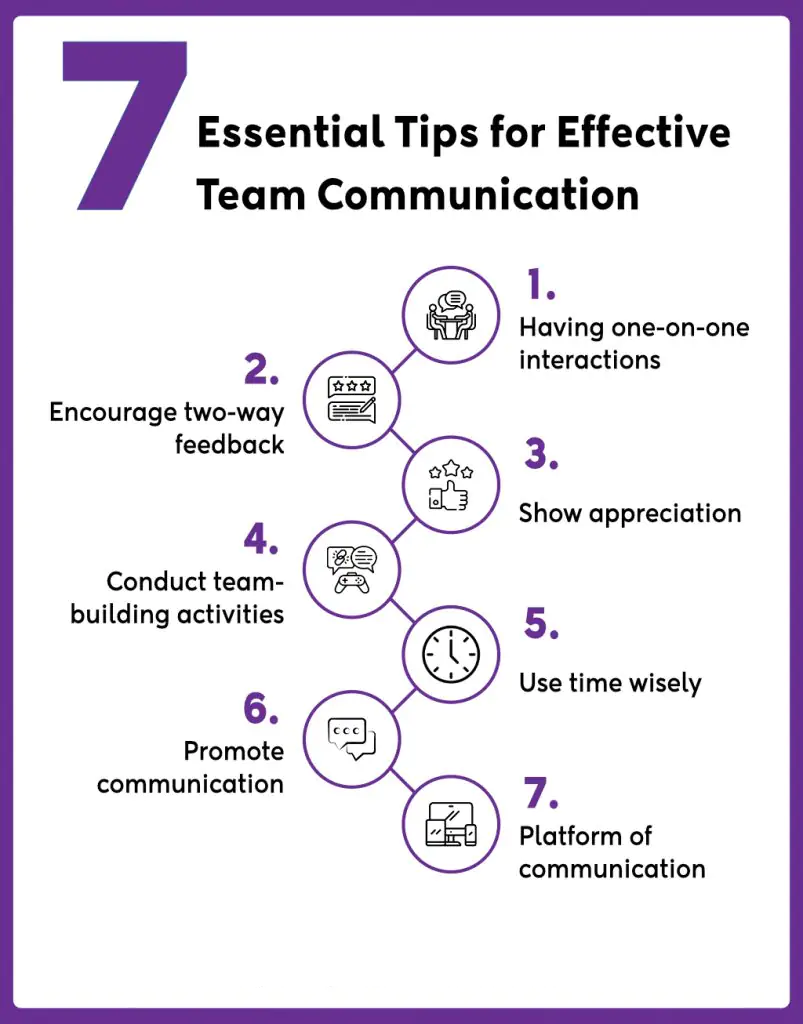
How to ensure clear communication during project sign off
Clear communication is the backbone of any project’s success. This is especially true for the sign-off process. Using documents like an IT project sign-off document or a software project sign-off document ensures everyone is on the same page.
Tools like project sign-off templates, project sign-off sheets, and project client acceptance sign-off forms help maintain transparency and accountability. Emails supporting these sign-offs add another layer of clear, accountable communication.
How to set realistic expectations for project sign off
Setting realistic expectations is like building a solid foundation for your project.
A well-structured project sign-off sheet clarifies responsibilities, outlines project requirements, and sets benchmarks for completion. These sheets, along with project sign-off templates, make the delivery process more manageable.
Documents like software project sign-off documents and IT project sign-off documents help make sure that all parties involved understand the criteria for closing the project. The project client acceptance sign-off form then confirms agreement with the final product or service, solidifying that the project is complete.
How to document everything for project sign off
Documentation is not just a box-ticking exercise—it’s essential. Using project sign-off templates and IT project sign-off documents helps record that all project requirements have been met. At project close, a project completion sign-off document secures validation of the project's completion from stakeholders.
Important documents, like the project client acceptance sign-off form and project delivery sign-off form, confirm that the project has been delivered to satisfaction and that the client is happy. This comprehensive set of project sign-off sheets is a crucial tool in any project manager’s toolkit.
Common challenges in project sign off and how to overcome them
Finalizing a project isn't always smooth sailing. Various challenges can pop up, each threatening to delay or derail the project. One major hurdle? Ensuring every project requirement is ticked off satisfactorily.
Sometimes, the nuances in a project sign-off sheet can lead to disputes over whether the project is truly completed as agreed. This problem often arises from unclear project sign-off templates or ambiguous project delivery sign-off forms. Another frequent challenge is convincing the client that everything is wrapped up. They may have reservations or misunderstandings, causing further delays.
How can you tackle these challenges? Start by using detailed documents like a software project sign-off document or an IT project sign-off document template. These tools help outline project deliverables clearly, leaving no room for doubt.
Sending a comprehensive project management sign-off email that details all the completed aspects can also go a long way in eliminating doubts.
Moreover, ensuring the project client acceptance sign-off form is transparent and agreed upon by all stakeholders is crucial. This clarity will facilitate a smooth and trouble-free sign-off process.
How to deal with unresponsive stakeholders during project sign off
Nothing stalls a project quite like unresponsive stakeholders. Their silence can drag out the project close, putting the brakes on timely project delivery. To navigate this issue, consider using communication tools that offer clear documentation.
Tools like:
- Project management sign-off emails
- Project sign-off templates
define deliverables and project requirements clearly. They also record stakeholder approvals, serving as a digital paper trail.
What if a stakeholder remains unresponsive? Document all communication attempts meticulously. This ensures there’s proof of your efforts to engage them.
Use project sign-off documents, such as a project completion sign-off document or software project sign-off document, to provide clear evidence of project completion. Set expectations for stakeholder involvement early on, so there are no surprises at the end.
How to address last-minute changes in project sign off

Last-minute changes can be a real curveball. They throw off timelines, budgets, and sometimes even project objectives. To manage these changes effectively, it’s vital to have a robust system in place.
Tools like:
- Project sign-off sheet
- Project sign-off templates
- Project approval sign-off document
can be incredibly helpful. These tools ensure that all project requirements are met before the project closes. They also help manage any amendments that come up after project delivery or project completion, ensuring they are properly documented and approved.
In any type of project—be it software, IT, or another type of work—it’s essential to understand client needs and manage them effectively. Maintain clear records through project management sign-off emails and handle any late alterations with care and precision.
Role of project management tools in project sign off
Project management software are the backbone of a smooth project sign-off process. They help create and manage documents that verify a project’s successful completion. Documents like:
- Project sign-off sheet
- IT project sign-off document
- Project delivery sign-off form
are essential in this regard.
These tools simplify the entire process by providing ready-to-use project sign-off templates, making the drafting of necessary documents quick and efficient. They ensure that all project requirements have been met and help close the project with clear client acceptance, as evidenced by the project client acceptance sign-off form.
Benefits of bonsai for project sign off
Several key benefits of using the Bonsai tool for project sign off facilitate operational procedures and client satisfaction. Bonsai’s features improve client satisfaction and process efficiency, allowing project completion in a seamless, professional manner.
- Bonsai organizes all project documents within a central place which reduces the chances of communication errors or filing missing.
- With pre-designed templates, document creation using automated processes becomes quick and efficient, it save time and ensuring consistency.
- Electronic signatures enable remote project sign-offs, speeding up approvals and providing secure finalization. These features make the sign off procedures more effective and efficient.
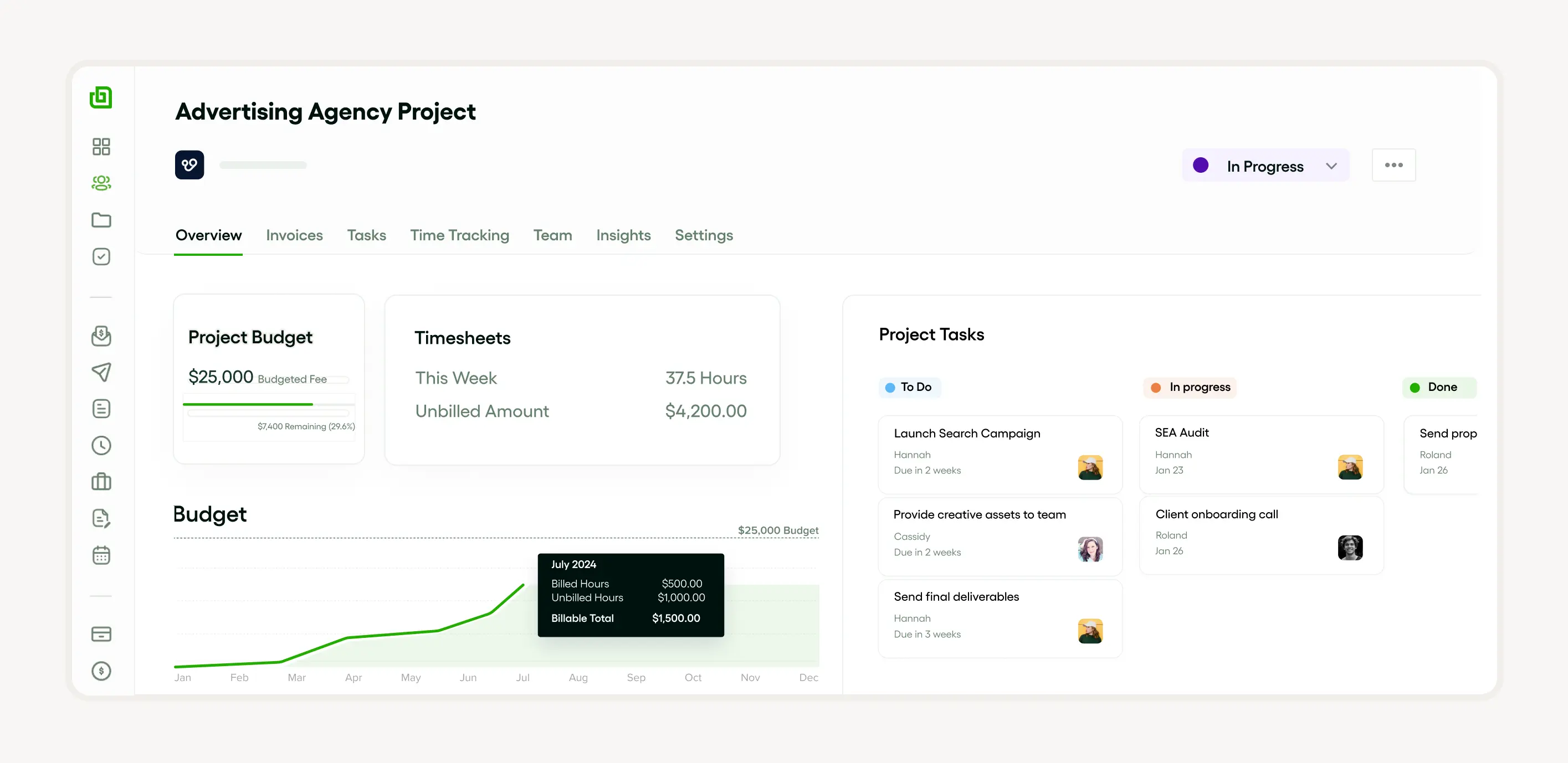
By consolidating documents, creating workflows, and enabling e-signatures, Bonsai reduces the time needed to complete projects and improves the project sign-off process. These features enhance business operations, minimize misunderstandings, and make approvals quicker and easier for both you and your clients.
Conclusion: impact of effective project sign off on agency success
Effective project sign-off is more than a procedural formality—it is a cornerstone of agency success. Using tools like:
- Project sign-off sheet
- IT project sign-off document
- Project client acceptance sign-off form
significantly improves project completion and delivery. These documents demonstrate fulfillment of project requirements, boosting client trust and satisfaction. Consistent use of clear project sign-off templates builds an agency's reputation for reliability and expertise. This paves the way for repeat business and long-term success.


'%3e%3cg id='Final-Copy-2_2_' transform='translate(1275.000000, 200.000000)'%3e%3cpath class='st0' d='M7.4,12.8h6.8l3.1-11.6H7.4C4.2,1.2,1.6,3.8,1.6,7S4.2,12.8,7.4,12.8z'/%3e%3c/g%3e%3c/g%3e%3c/g%3e%3cg id='final---dec.11-2020'%3e%3cg id='_x30_208-our-toggle' transform='translate(-1275.000000, -200.000000)'%3e%3cg id='Final-Copy-2' transform='translate(1275.000000, 200.000000)'%3e%3cpath class='st1' d='M22.6,0H7.4c-3.9,0-7,3.1-7,7s3.1,7,7,7h15.2c3.9,0,7-3.1,7-7S26.4,0,22.6,0z M1.6,7c0-3.2,2.6-5.8,5.8-5.8 h9.9l-3.1,11.6H7.4C4.2,12.8,1.6,10.2,1.6,7z'/%3e%3cpath id='x' class='st2' d='M24.6,4c0.2,0.2,0.2,0.6,0,0.8l0,0L22.5,7l2.2,2.2c0.2,0.2,0.2,0.6,0,0.8c-0.2,0.2-0.6,0.2-0.8,0 l0,0l-2.2-2.2L19.5,10c-0.2,0.2-0.6,0.2-0.8,0c-0.2-0.2-0.2-0.6,0-0.8l0,0L20.8,7l-2.2-2.2c-0.2-0.2-0.2-0.6,0-0.8 c0.2-0.2,0.6-0.2,0.8,0l0,0l2.2,2.2L23.8,4C24,3.8,24.4,3.8,24.6,4z'/%3e%3cpath id='y' class='st3' d='M12.7,4.1c0.2,0.2,0.3,0.6,0.1,0.8l0,0L8.6,9.8C8.5,9.9,8.4,10,8.3,10c-0.2,0.1-0.5,0.1-0.7-0.1l0,0 L5.4,7.7c-0.2-0.2-0.2-0.6,0-0.8c0.2-0.2,0.6-0.2,0.8,0l0,0L8,8.6l3.8-4.5C12,3.9,12.4,3.9,12.7,4.1z'/%3e%3c/g%3e%3c/g%3e%3c/g%3e%3c/g%3e%3c/svg%3e)